Kubaru Running User
The user that first enables Kubaru will automatically be designated as the Running User. Kubaru leverages this user’s permissions to perform various automated processes. To ensure Kubaru functions properly, it’s important that the user meets the following conditions:
Option 1: System Administrator Setup (Recommended)
Assigning a standard System Administrator profile is the simplest approach and guarantees Kubaru has all necessary access as your routing rules evolve.
Salesforce User License: Must be the standard Salesforce User License. Note: the Salesforce Integration and Salesforce Platform licenses are incompatible.
Salesforce Profile: System Administrator
Kubaru Role: Must be assigned the Admin role within Kubaru.
Option 2: Granular Permissions Setup
If your security policy restricts assigning the System Administrator profile, you can grant the Running User a base profile paired with a custom permission set containing the specific permissions listed below.
License & Application Access
Salesforce User License: Must be the standard Salesforce User License. Note: the Salesforce Integration and Salesforce Platform licenses are incompatible.
Kubaru Role: Must be assigned the Admin role within Kubaru.
Object & Field-Level Permissions
The Running User requires access to any objects and fields referenced in your routers:
Modify All Access (Assigned Objects): Required on each object configured for assignment (e.g., Lead, Contact, Case, Custom Objects).
- Note: If
Modify Allaccess is not an option, the running user must at least have Read and Edit access to all records being assigned by Kubaru.
- Note: If
Edit Access (Assigned Fields): Required for all fields updated during assignment (e.g.,
OwnerId).Edit Access (Field Updates): Required for any additional fields referenced in field updates.
Read Access (Router Filters): Required for any fields evaluated in router filters.
Parent Object Access (Activities): If assigning Activity objects (e.g., Tasks, Events), the user must have Modify All access to all expected parent objects (e.g., Lead, Account, Opportunity).
System Permissions
The following system permissions must be enabled on the user’s Profile or Permission Set:
Manage Users: Required if you are using the Must be Logged into Salesforce feature.
API Enabled: Required for background API execution and automated processing.
Modify Metadata Through Metadata API Functions: Required for backend metadata operations and configuration deployment.
Changing the Running Kubaru User
You can follow these steps to change the running user:
Expand the Admin tab in the navigation menu and click Settings.
Click Change running user to me.
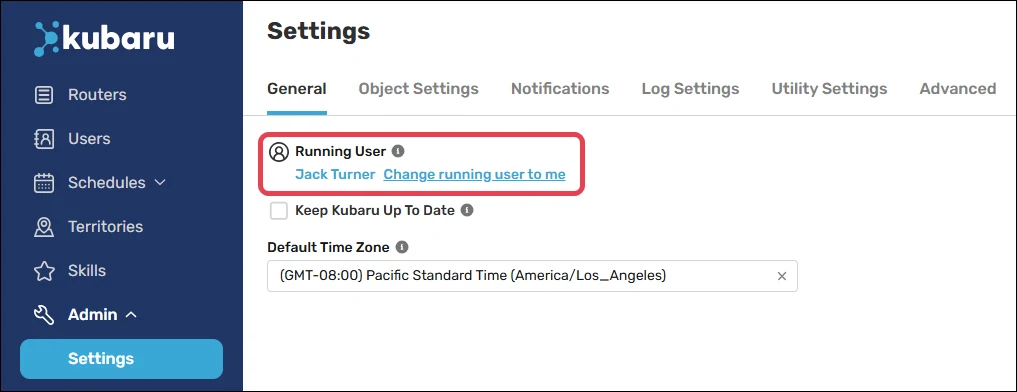
If you’d like to designate someone else as the running user, you’ll need to log in as that user before following the steps above.