Pause During Phone Calls
Heads up
A custom phone integration is only possible if your phone provider has an API that allows you to see who is on the phone in real time.
Kubaru empowers you to build custom phone system integrations tailored to your needs. This allows you to pause agents from receiving assignments while they’re on a call. You can also configure a call wrap-up period, keeping agents paused for a set amount of time after a call ends.
Create Your Apex Class
Integrating call data into Salesforce is typically the most significant step in building your custom phone system integration. While the specifics of fetching call data depend on your provider’s setup, many offer APIs for real-time visibility into call status. For example, here’s the Aircall API documentation.
Once you’ve identified your API method and have established a protocol to call out to your phone application, you’ll need to implement it in a Callable Apex class. This class will execute a method that performs a callout and syncs data to Kubaru.
After fetching the phone data, you will need to land it in the nwcs_ldl__OnPhone__c checkbox field on the Kubaru package’s nwcs_ldl__User__c object. This checkbox indicates whether the user is on the phone or not. While this is a custom object, it references the standard user in its nwcs_ldl__User__c field. Also, note that the Name field of each record has the same value as the Name field of the standard user record.
Here is some example Apex code that demonstrates how to structure your Callable apex class. In this example, we structure the callable class to initiate the method. From there, we make a callout to a phone system, obtain a set of email addresses of users who are on the phone in the response, and ensure that the data in the nwcs_ldl__User__c table matches the retrieved data.
Please note that this example is for demonstration purposes only and is not intended to be used as is.
// Class must have global access modifier.
global class KubaruPhoneIntegration implements Callable, Database.AllowsCallouts {
    // Call method must have global access modifier.
    global static Object call(String method, Map<String, Object> args) {
        switch on method {
            when 'SyncPhoneData' {
                SyncPhoneData();
                return method + ' was successfully executed';
            }
        }

        return 'Could not find method "' + method + '"';
    }

    // Must have constructor with no parameters that has global access modifier.
    global KubaruPhoneIntegration() {}

    public static void SyncPhoneData() {
        Set<String> usersOnPhoneEmails = new Set<String>();

        // Call out to phone system API and get emails of users who are on the phone.
        HttpRequest request = new HttpRequest();
        request.setEndpoint('https://myphonesystem.com/getUsersOnPhoneByEmail');
        request.setHeader('Authorization', 'Bearer myApiToken-xxxxxx-1234567890');
        request.setHeader('Content-Type', 'application/json;charset=UTF-8');
        request.setMethod('GET');

        // In this example, each data packet has an email address as its key.
        // The response format in reality will vary from system to system.
        String response = new Http().send(request).getBody();
        Map<String, Object> resBody =
            (Map<String, Object>) JSON.deserializeUntyped(response);

        usersOnPhoneEmails.addAll(resBody.keySet());

        // Fetch Kubaru user records that are either on the phone, or currently marked as such.
        List<nwcs_ldl__User__c> users = [
            SELECT Id, nwcs_ldl__OnPhone__c, nwcs_ldl__User__r.Email
            FROM nwcs_ldl__User__c
            WHERE nwcs_ldl__OnPhone__c = true
                OR nwcs_ldl__User__r.Email IN :usersOnPhoneEmails
        ];

        List<nwcs_ldl__User__c> updatedUsers = new List<nwcs_ldl__User__c>();

        // Ensure nwcs_ldl__OnPhone__c matches the latest phone data.
        for (nwcs_ldl__User__c user : users) {
            if (usersOnPhoneEmails.contains(user.nwcs_ldl__User__r.Email)) {
                if (!user.nwcs_ldl__OnPhone__c) {
                    user.nwcs_ldl__OnPhone__c = true;
                    updatedUsers.add(user);
                }
            } else if (user.nwcs_ldl__OnPhone__c) {
                user.nwcs_ldl__OnPhone__c = false;
                updatedUsers.add(user);
            }
        }

        // Perform DML on any Kubaru users that were updated.
        if (!updatedUsers.isEmpty()) {
            update updatedUsers;
        }
    }
}
Keep in mind
- Our own “call” execution of the above class will use your input string for the “method” param as detailed in the next section. However we only ever pass an empty map (i.e. new Map()) into the “args” param.
Enable Custom Phone Integration
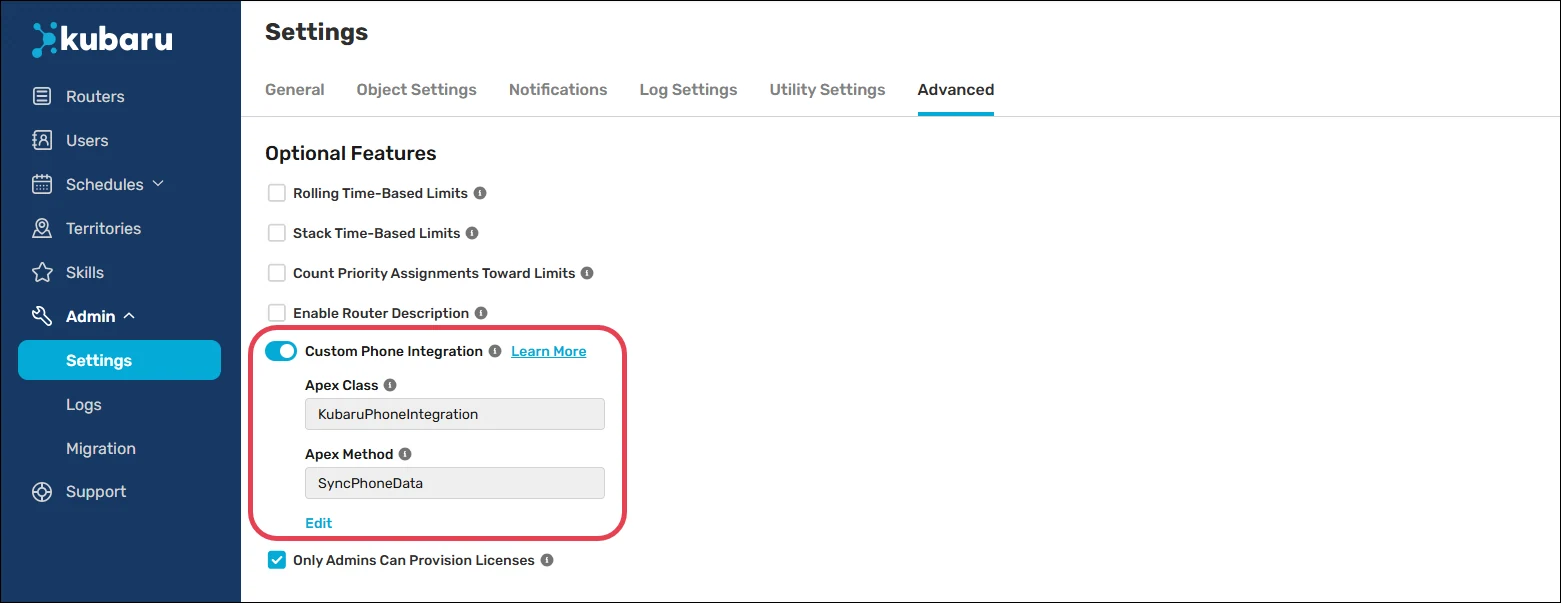
Kubaru provides a convenient way to integrate your Apex class with our recurring jobs, enabling near real-time syncing of your phone data. Follow these steps to enable your custom phone integration:
Expand the Admin tab in the navigation menu and click Settings.
Click Advanced.
Enable the Custom Phone Integration toggle.
Click OK.
Click the Edit link below the Apex Method field.
Select your Apex Class and enter the name of your Apex Method if applicable.
Click Save.
Enable Pause During Phone Calls
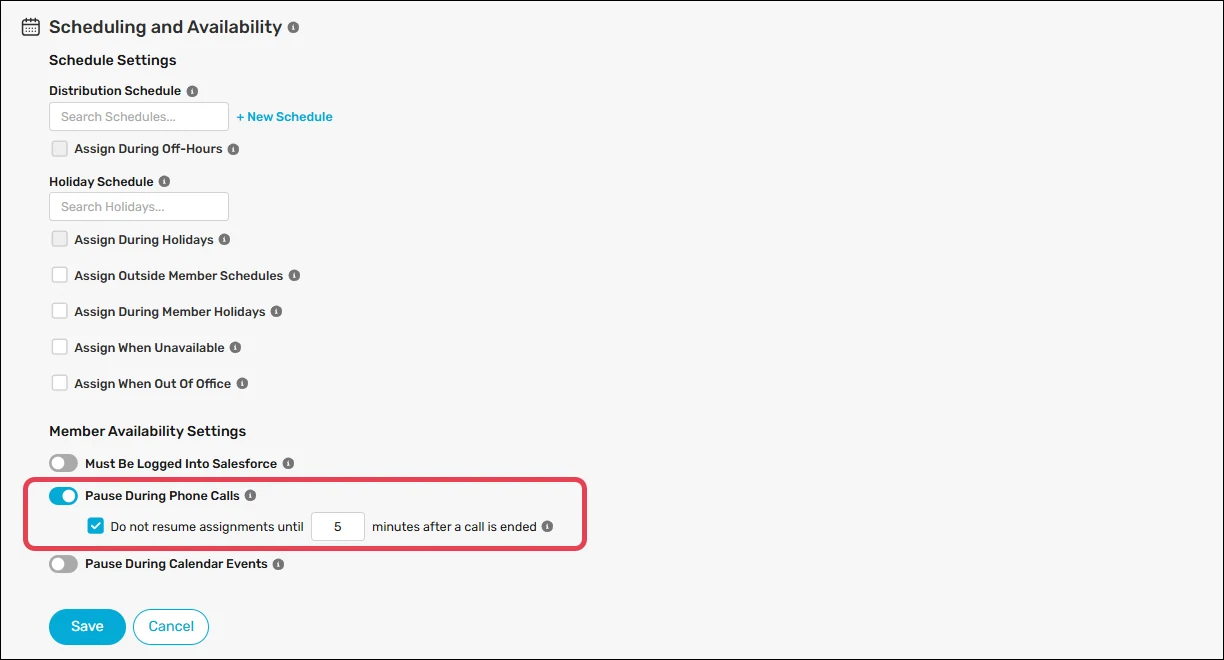
Follow these steps to enable the Pause During Phone Calls feature on one or more routers:
Create a new router or edit an existing one.
Scroll to Additional Settings and expand Scheduling and Availability.
Enable the Pause During Phone Call toggle.
(Optional) Check Do not resume assignments until ___ minutes after a call is ended, and enter the number of minutes you’d like users to remain paused after ending a call.
Click Save.
Keep in mind
Be mindful of your API usage limits. Our recurring jobs typically run several times a minute. If you integrate an apex class that consumes a callout, this means you will incur that many callouts on an ongoing basis.
Any failures that occur while attempting to execute your apex class will be caught so as to not cause any failures of our application’s normal processes, and an email will be sent to those designated in Kubaru Admin Alerts.