














Quick Summary
The best lead-to-account matching software finds the account a new lead belongs to and routes the lead to that account’s owner. Our top three all match and route inside Salesforce, so pick by what else you need.
Fuzzy matching catches near-miss company names, exact matching keeps email domains clean, and routing the lead to the account owner is the step that stops two reps calling one company.
| Tool | Best For | Starting Price |
|---|---|---|
| Kubaru | Salesforce teams routing matched leads to account owners | $20/user/month, 30-day trial |
| LeanData | Enterprises routing across many Salesforce objects | No public pricing, quote on a demo |
| Traction Complete | Teams that need account hierarchies with matching | $39/user/month ($10K/yr minimum) |

Why Leads From Existing Accounts Still Go to the Wrong Owner
In a December 2021 survey run by LeanData and partners, 1,732 B2B sales, marketing and ops professionals described how they manage leads. Two-thirds were happy with how they match leads to accounts.
Yet only 32% said leads never go to the wrong owner. That’s less odd than it sounds, because spotting the account and getting the lead to its owner are separate jobs.
In the same survey, 60% said leads sometimes go to the wrong owner. Every tool on this list can spot the match, so what does each one do with the lead after that?
Why Listen to Us?
Conga improved its speed to lead by 40% with Kubaru. Ooma now responds to new leads in under five minutes, with conversions up more than 10%. Both stories are on our customer stories page.
What Is Lead-to-Account Matching Software?
Lead-to-account matching software finds which existing account in your CRM a new lead belongs to.
It compares details like company name, email domain and website, and uses fuzzy matching to catch near misses. A lead who typed “Acme Inc.” still matches your Acme Corporation account.
You can match leads to accounts in Salesforce with its own matching and duplicate rules. Matching software goes one step further and sends a matched lead straight to the account owner.
How Does Lead-to-Account Matching Feed Lead Routing?
Lead-to-account matching tells your routing rules who should own a new lead. A solid setup works through three steps in this order.
- The matched account owner: When the lead’s company is already an account, the lead goes to the rep who owns that account. Without that match, a second rep can end up calling an account a colleague already owns.
- The territory owner: If nothing matches, or the account owner is inactive, territory rules assign the rep who covers the lead’s region or industry.
- A round robin fallback: Any lead still without an owner goes to a round robin pool, which hands leads to available reps in turn. No lead waits in a queue while your team works out who should take it.
Speed matters, too. A study of 1.25 million leads compared firms that reached out within the hour with firms that tried an hour later. The faster group was nearly seven times as likely to qualify the lead.
How We Evaluated These Tools
We weighed how each tool finds the account, by exact name, fuzzy name, email domain or hierarchy. We also checked whether it routes the lead to the account owner, since that step decides your speed to lead.
Where no account matches, we looked at the fallback, and at who can change the rules without an admin. Prices come from each vendor’s own website or AppExchange listing, and ratings from G2, both checked in November 2026.
10 Best Lead-to-Account Matching Software Tools
Each entry covers what the tool matches on, where the lead goes next and what it costs.
If you only need better assignment, see our list of the best Salesforce lead routing software.
| # | Tool | Best For | Matches By | Starting Price | Rating |
|---|---|---|---|---|---|
| 1 | Kubaru | Salesforce teams routing matched leads to account owners | Your Salesforce Duplicate Rules, exact or fuzzy | $20/user/month, 30-day trial | G2 4.9/5 (8) |
| 2 | LeanData | Enterprises routing across many Salesforce objects | Fuzzy name, website and email, plus hierarchy | No public pricing, quote on a demo | G2 4.6/5 (1,069) |
| 3 | Traction Complete | Teams that need account hierarchies with matching | Fuzzy name, domain and hierarchy level | $39/user/month ($10K/yr minimum) | G2 4.7/5 (176) |
| 4 | ZoomInfo Operations | ZoomInfo customers who want enrichment built in | Domain and company hierarchy | Not published, quote from sales | None on G2 |
| 5 | Openprise | Ops teams cleaning data across several systems | AI fuzzy match on name, domain, website and location | From $35K/year (Professional) | G2 4.9/5 (64) |
| 6 | Chili Piper (Distro) | Teams already using Chili Piper for scheduling | Exact and fuzzy account match | $1,250/month billed annually, 15 seats | G2 4.6/5 (740, Chili Piper overall) |
| 7 | LeadAngel | Teams that want a dedicated fuzzy matching engine | Scored fuzzy company-name match | Not published, quote from sales | G2 4.5/5 (46) |
| 8 | Default | Inbound teams that want form-to-meeting in one tool | Email domain against account website | $12,000/year (Growth) | G2 4.6/5 (62) |
| 9 | Sweep | Admins who want routing on a visual map of their org | Exact or fuzzy account match | From $40/user/month | G2 4.9/5 (38) |
| 10 | Salesforce Matching Rules | Simple matching, with an admin to build the Flow | Exact or fuzzy matching rules | Included with Pro Suite and up | G2 4.4/5 (27,585, Sales Cloud overall) |
1. Kubaru
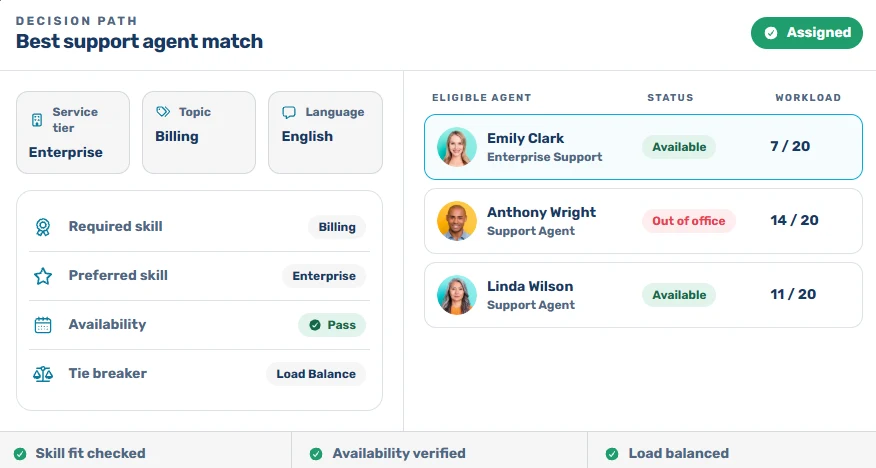
Kubaru is a native Salesforce app for automated lead, case and record assignment. It routes records by skills, territory, workload and availability, and business users manage the assignment logic themselves.
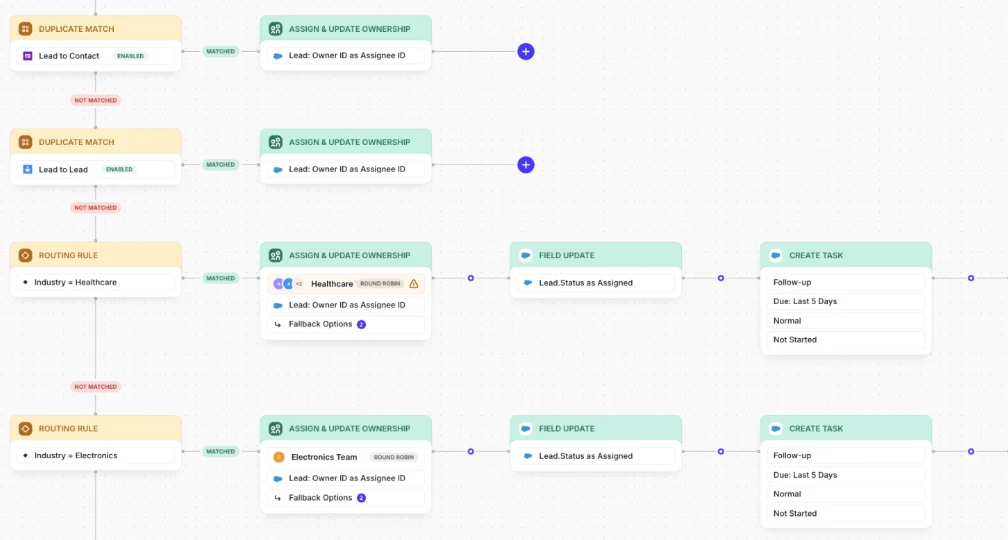
When a new lead comes from an existing account, its duplicate matching routers find that account and send the lead to its owner in the same step.
It spots the match with your active Salesforce Duplicate Rules, using any mix of exact and fuzzy criteria.
The rest of your Salesforce lead routing runs in the same app, so unmatched leads still get an owner. Put the matching router first in the evaluation order, a territory router second and a round robin router last.
Key Features
- Tie breakers: Breaks a tie between several matching accounts by last activity.
- Lead-to-contact matching: Sends a lead to an existing contact’s owner when your rule matches them on email.
- SLA reassignment: Reassigns leads left unworked after a set time, so they don’t go cold.
- Scheduling: Pauses assignments during off-hours, on holidays or when reps log out of Salesforce.
- Assignment logs: Traces each assignment from the duplicate found to the owner copied.
Pricing
- Free trial: 30 days with all features, no credit card required.
- Standard: $20 per user per month, with all features, free onboarding and free lifetime support.
- Enterprise: Custom pricing, with volume discounts for 50+ licenses and nonprofit discounts.
Pros
- Team leads manage routers, members and schedules without Salesforce admin access, which one G2 reviewer credits for adoption across several support teams.
- One AppExchange reviewer cut speed to lead from 45+ minutes to 6 minutes in under a day of setup.
- Onboarding is free and hands-on, and several G2 reviewers single out the setup help.
Cons
- Matching is only as good as your Salesforce Duplicate Rules, since Kubaru doesn’t run its own matching engine.
- There’s no enrichment or hierarchy builder, so filling in sparse leads or linking parent accounts takes another tool.
- It’s Salesforce-only, and Duplicate Rules don’t cover Case or Opportunity.
Best For
Salesforce teams that want matched leads routed to account owners, with ops managers running the rules.
Rating
G2 rating: 4.9/5 (8 reviews). Kubaru also holds 5.0/5 from 153 reviews on the Salesforce AppExchange.
2. LeanData
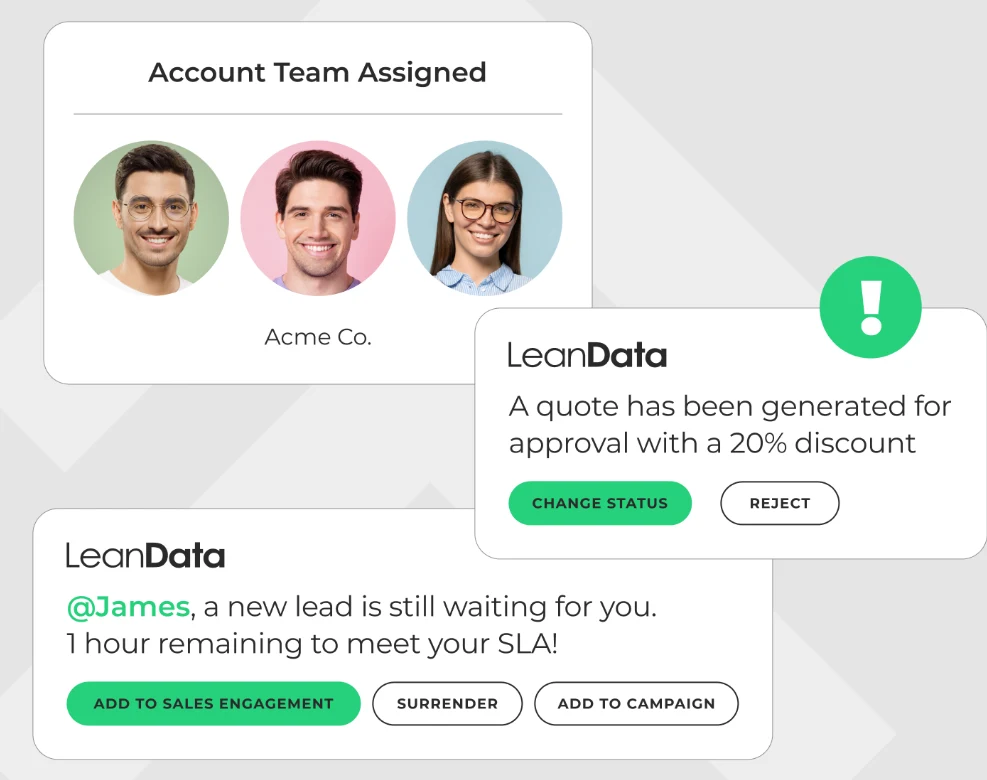
Most enterprise RevOps teams already know LeanData, whose routing runs on a visual, no-code FlowBuilder for Salesforce. Matched leads can go straight to the account owner, while unmatched ones fall through to territory or round robin rules.
Its Lead-to-Account Match node runs fuzzy matching on fields such as company name, website and email. Filters narrow the list, and tiebreakers run in order until one account is left.
Key Features
- Account hierarchy matching: Matches a lead to the parent or ultimate parent account.
- Round robin pools: Skips reps who are outside working hours or at their cap.
- SLA tracking: Tracks response SLAs and sends alerts by email, Slack or Teams.
- Any-object routing: Routes any standard or custom Salesforce object on the Premium edition.
Pricing
- Standard, Advanced and Premium editions: Not published. LeanData quotes each package based on features, objects and the number of Salesforce users or queues.
- Setup and onboarding: Billed separately for every package.
- Add-ons: BookIt scheduling and Journeys cost extra.
Pros
- Ops teams change routing logic in the visual FlowBuilder without a developer.
- Audit logs show how each routing decision was made, so a misrouted lead is easy to trace.
- Matching can use any standard or custom field, so you choose what decides the account.
Cons
- Advanced setups have a steep learning curve without experienced help.
- Flows with many nodes get cluttered and harder to read.
- Contact and account routing need the Advanced edition or higher.
Best For
Enterprises routing leads, contacts and accounts across many Salesforce objects in one flow builder.
Rating
G2 rating: 4.6/5 (1,069 reviews)
3. Traction Complete
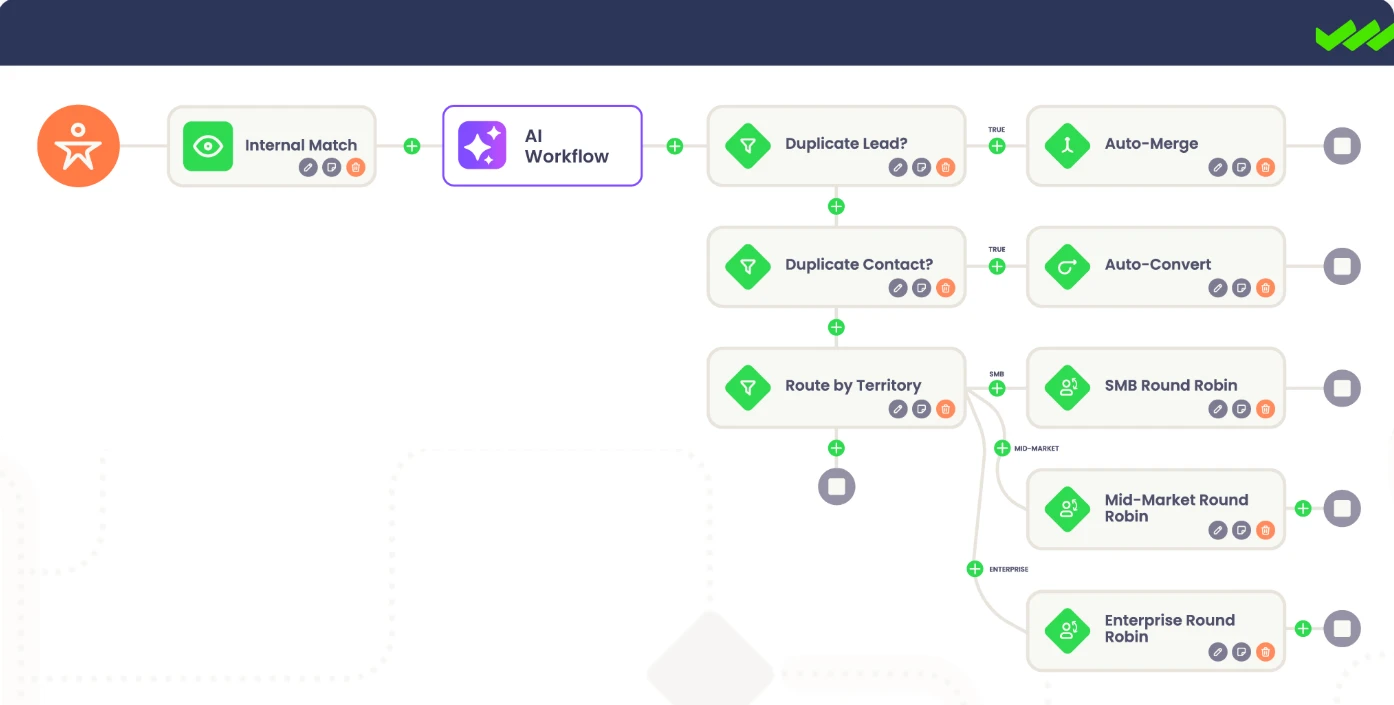
Traction Complete is a Salesforce-native data management suite. Its Complete Leads product matches each new lead to an existing account, then assigns it by account ownership, territory or round robin.
Complete Leads can also match a lead to the right level of a hierarchy, such as a subsidiary. Those parent-child links come from Complete Hierarchies, which Traction Complete sells separately.
Key Features
- Availability scheduling: Routes only to reps who are available and under capacity.
- SLA timers: Enforces response SLAs with timers and automatic reassignment.
- Any-object routing: Routes leads, contacts, accounts and opportunities in one drag-and-drop builder.
- Rep alerts: Notifies the assigned rep in Slack or email.
Pricing
- Complete Leads: From $39 per user per month, with a minimum spend of $10,000 a year.
- Complete Hierarchies: Priced separately, quote from sales.
- Nonprofits: Discounts available.
Pros
- Checks account and contact ownership before routing, so the lead reaches the rep who owns the relationship.
- Reps get a Slack or email alert the moment a lead lands with them.
- The drag-and-drop builder lets RevOps change routing without Apex.
Cons
- Multi-object flows need a solid grasp of Salesforce’s data model.
- Tuning match rules to avoid false positives takes ongoing testing.
- The $10,000 yearly minimum is a big commitment for small teams, who may want to weigh Traction Complete alternatives.
Best For
Teams that need account hierarchies built and maintained alongside matching.
Rating
G2 rating: 4.7/5 (176 reviews)
4. ZoomInfo Operations
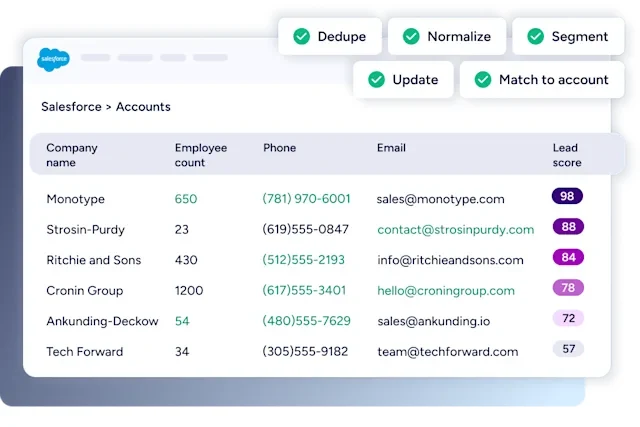
If you already pay ZoomInfo for data, ZoomInfo Operations (formerly RingLead) adds routing and data quality to the same contract. Matching runs on company hierarchy and domain, and routing by round robin, territory or conditional logic.
Enrichment fills in missing company details before routing. That gives territory rules the company fields they need before the lead is assigned.
Key Features
- Lead limits: Caps how many leads each rep receives per day, week or month.
- Availability checks: Routes around reps who are out, using time-off toggles and a Slack integration.
- Duplicate prevention: Blocks duplicates at entry and merges existing ones with custom matching rules.
- Normalization: Standardizes phone numbers, company names, addresses and field values.
Pricing
Not published. Request a custom quote from sales.
Pros
- Combines routing with dedupe and enrichment, so you run fewer separate apps for lead management.
- Custom dedupe rules merge repeat leads, so they don’t pile up in Salesforce.
- Checks imported lists against existing records before they’re added.
Cons
- Advanced workflows take some technical knowledge to configure.
- Reviewers say the cost runs high for smaller teams.
- Data syncs and enrichment updates sometimes lag, so some records need a manual check.
Best For
ZoomInfo customers who want enrichment and routing from the same vendor.
Rating
G2 rating: none. ZoomInfo Operations has no reviews on its own G2 listing.
5. Openprise
Openprise treats matching as one job inside a wider data orchestration platform for enterprise go-to-market teams. Its AI fuzzy matching weighs company name, email domain, website and location together before it ties a lead to an account.
A matched lead can go to the account owner, and routing rules also cover territories through a routing table. If a lead doesn’t match at high confidence, you pick the fallback, like a manual review queue.
Key Features
- Cross-system deduplication: Finds and merges duplicates across Salesforce and Marketo, Eloqua or HubSpot.
- Enrichment waterfall: Passes each record through several data providers until one returns a qualified match.
- No-code rule builder: Lets your ops team change matching and routing logic without an IT ticket.
- Routing table: Applies one routing table update across your whole database.
Pricing
- Professional: From $35K a year, with unlimited user seats.
- Enterprise: Not published, quote from sales.
Pros
- A manual review queue catches low-confidence matches instead of guessing.
- Cleans and dedupes records, then reruns those jobs on a schedule.
- Unlimited seats on Professional, so the price doesn’t climb with headcount.
Cons
- The interface and templates take a few training videos to learn.
- Jobs get hard to keep organized, and error messages aren’t always clear.
- A $35K yearly starting price is a big spend if you only need matching.
Best For
Ops teams cleaning and matching data across their CRM and marketing automation.
Rating
G2 rating: 4.9/5 (64 reviews)
6. Chili Piper (Distro)
Distro is Chili Piper’s Salesforce lead distribution product, part of its Demand Conversion Platform. It runs exact and fuzzy matching against your accounts, so a lead from a known company goes straight to that account’s owner.
Unowned leads go to a weighted round robin. If Chili Piper already runs your demo forms, the same rules cover those forms and Salesforce, so you build them once.
Key Features
- Any-object routing: Routes standard or custom Salesforce objects on create, update or both.
- SLA reassignment: Hands a lead to another rep when the SLA lapses.
- Preview mode: Tests a router on existing Salesforce records before you publish it.
- Routing log: Shows the rule, account and rep behind each assignment.
Pricing
- Growth: $1,250 per month billed annually ($15,000 a year), with 15 seats, then $45 per extra seat per month.
- Scale: $3,500 per month billed annually ($42,000 a year), with 30 seats, then $50 per extra seat per month.
Our Chili Piper alternatives guide compares other options.
Pros
- Weighted queues balance leads by rep and skip anyone out of office.
- Web form demo requests go straight to the right AE.
- G2 and Capterra reviewers praise its quick, knowledgeable support.
Cons
- The 15-seat base means a small team still pays $15,000 a year.
- Territory tweaks and new queues often need a knowledgeable admin.
- Editing a copied node also changes the original, per one G2 review.
Best For
Teams already using Chili Piper for scheduling who want matching in the same rules.
Rating
G2 rating: 4.6/5 (740 reviews, for Chili Piper overall)
7. LeadAngel
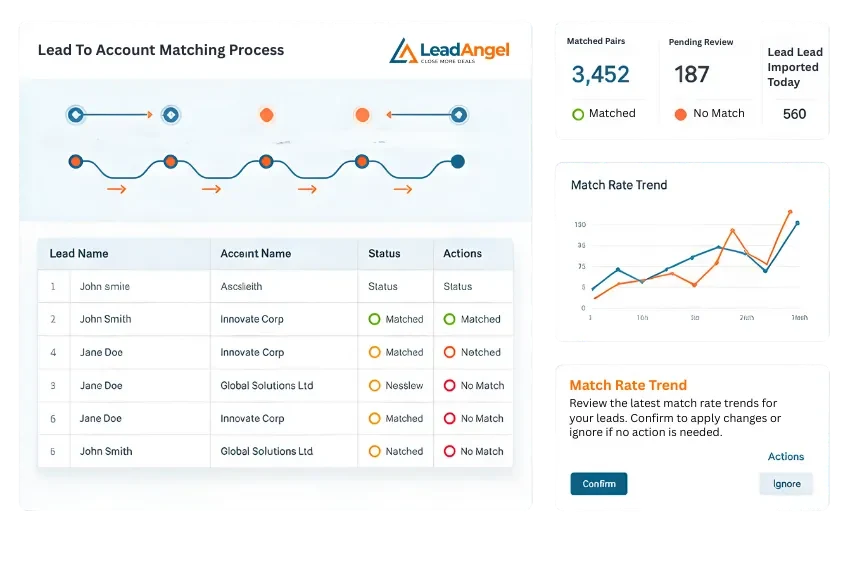
LeadAngel is built around fuzzy lead-to-account matching and runs it across Salesforce, HubSpot and Microsoft Dynamics 365. Its algorithm scores each new lead against your accounts by company name, then routes it to the account’s owner.
Every candidate account gets a match score from rules you set. You can mark fields that must match, pick a tiebreaker for equal scores and set a score cutoff.
Key Features
- Always Match and Never Match rules: Forces a match for specific company relationships, or blocks one even when a close result comes up.
- Background rematching: Rematches your whole database whenever you update a matching rule.
- Team distribution: Routes leads by territory or custom rules to round robin or weighted teams.
- SLA re-routing: Reassigns a lead when the rep doesn’t act in time.
Pricing
Not published. Contact sales for a price quote.
Pros
- Automatic routing replaces manual assignment, so reps answer new leads faster.
- Background rematching means a rule change fixes past matches, not just new leads.
- Always Match and Never Match rules give you a manual override without touching the algorithm.
Cons
- Occasional glitches like double routing can force a return to manual assignment.
- Building or editing workflows gets confusing with so many features.
- Pages can be slow to load while you’re making changes.
Best For
Teams that want a dedicated, tunable fuzzy matching engine across more than one CRM.
Rating
G2 rating: 4.5/5 (46 reviews)
8. Default
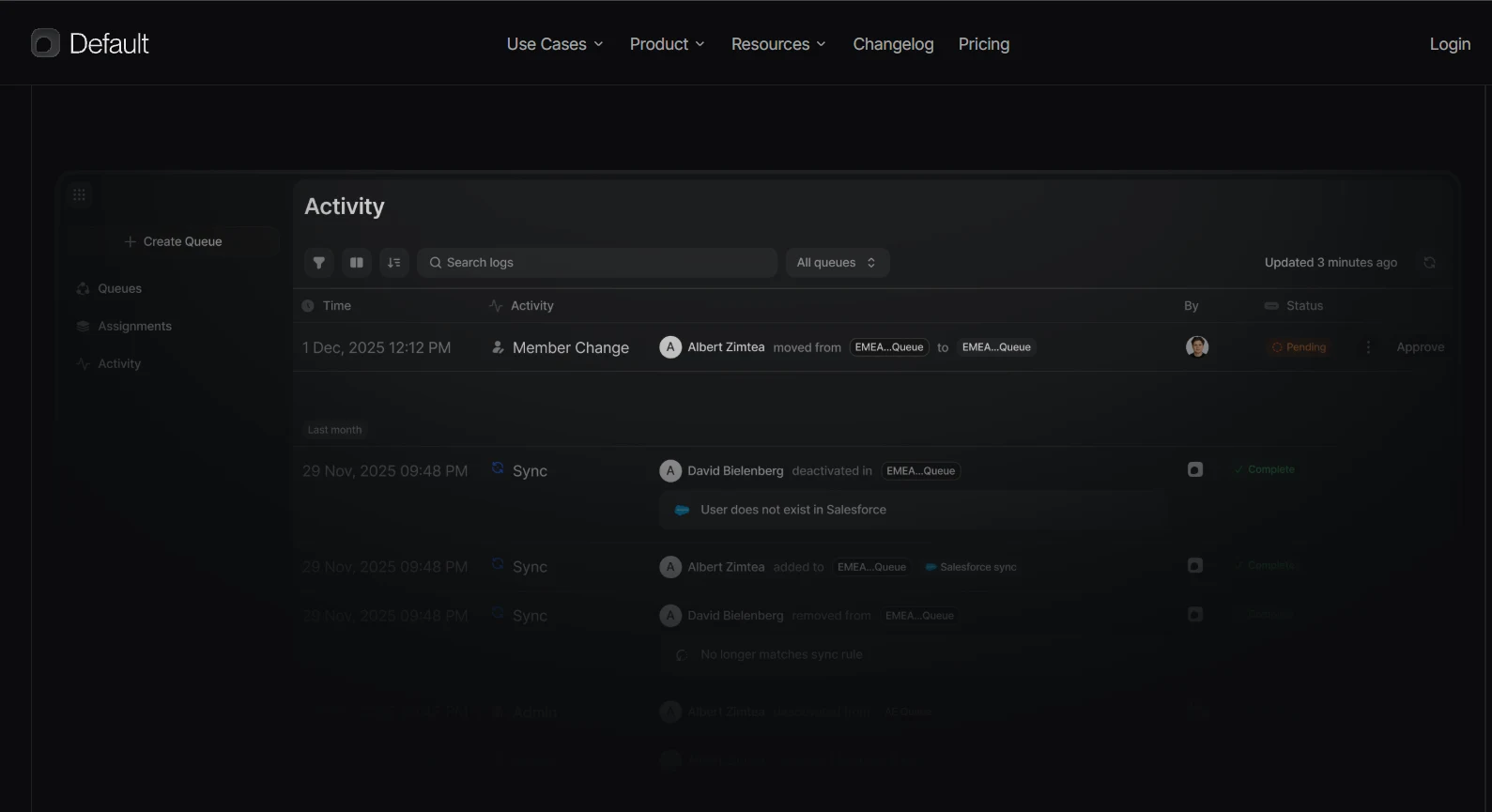
Default is an inbound platform that takes a form submission through enrichment, routing and meeting booking in one workflow. Its Match Record step finds the lead’s Salesforce account, so the lead goes to the account owner.
Default compares the lead’s email domain with each account’s Website field, ignoring https, www, paths and subdomains. Gmail and other public domains never match, so those leads go to your rules or round robin.
Key Features
- Account tiebreakers: Picks one account when several match, by most recent edit, headcount or parent account.
- Rules of Engagement: Routes unowned leads by company size and region to a weighted round robin.
- Waterfall enrichment: Pulls company size and job title from several providers, even when the form doesn’t ask.
- Logs: Show each assignment with every rep’s score and the tiebreaker used.
Pricing
- Growth: $12,000 per year.
- Enterprise: $25,000 per year.
- Seats: $540 per user per year for routing and scheduling, or $240 for scheduling only.
Pros
- Round robin and routing decision trees take no code to set up.
- It works with HubSpot as well as Salesforce, so one vendor covers both CRMs.
- Booked meetings go straight onto the routed rep’s calendar.
Cons
- Workflows need a lot of setup work before they’re ready for production.
- The builder has no copy and paste or templates, so shared logic gets rebuilt by hand.
- Its many options make advanced workflows slow to learn.
Best For
Inbound teams that want form fill, matching, routing and booking in one workflow.
Rating
G2 rating: 4.6/5 (62 reviews)
9. Sweep
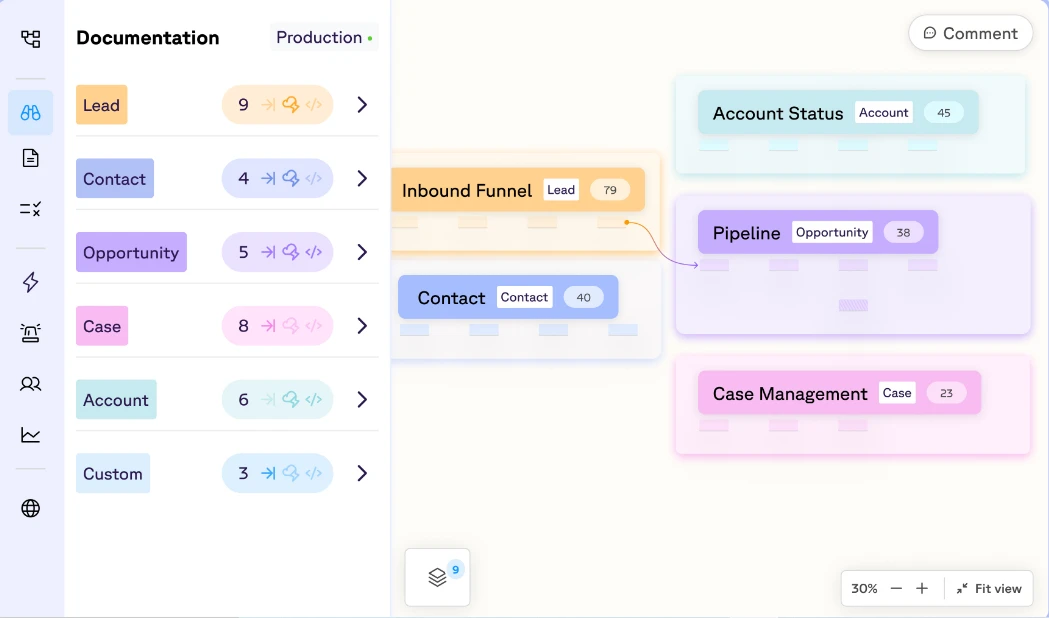
Sweep is a Salesforce metadata platform that maps how your org works. Its routing and matching tools can send a matched lead straight to the account owner.
Sweep’s Match and Route tools run exact or fuzzy account matching, then apply the routing rules you build on the same map.
Key Features
- Priority matching: Ranks your matching rules so the strongest match wins.
- Lead conversion: Converts matched leads and attaches them to the account.
- Routing methods: Routes leads by territory, round robin or weighted distribution.
- Slack alerts: Notifies reps and managers in Slack as leads are assigned.
Pricing
Routing and Matching costs $40 per user per month in the Agentic Ops Toolkit, and platform plans start at $2,500 a month billed annually.
See our Sweep alternatives for other options.
Pros
- Routing, dedupe, lead conversion and Slack alerts run in one tool, which cuts build time.
- The visual workspace shows objects, fields, automations and dependencies together.
- Support responds fast and can ship bug fixes within days.
Cons
- Duplicate management takes extra effort to set up.
- You can’t order Sweep automations against Salesforce Flow, which matters when both update a lead.
- Failed automations don’t appear in Sweep Logs, and there’s no debug option.
Best For
Admins who want routing built on a visual map of their Salesforce org.
Rating
G2 rating: 4.9/5 (38 reviews)
10. Salesforce Matching Rules
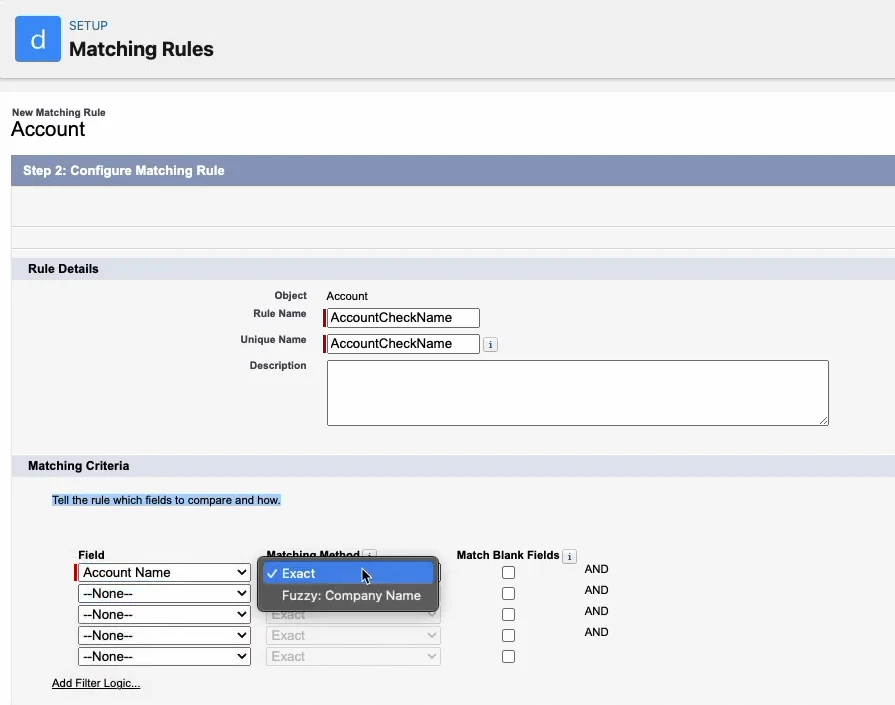
Salesforce Matching Rules are the duplicate tools built into Salesforce. A matching rule decides what counts as a match, with exact or fuzzy logic, and a duplicate rule decides what happens next.
The duplicate rule either blocks the save or shows an alert the rep can bypass. Neither rule changes the lead’s owner, so sending a match to the account owner takes a Flow alongside your assignment rules.
Key Features
- Standard matching rules: Covers accounts, contacts and leads out of the box.
- Fuzzy matching: Flags near-matches such as nicknames in first names.
- Leads-on-accounts rule: Comes ready-made with Account Engagement Advanced or Premium.
- Duplicate reports: Shows which records reps saved after bypassing an alert.
Pricing
- Duplicate Management: Included at no charge with Sales Cloud from Pro Suite up.
- Agentforce Sales editions: $25 (Starter Suite) to $550 (Max) per user per month.
Pros
- There’s no new contract, since it comes with your Salesforce edition.
- Reps get a warning before they save a duplicate.
- Duplicate reports show which warnings reps bypassed, so you can tighten the rules.
Cons
- It blocks or warns, but never reassigns the lead.
- Salesforce can refuse to activate a rule that generates too many identical match keys, which a Company-only rule often does.
- You’re limited to three matching rules per duplicate rule and five active per object.
Best For
Teams with simple matching needs and an admin who can build the Flow.
Rating
G2 rating: 4.4/5 (27,585 reviews, for Salesforce Sales Cloud overall)
How to Choose the Right Lead-to-Account Matching Software
- Want ops managers routing matched leads to the account owner? Kubaru finds the match with your Salesforce Duplicate Rules, then routes the lead to that owner.
- Running enterprise routing across many objects? LeanData maps it in a visual FlowBuilder.
- Need account hierarchies and data cleanup too? Traction Complete offers both, with a $10,000 yearly minimum.
- Already paying for ZoomInfo or Chili Piper? ZoomInfo Operations or Chili Piper’s Distro adds matching from that same vendor.
- Cleaning data across your CRM and marketing automation? Openprise covers both, from $35K a year.
- Also on HubSpot or Dynamics 365? LeadAngel’s fuzzy matching works there and in Salesforce.
- Do forms bring in most of your pipeline? Default enriches, routes and books each form fill.
- Want a visual map of your org first? Sweep builds matching and routing on top of one.
- Simple needs and an admin to build a Flow? Salesforce Matching Rules come with Pro Suite and up.
FAQs
What is lead-to-account matching?
Lead-to-account matching is the process of connecting a new lead to the account its company already has in your CRM. Salesforce connects a lead to an existing account when someone converts the lead.
Before that, a lead from a company you already sell to can look just like a brand-new prospect.
What is the difference between exact matching and fuzzy matching?
Exact matching needs two values to be identical. Fuzzy matching also accepts close variations like nicknames and typos. Salesforce’s example is a fuzzy first-name rule that flags Margaret Chan and Maggie Chan as likely duplicates.
Fuzzy matching catches more true matches, but also some false ones. Use it on company names, and keep exact matching for email domains.
Does Salesforce do lead-to-account matching natively?
Yes, Salesforce can match a new lead to an existing account, but it won’t reassign the lead. Its duplicate rules can only block the save or show an alert.
Getting the lead to the account owner takes a Flow your admin builds, or an app like Kubaru that routes on those same rules.
Why would lead owner be different from account owner in Salesforce?
Salesforce assigns each new lead based on its own details, not the account it might belong to. Your admin might route it by location or sales territory, so it can land with someone other than the account owner.
Start With Who Owns Your Matched Leads
Before you book any demos, check who owns a few recent leads from companies already in your CRM. If any went to someone other than the account owner, that’s the gap to close.
Kubaru’s duplicate matching routers read your active Duplicate Rules, so each matched lead goes to its account or contact owner.
Want to see how Kubaru would route your leads? Schedule a demo.