















Quick Summary
The best case assignment apps route each case by skill, workload and availability. Pick one your support managers can run without an admin.
| Tool | Best For | Starting Price |
|---|---|---|
| Kubaru | Teams that want business users to own case routing | $20/user/month, 30-day trial |
| Distribution Engine | SLA-driven distribution across cases and other Salesforce objects | $20/user/month (SLAs from $35) |
| Q-assign | Service teams matching cases on skills and workload | No public pricing, quote on request |

Where Native Case Assignment Falls Short for Big Support Teams
Sending a case to a queue is the easy part, and Salesforce case assignment already does that. But only one assignment rule can be active, and it doesn’t check whether the agent it routes to is away or already swamped.
Omni-Channel does check presence and capacity, but it needs at least Service Cloud’s Pro Suite, from $100 per user a month. With either tool, you’ll usually need an admin to change the routing.
Here’s what a dedicated app adds.
What Is Salesforce Case Assignment Software?
Salesforce case assignment software is an app that picks an agent for each new case and makes them the owner.
Built-in assignment rules already send a case to a person or queue based on your criteria. These apps check what a rule can’t, like whose turn it is, who’s in today and who’s least busy.
For example, a rule sends a German customer’s billing case to the Billing queue. But an app sends it to a German-speaking billing agent who’s free.
How We Evaluated These Tools
We checked what each app does beyond assignment rules and queues (skills, workload caps, SLA reassignment) and who edits its rules. We also noted published pricing and how many reviews back each rating.
10 Best Salesforce Case Assignment Software
We judged each app on what it adds to Salesforce’s built-in routing. That comes down to skills, workload and availability matching, SLA follow-through, and whether a support manager can change the rules.
| # | Tool | Best For | Routes Cases By | Starting Price | Rating |
|---|---|---|---|---|---|
| 1 | Kubaru | Teams that want business users to own case routing | Topic, skill, availability, workload | $20/user/month, 30-day trial | AppExchange 5.0/5 (153) |
| 2 | Salesforce Case Assignment Rules, Queues and Omni-Channel | Simple criteria routing, or Service Cloud teams with admin time | Criteria; Omni-Channel adds capacity, skills | From $25/user/month | Capterra 4.5/5 (832, for Service Cloud) |
| 3 | Distribution Engine | SLA-driven distribution across cases and other Salesforce objects | Skills, workload, availability, SLA | $20/user/month (SLAs from $35) | AppExchange 4.98/5 (139) |
| 4 | Q-assign | Service teams matching cases on skills and workload | Skill, workload, availability, SLA risk | No public pricing, quote on request | AppExchange 4.97/5 (141) |
| 5 | Plauti Assign | Teams already using Plauti’s data tools in Salesforce | Any field, skills, capacity, availability | Not published, quote on a demo | AppExchange 4.98/5 (64) |
| 6 | LeanData | Enterprises already routing leads in LeanData | Tier, issue, capacity | No public pricing, quote on a demo | AppExchange 4.93/5 (283) |
| 7 | Dispatcher | Small support teams that want free round robin | Round robin, weights, hourly schedules | Free | AppExchange 4.93/5 (14) |
| 8 | Case Auto Assign | Small teams that just need cases handed out | Logged-in agent | Free | AppExchange 5.0/5 (1) |
| 9 | Optimized Case Assignment | Service Cloud teams that work in shifts | Origin, priority, shift | Free | AppExchange 5.0/5 (1) |
| 10 | Traction Complete | Teams already routing leads in Traction Complete | Criteria, round robin, capacity | $39/user/month, $10K/yr minimum | AppExchange 5.0/5 (22) |
1. Kubaru
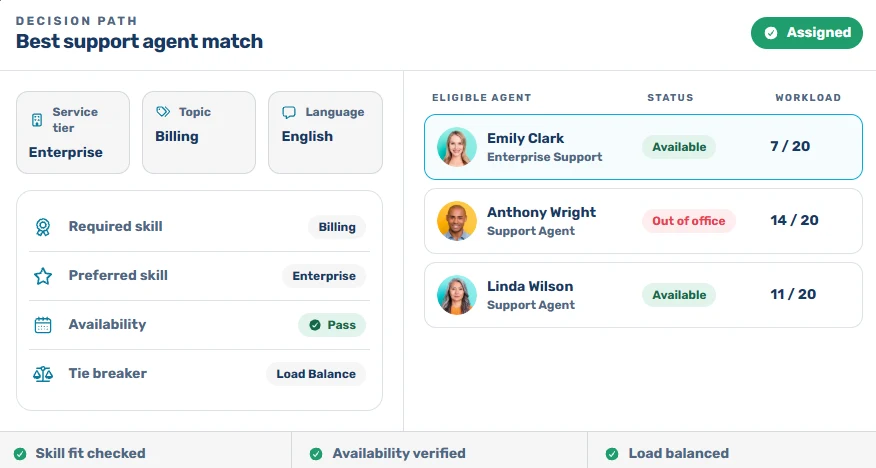
Kubaru is a native Salesforce app for automated lead, case, and record assignment. It routes every case to the right agent by skills, territory, workload and availability. Because it’s built for business users, your support managers change the routing themselves.
Its router reads each new case’s tier, topic and language, then finds agents with the required skill. It skips anyone who’s out of office or at their case limit, then picks the agent with the lowest workload.
If nobody works a case within your SLA, Kubaru reassigns it or alerts a manager on Slack. More than 100 enterprise companies, including Genesys, SolarWinds and Paylocity, run their case distribution on Kubaru.
Key Features
- Round Robin: Shares cases out evenly, or by weight if you’d like senior agents to take more.
- Schedules: Sets shifts, holidays and out-of-office time per agent, and SLA timers only count working hours.
- Shark Tank: Lets agents claim open cases from a shared pool, first come, first served.
- Assignment Logs: Shows who got each case and why, down to the skill and workload.
- Any Object: Assigns any standard or custom object, so your sales team can use it too.
- Native Security: Keeps routing and case data inside your organization, under the permissions you’ve set.
Pricing
- Free trial: 30 days with every feature, and you won’t need a credit card.
- Standard: $20 per user per month, with every feature, free onboarding and lifetime support.
- Enterprise: Custom pricing, with volume discounts at 50+ licenses.
Pros
- Team leads update routers and schedules themselves, so a new hire doesn’t wait on an admin.
- Round robin stops agents grabbing easy cases from a queue and leaving the hard ones waiting.
- Free onboarding covers moving your case assignment rules, and most migrations take 1 to 2 days.
Cons
- There’s no free plan after the trial, and every agent receiving cases needs a paid license.
- If you have several case types, the first setup takes a while and a little getting used to.
- Kubaru focuses on assignment and SLAs, so you’ll still work cases in Salesforce’s own views.
Best For
Support teams that want business users to own case routing, from skills and workload to SLAs.
Rating
AppExchange rating: 5.0/5 (153 reviews)
2. Salesforce Case Assignment Rules, Queues and Omni-Channel
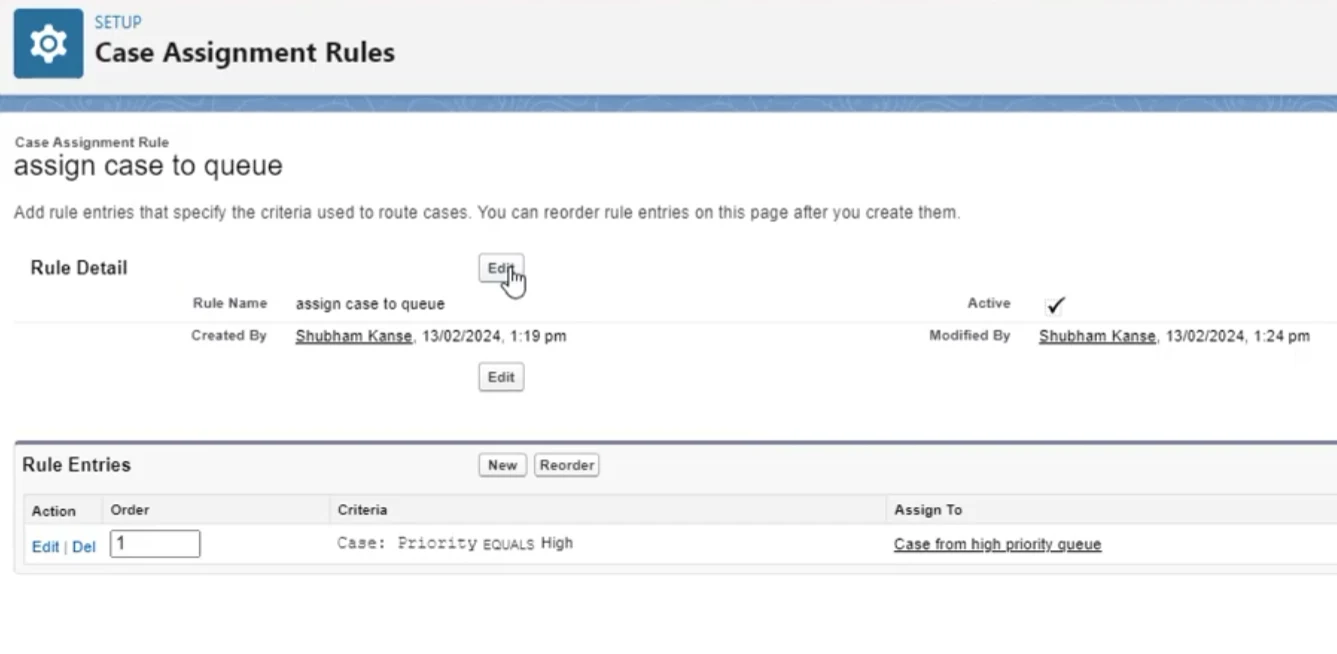
Salesforce has three built-in ways to route cases. Assignment rules send new cases to a user or queue by criteria, and queues hold a team’s shared list. Omni-Channel pushes cases to available reps with spare capacity.
An assignment rule checks its entries in order, and the first match wins. Editing it needs the Customize Application permission, so support managers usually rely on an admin.
Key Features
- Related-Record Criteria: Matches on account, contact or asset fields, plus the case’s own.
- Escalation Rules: Reassigns cases left open past a set number of business hours.
- Skills-Based Routing: Maps case fields to skills and offers each case to the first available rep with them.
- Capacity Models: Routes to the least busy rep (Least Active) or the least full one (Most Available).
Pricing
- Starter Suite: from $25/user/month
- Pro Suite: from $100/user/month
- Core: $195/user/month
- Advanced: $395/user/month
- Max: $550/user/month
Pros
- Rules, escalations and queues come with every Service Cloud edition.
- Omni Supervisor shows each rep’s capacity across channels from Pro Suite up.
- Account criteria send a key account’s cases straight to its team.
Cons
- Each rule entry assigns to one user or queue, so spreading cases evenly needs Omni-Channel.
- Omni-Channel routes a case by queue or by skills, never both.
- Starter Suite lacks Omni-Channel, so skills and capacity routing start at Pro Suite.
Best For
Teams with simple criteria routing, or Service Cloud teams with admin time for Omni-Channel.
Rating
Capterra rating: 4.5/5 (832 reviews, Salesforce Service Cloud overall)
3. Distribution Engine
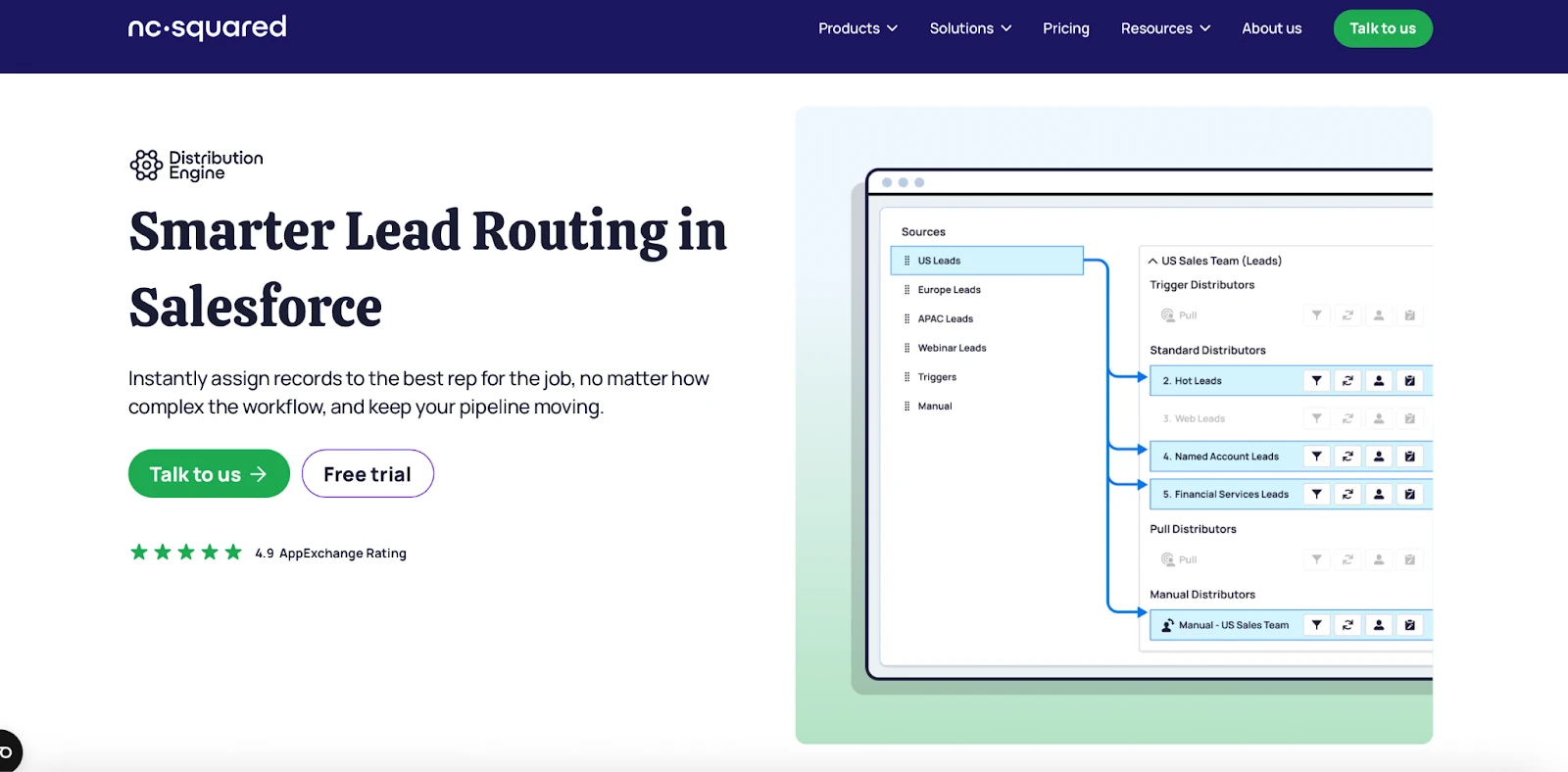
Distribution Engine (formerly NC Squared) is a Salesforce-native app that routes cases, leads and custom objects. When an agent misses a case’s SLA, the app takes the case back and reassigns it.
Key Features
- Tag-based skills routing: Matches cases to agents tagged by product, language or region.
- Caps and load balancing: Limits each agent’s daily cases and sends new ones to whoever has the fewest open.
- Availability management: Skips agents who are out of office, off shift or on holiday.
- Distribution logs: Records every assignment for reporting inside Salesforce.
Pricing
- Starter: $20/user/month
- Advanced: $35/user/month
- Unlimited: $55/user/month
- Billed annually, five-license minimum, free 30-day trial
Pros
- Team Manager permissions let support managers adjust caps, skill tags and availability for their teams.
- Multi-level fallbacks to backup teams or queues are built with clicks and no Apex.
- Support joins troubleshooting calls quickly when a rule misroutes live cases.
Cons
- SLAs, missed-SLA reassignment and Team Manager permissions start at the $35 Advanced plan.
- The Shift Planner, which schedules agent hours up to 12 weeks ahead, is Unlimited-only.
- Every agent, admin and manager using it needs a paid license.
Best For
Support teams that need SLA-driven distribution across cases and other Salesforce objects.
Rating
AppExchange rating: 4.98/5 (139 reviews)
4. Q-assign
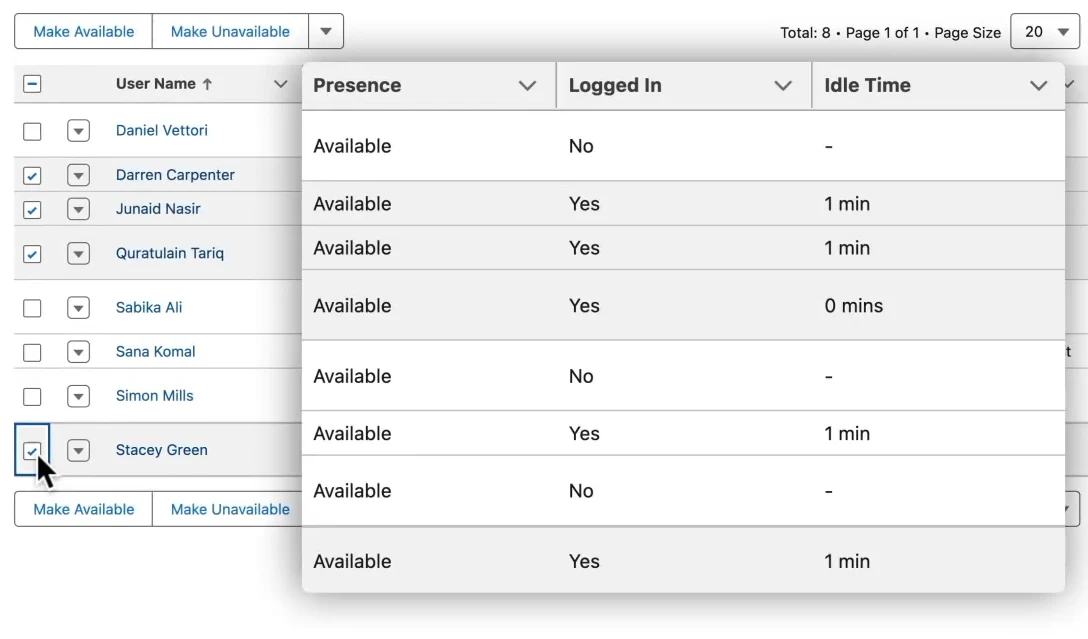
Q-assign is Ortoo’s native Salesforce app for matching cases on skill, workload and availability. It also routes leads and custom objects, and reassigns any case nearing an SLA breach.
Routing runs through assignment groups that pair a source queue with agents and point-and-click rules. Operations teams configure those rules, with no developer needed.
Key Features
- Pull Queues: Lets agents pull the next case by priority, so nobody cherry-picks.
- Waterfall Fallback: Passes an unaccepted case down a backup list of agents.
- Audit Trail: Shows on each case which rule fired and why.
- AI Triage: Tags new cases by topic and urgency for routing.
Pricing
Q-assign has no public pricing, so you’ll request a quote from Ortoo based on records processed. Sandbox testing is free.
Pros
- Workload caps free up as cases close, which keeps work even across agents.
- Availability checks skip logged-out, off-shift and out-of-office agents, so cases don’t stall.
- Automatic reassignment gives stalled cases a new owner without manual triage.
Cons
- Learning the many settings takes time, so plan on Ortoo’s team helping with setup.
- AI actions need your own LLM key and a separate AI provider contract.
- Without a published price, cost comparisons wait for a quote.
Best For
Service teams matching cases on skills and workload.
Rating
AppExchange rating: 4.97/5 (141 reviews)
5. Plauti Assign
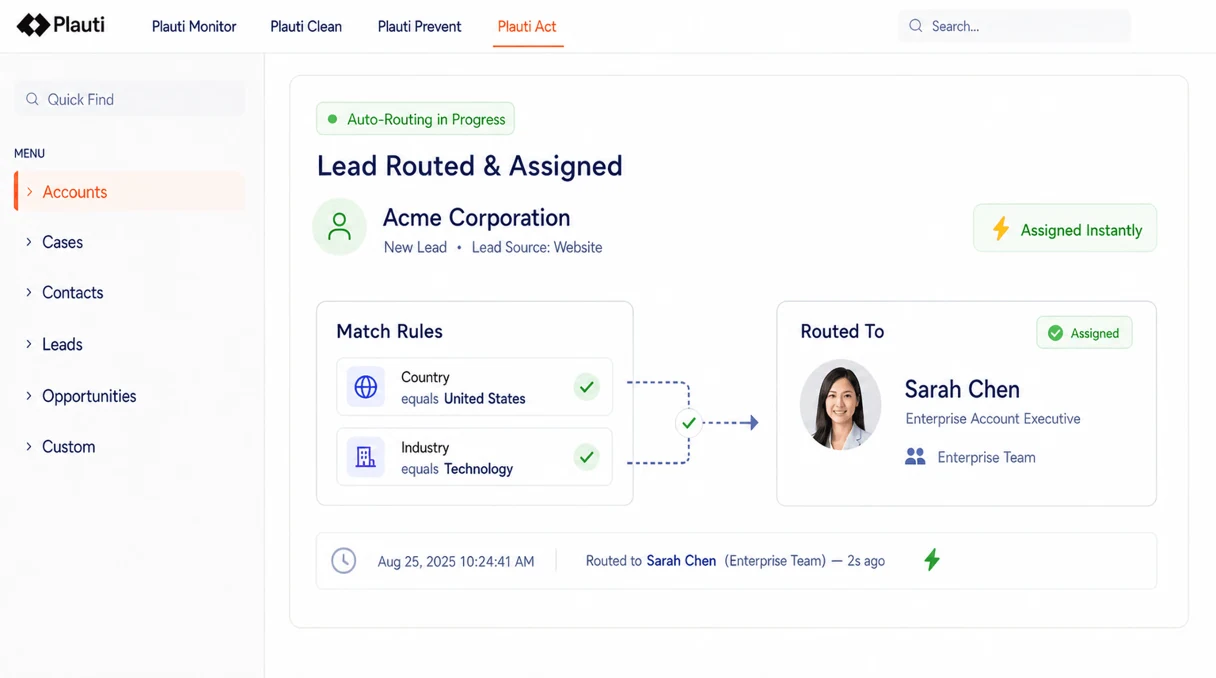
Plauti Assign, formerly Super Round Robin, is the routing app in Plauti’s data platform for Salesforce. It assigns cases, leads and custom objects, with rules that split cases by priority, record type or any field.
It checks shifts, Out of Office and Omni-Channel presence before it picks an agent. If nobody works a case in time, an SLA reassigns it.
Key Features
- Capacity models: Caps how many open cases each agent can hold at once.
- User skills: Sends cases to agents with a skill you define, such as Spanish.
- Match logs: Stores the rules and field values behind every assignment attempt.
- Intent routing: Routes a case by an intent field your AI sets, such as cancellation.
Pricing
Plans are not published. Instead, Plauti quotes a base fee plus seats on a demo call. There is a free 14-day trial available.
Pros
- A reassignment cap stops an unworked case from bouncing between agents.
- Support managers can edit groups, rules, assignees and skills without global settings access.
- When the SLA reassigns a case, it skips the agent who missed it.
Cons
- No public pricing, so budgeting takes a sales call.
- An admin does the first setup and keeps the global settings.
- Match Groups, capacity models and SLAs make an inherited setup slow to learn.
Best For
Teams already using Plauti’s data tools in Salesforce.
Rating
AppExchange rating: 4.98/5 (64 reviews)
6. LeanData
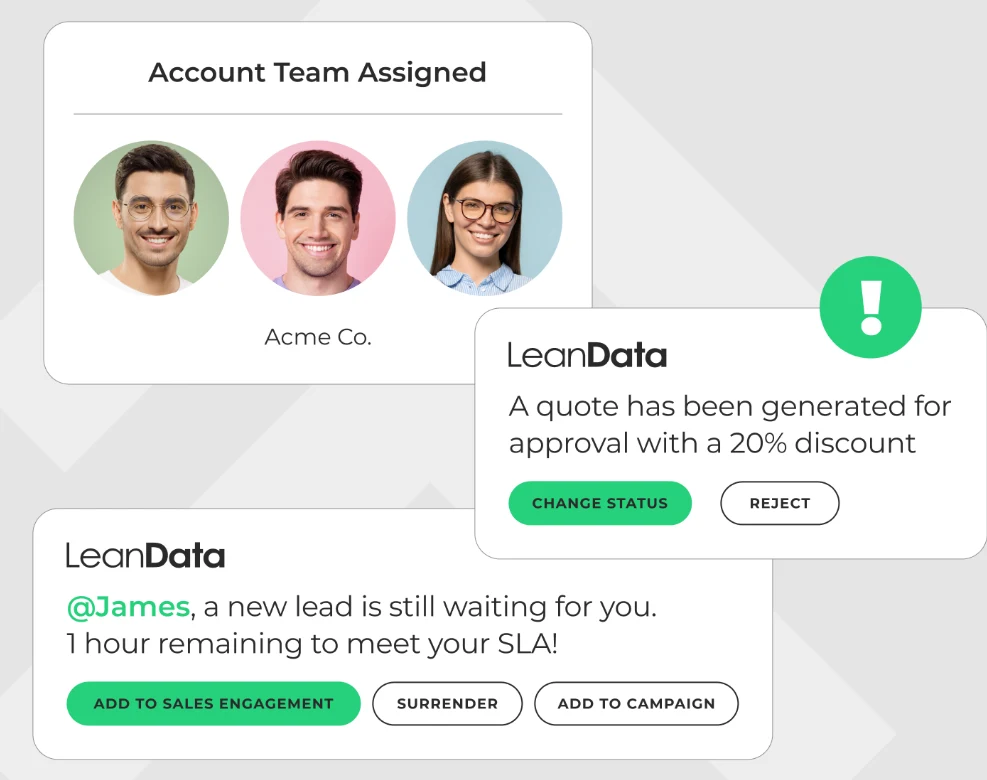
LeanData is a Salesforce-native go-to-market platform that routes leads, contacts and accounts. Its top edition adds cases, so sales and support can share one flow builder.
LeanData sends each case to a specialist based on tier, issue and account context. When a rep is out of office, it reassigns their active cases.
Key Features
- Capacity routing: Spreads cases by round robin, territory or rep capacity.
- SLA tracking: Times each case’s response and close, and escalates before a breach.
- Alerts: Notifies support reps by Slack, email or Microsoft Teams as cases arrive.
- AI Inference Node: Pulls intent and sentiment from free-text fields for routing.
Pricing
No public pricing. LeanData quotes each package on a demo, based on features, objects and users or queues.
Pros
- One drag-and-drop builder routes leads, accounts and cases, so support needs no second tool.
- Audit logs show the path behind each assignment, which speeds up troubleshooting.
- Rules change without code, so routing updates don’t wait on IT.
Cons
- Case routing comes only in Premium, and no edition has a public price.
- Large routers get hard to follow as branches and lines overlap.
- LeanData aims the builder at RevOps, so case rules tend to stay with ops.
Best For
Enterprises already routing leads in LeanData.
Rating
AppExchange rating: 4.93/5 (283 reviews)
7. Dispatcher
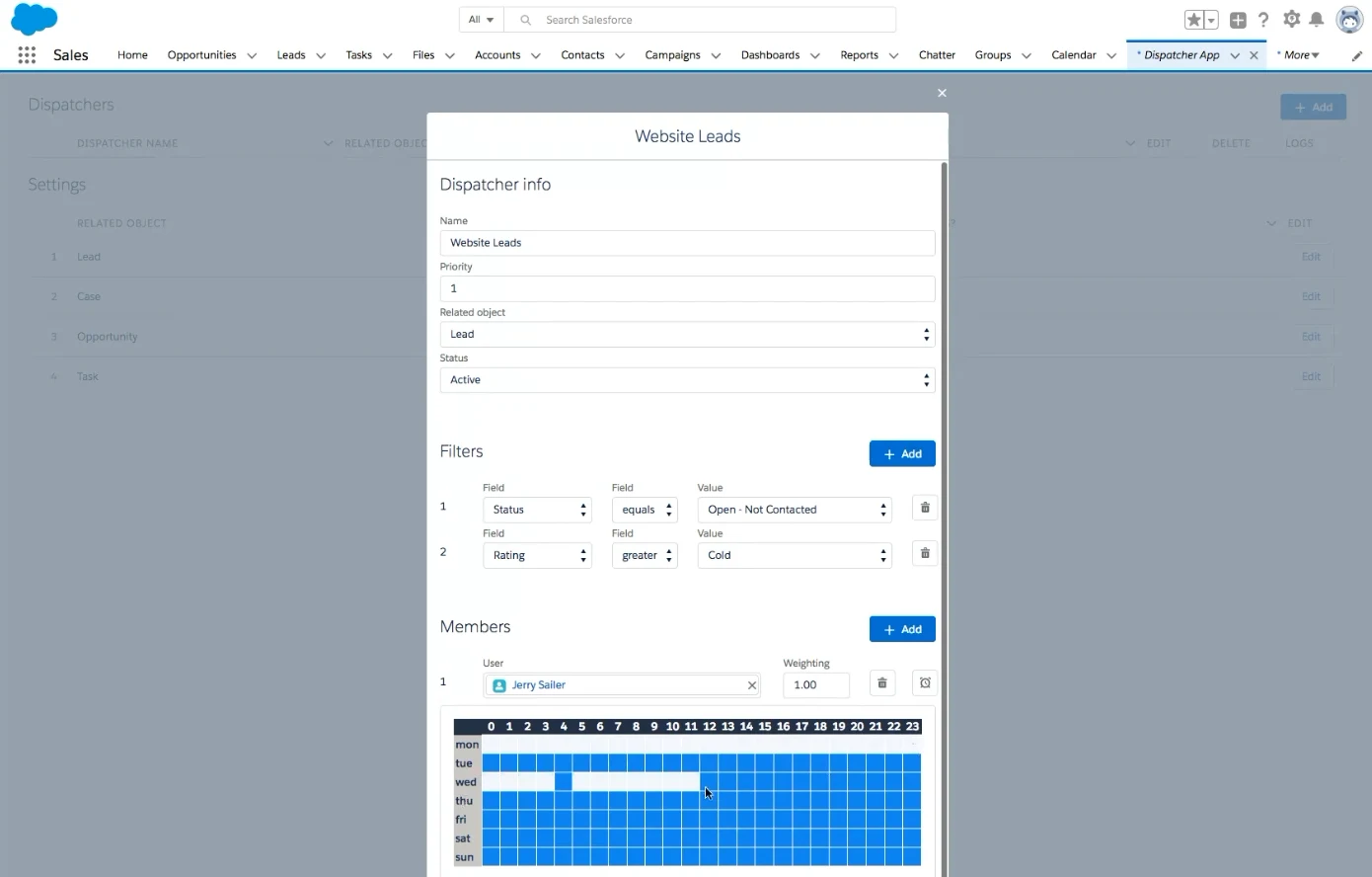
Dispatcher is an AppExchange app from IBR LLC that assigns leads, cases, tasks and opportunities by round robin. For a small support team, it’s a free way to share new cases out in turn.
Each dispatcher is a rule that filters records by field values, then assigns them by each user’s hourly schedule. One setup can cover weekday office hours and a separate weekend on-call schedule.
Key Features
- Queue and Rule Integration: Works alongside your existing queues and assignment rules.
- Weighted Assignment: Gives agents who handle more volume a bigger share of cases.
- Multiple Dispatchers: Runs several rule sets, one per team or case type.
- Still Maintained: Version 2.18 shipped in October 2026, so this free app is still updated.
Pricing
Free to use on the AppExchange.
Pros
- Support managers can change case routing without asking the Salesforce admin.
- Field filters mean one dispatcher can serve just the billing cases.
- The free app still comes with quick setup support.
Cons
- It routes leads, tasks, cases and opportunities only, so custom objects aren’t covered.
- It assigns by turn order, weight and schedule, so it doesn’t match cases on skills or caseload.
- There are no SLA timers, so a case that stalls after assignment stays put.
Best For
Small support teams that want free round robin case assignment.
Rating
AppExchange rating: 4.93/5 (14 reviews)
8. Case Auto Assign
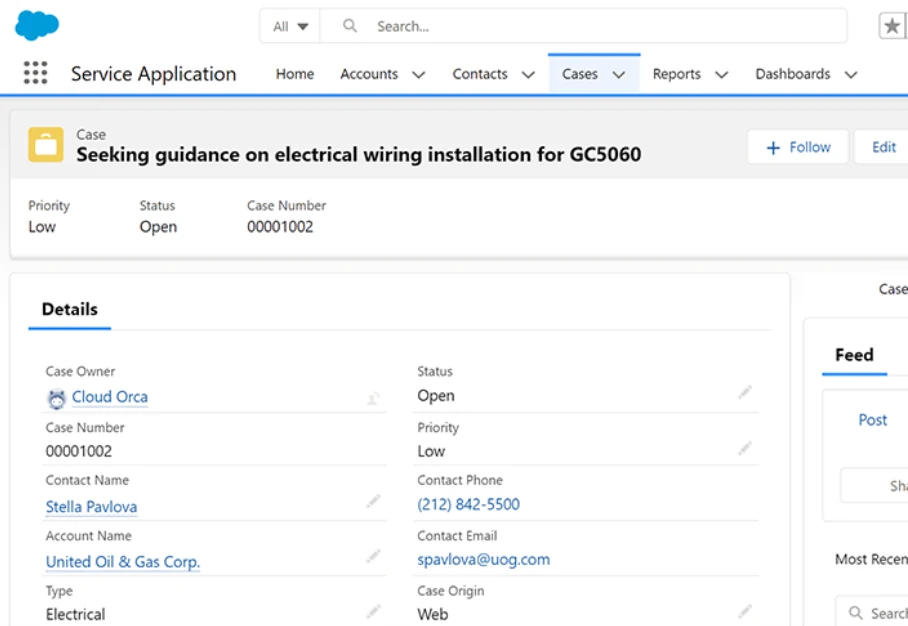
Case Auto Assign, a free Lightning component from Cloud Orca, hands cases to agents automatically. It covers cases only, with no rules for a manager or admin to edit.
Agents pick up their own work. The component assigns each case to a logged-in agent with no manual input. Setup is one component on the Case record page.
Key Features
- Logged-in agents only: Assigns to agents who are logged in, so cases never land with someone away.
- Low upkeep: Needs little to no maintenance.
- Reviewed package: Installs as a managed package that passed the AppExchange security review.
- Mobile support: Runs in the Salesforce mobile app.
Pricing
Free for any number of users.
Pros
- It’s free at any team size, so there’s no license count to track.
- New agents are covered as soon as they log in.
- There’s nothing to configure beyond adding the component to the case page.
Cons
- The listing doesn’t say how it chooses between several logged-in agents.
- It has no skills, workload, availability or SLA rules, so it can’t match or balance cases.
- The current version dates from April 2022, so don’t expect new features.
Best For
Small teams that just need cases handed out without paying for an app.
Rating
AppExchange rating: 5.0/5 (1 review)
9. Optimized Case Assignment
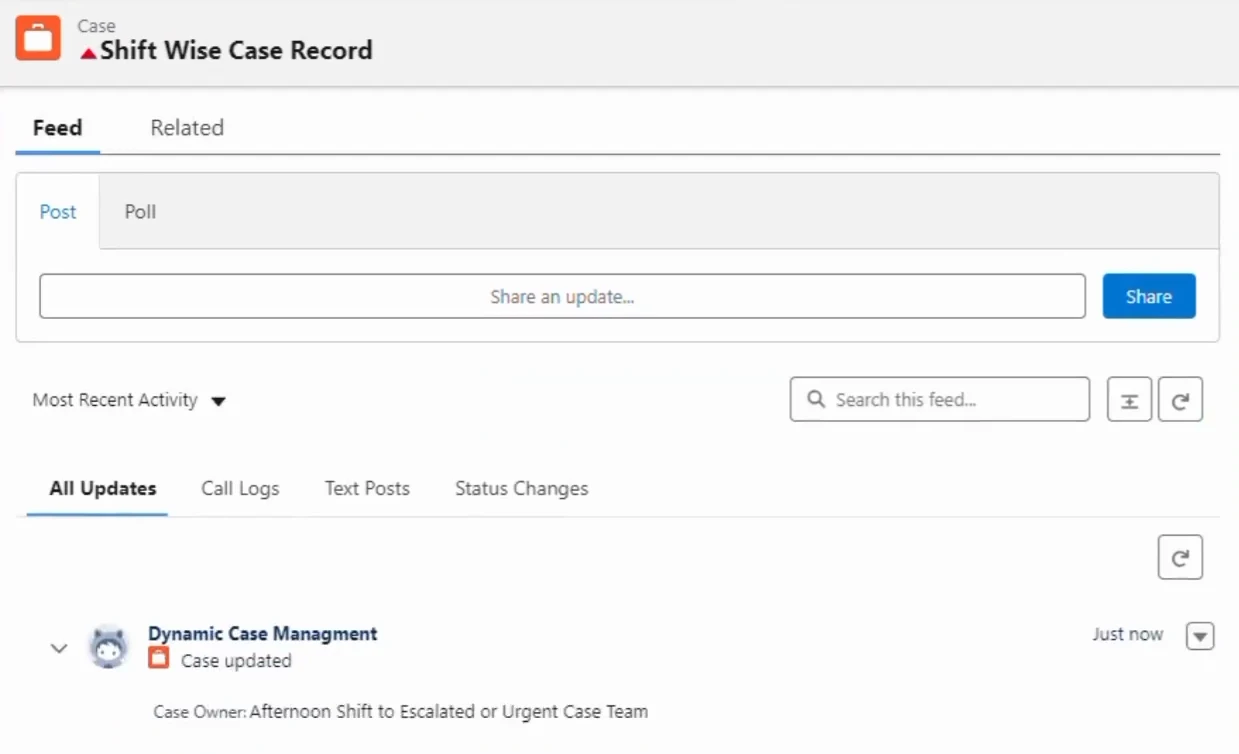
Optimized Case Assignment is a free Service Cloud app from Wissen Infotech, a Salesforce consulting partner. It suits support teams that work in shifts and need urgent cases escalated.
It installs in your org as a managed package with its own tabs and custom objects. It was listed on the AppExchange in May 2024.
Key Features
- Origin and priority routing: Assigns each case by where it came from and how urgent it is.
- Shift-based assignment: Uses shifts as a third input alongside origin and priority.
- Automated notifications: Sends automatic alerts to keep each case on track.
- Urgent case escalation: Escalates complex or urgent cases automatically.
Pricing
Free to use on the AppExchange.
Pros
- You can add shift-based routing to Service Cloud with no license cost.
- Its apps, tabs and objects don’t count against your Salesforce org limits.
- Its one AppExchange review credits it with saving the team time on case assignment.
Cons
- It’s still on version 1.0.0, with no update since May 2024.
- The listing doesn’t mention skills or workload matching, which matters if you route by expertise.
- The listing offers a demo video but no documentation or support contact, so setup questions go to Wissen.
Best For
Service Cloud teams that work in shifts and want free case assignment with escalations.
Rating
AppExchange rating: 5.0/5 (1 review)
10. Traction Complete
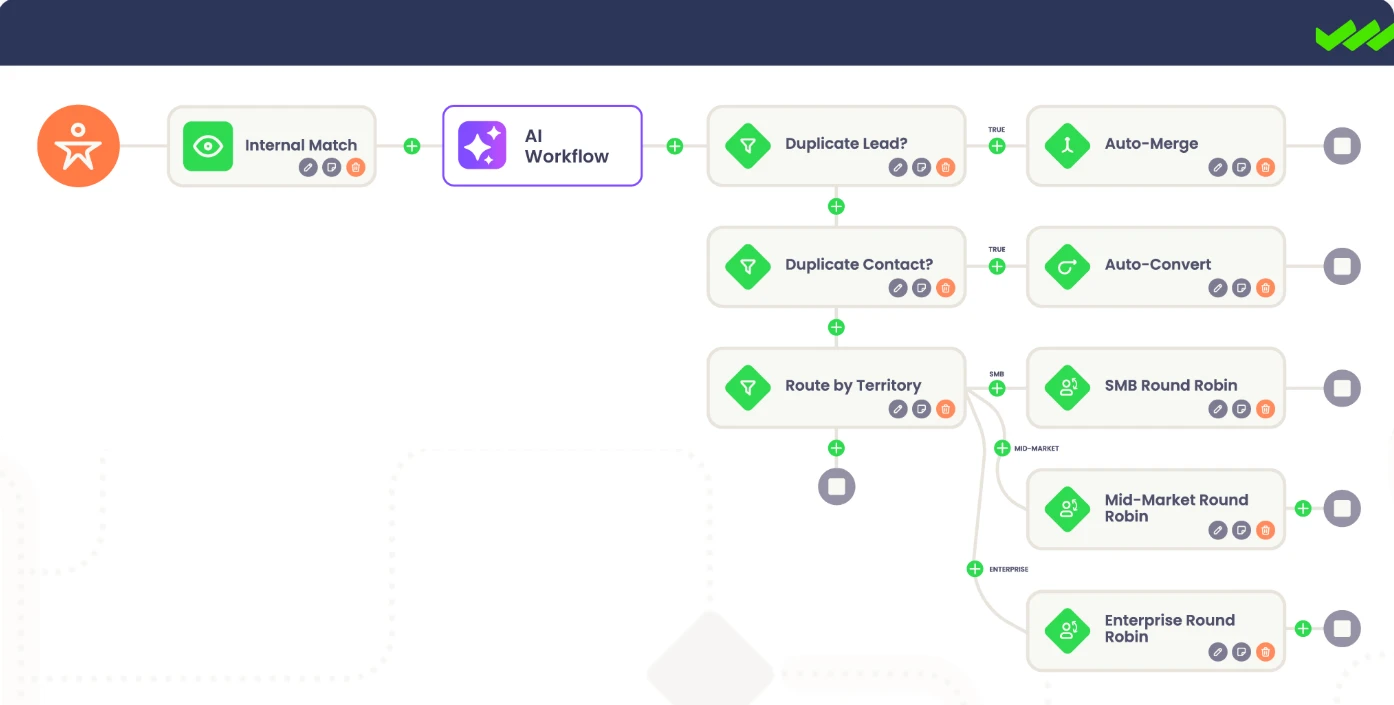
Traction Complete is a Salesforce-native data platform whose Complete Leads app matches and routes records. Despite the name, it routes cases too, assigning each one to a CSM by criteria or round robin.
Your RevOps team edits rules in a drag-and-drop flow builder, without writing Apex. The app also checks CSM availability and capacity, and times each response.
Key Features
- Round Robins: Rotates records by weighting, capacity caps or availability.
- Escalation Alerts: Sets response thresholds that trigger escalation notifications.
- Any-Object Routing: Routes contacts, opportunities and custom objects through one engine.
- Mass Modification: Reassigns ownership in bulk when territories or team members change.
Pricing
- $39 per user per month on its AppExchange listing, with a $10,000 a year minimum spend
- Its website lists no prices, so book a demo for a quote
Pros
- Slack and email alerts reach reps where they already work.
- A basic admin can build complex routing in the visual builder.
- The customer success team helps design and test rules during setup.
Cons
- None of its 22 AppExchange reviews, the newest from March 2023, covers case routing.
- Complete Leads is designed for revenue teams, so matching and enrichment target sales data.
- Flows need ongoing tweaks as your rules change.
Best For
Teams already routing leads in Traction Complete who want cases in the same flows.
Rating
AppExchange rating: 5.0/5 (22 reviews)
How to Choose the Right Salesforce Case Assignment Software
Start with the gap that’s costing your team the most.
Skills
Need cases to reach the agent who knows that product or speaks that language? Q-assign matches on skill and workload together.
On Service Cloud Pro Suite with an admin to spare, Omni-Channel’s skill-based routing comes included.
Workload and Availability
- Big team with caseload caps and shifts? Kubaru balances by active cases and follows your out-of-office, holiday and shift schedules.
- Shift-based Service Cloud team? Optimized Case Assignment assigns by origin, priority and shift, for free.
- No budget? Dispatcher round-robins cases for free, and Case Auto Assign hands cases to whoever is logged in. Neither checks caseload.
SLA Follow-Through
If missed SLAs worry you most, Distribution Engine fits best. Its Advanced plan ($35/user/month) takes a case back when an agent misses the SLA.
Kubaru runs SLA timers on any object, and it can reassign a case on a breach.
Cross-Object Routing
Already routing leads in LeanData, Traction Complete or Plauti? You can send cases through the same tool, though LeanData only routes cases on Premium. Starting fresh, Distribution Engine and Kubaru both route cases, leads and custom objects.
Business-User Administration
If you want support managers to own routing without an admin, Kubaru lets them manage the assignment logic themselves. Q-assign’s point-and-click rules can also be edited without code.
FAQs
Can Salesforce assign cases automatically?
Yes. Salesforce’s case assignment rules automatically send each incoming case to a person or queue. Your criteria can even check fields on the related account or contact.
But rules ignore workload and who’s online, so for that you’ll need Omni-Channel or an app.
What’s the difference between case assignment rules and Omni-Channel?
Case assignment rules give each new case an owner based on your criteria, and that’s all they do. Omni-Channel sends each case to an agent who’s online and has room, matched by queue or skills.
Omni-Channel needs the Pro Suite and an admin to set it up, so compare it with an assignment app first.
What is round robin case assignment?
Round robin case assignment hands new cases to agents in turn, so everyone gets an even share. Weighted round robin gives some agents a bigger share.
Salesforce’s assignment rules can’t rotate by themselves, since each rule entry assigns to one user or queue. A free app like Dispatcher adds the rotation.
Test Who Can Change the Rules
Every tool here gets a case to an agent, so the bigger question is who keeps the routing current. Before you pick one, have your support manager update routing so new cases skip an agent who’s on vacation, without asking the admin.
In Kubaru, your support manager can set an out-of-office schedule to keep that agent from receiving new assignments. Book a demo or start the free 30-day trial and run that test yourself.