















Quick Summary
For teams evaluating Salesforce lead management software, Kubaru stands out with instant assignment and unlimited routing that won’t slow your team down. LeanData is the pick for enterprise teams that need advanced lead-to-account matching and revenue orchestration. NC Squared offers flexible round robin distribution for mid-market teams running high-volume queues.
| Tool | Best For | Starting Price | Key Strength |
|---|---|---|---|
| Kubaru | Fast-moving teams needing instant lead assignment and unlimited routing | $20/user/month | Multi-factor routing with business-user control |
| LeanData | Enterprise teams with complex lead-to-account matching needs | Contact for pricing | Advanced account matching & RevOps automation |
| NC Squared (Distribution Engine) | Mid-market teams that require flexible round robin and capacity balancing | $20/user/month (Starter) | Reliable high-volume distribution across any Salesforce object |

Having Trouble Finding the Right Salesforce Lead Management Software?
Growing teams often hit the 3,000-rule cap in Salesforce’s built-in assignment rules. The native rules only handle leads and cases, don’t support round robin, and require admin access to change. That can leave sales teams waiting on admins whenever they need to update their routing logic.
At Kubaru, we’ve spent years helping sales teams automate lead assignment and routing within Salesforce. We’ve helped over 300 businesses optimize their lead management workflows and achieve sub-5-minute response times. We know what slows teams down and what helps them scale without hitting Salesforce’s technical limits.
What Is Salesforce Lead Management Software?
Salesforce lead management software automates the entire process of capturing, routing, assigning, scoring, and tracking leads within your Salesforce environment. Instead of relying on manual processes or limited built-in rules, these tools give your team faster response times and fairer distribution. Business users can also manage routing themselves, so they don’t need admins for every change.
The 10 Best Salesforce Lead Management Software Tools
1. Kubaru
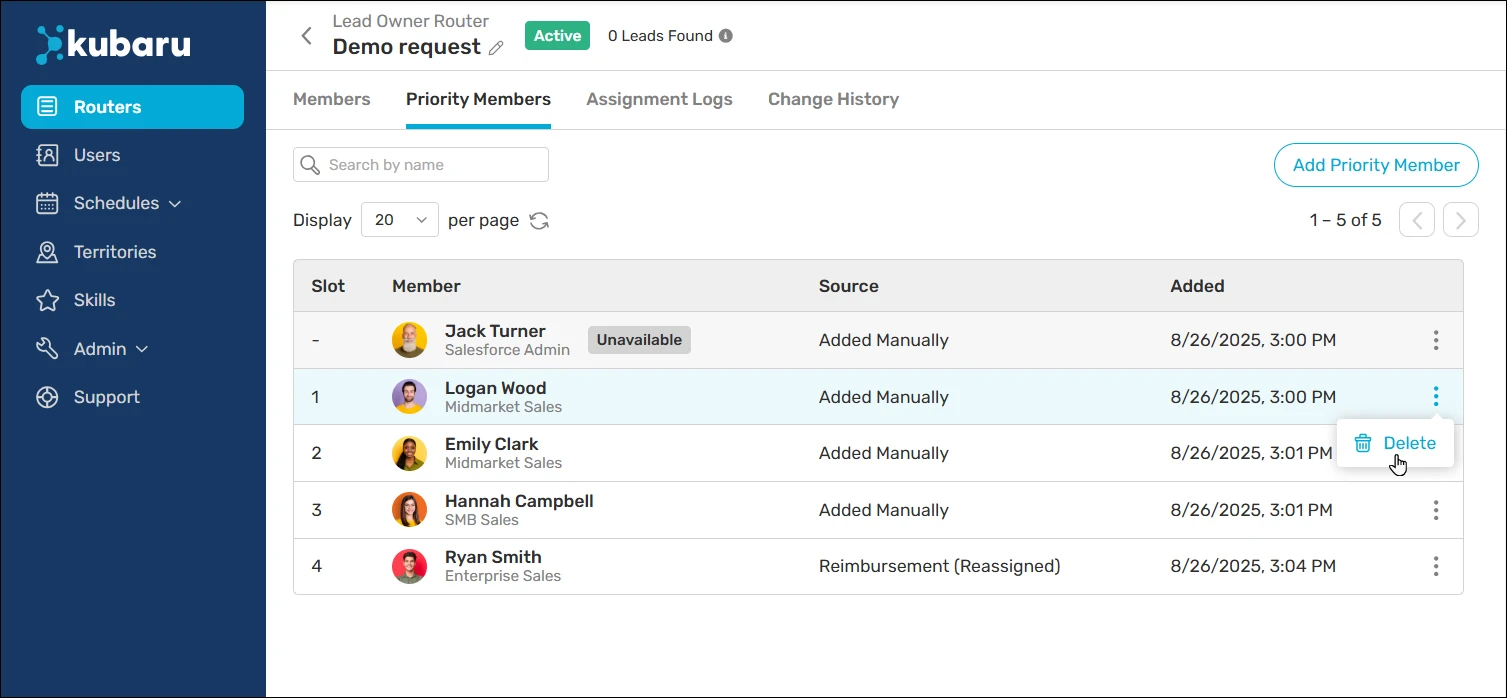
Kubaru is a native Salesforce app for automated lead, case, and record assignment. It tackles slow response times, the 3,000-rule limit, and the wait you’d otherwise face for admin-driven routing changes.
Key Features
- Instant Automated Assignment: Assign leads and cases to the right rep the moment they enter Salesforce, based on skills, territories, workload, and availability
- Multi-Factor Assignment Logic: Combine multiple routing criteria in a single rule so records land with the best-fit rep every time
- Round Robin Distribution: Distribute records evenly across your team with standard and weighted round robin options
- Business User Administration: Let sales ops managers and team leads manage assignment logic directly without Salesforce admin privileges
- Automated Reassignment: Automatically reroute unworked or cold records before they slip through the cracks
- Territory Management: Define and manage geographic or account-based territories to keep routing aligned with your go-to-market strategy
Pricing
Kubaru charges a simple and affordable fee of $20/user/month with no hidden fees.
G2 Rating
G2 Rating: 4.9/5 stars
Pros
- 100% native to Salesforce, introducing zero new security vulnerabilities
- Unlimited assignment rules (no 3,000-rule cap)
- Business users don’t need admin privileges to control routing
- Free lifetime support with 150+ five-star AppExchange reviews
- Pricing typically less than half of competitors like LeanData
- Reduce average response time to under 5 minutes
Cons
- It’s focused exclusively on assignment, not a full RevOps platform
- It doesn’t match the feature depth of broader tools like LeanData
Best for:
Teams that want business users like sales ops managers and team leads to manage Salesforce assignment directly, without waiting on admins.
2. LeanData
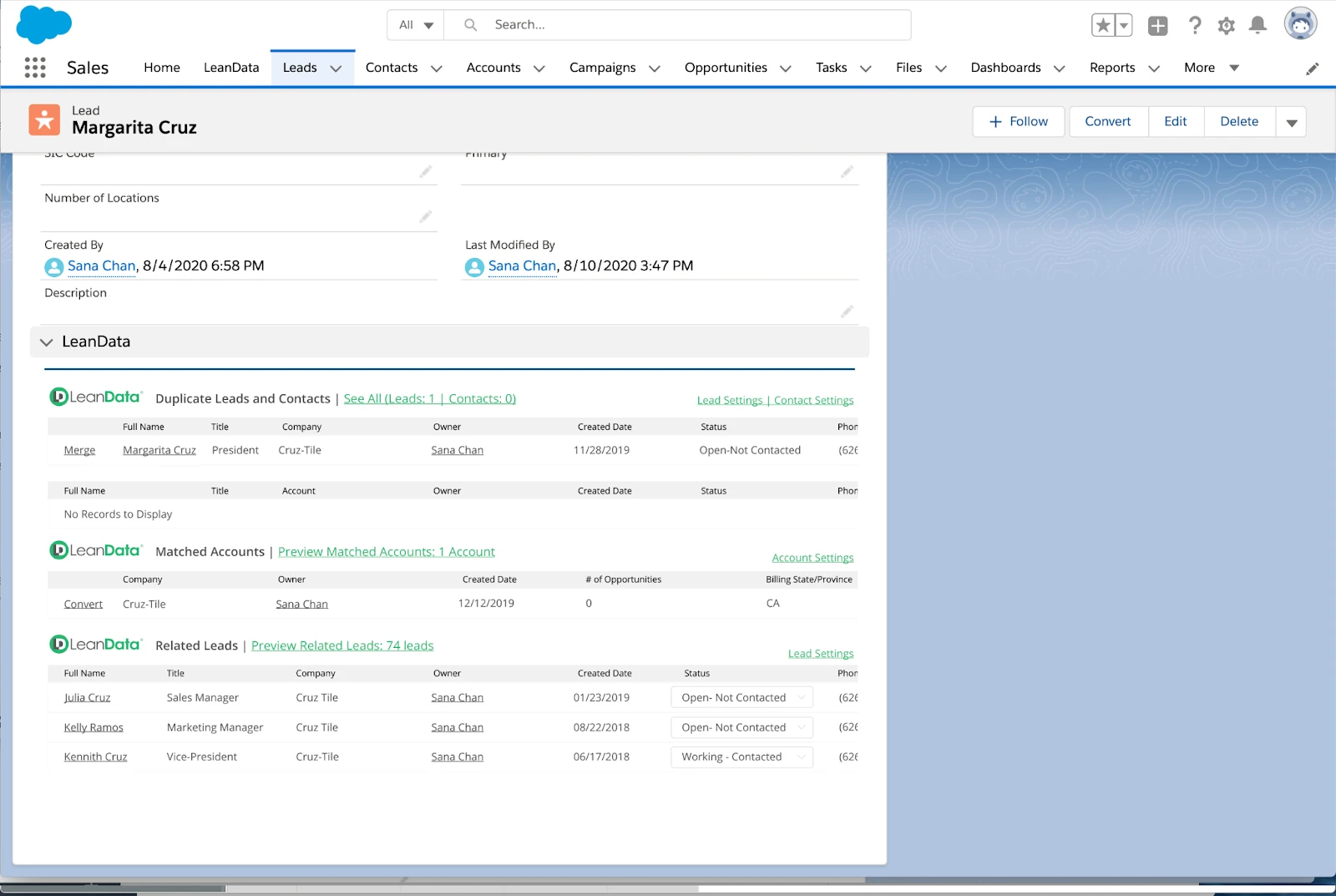
LeanData is a comprehensive revenue operations platform that includes advanced lead routing, lead-to-account matching, and attribution capabilities. It’s built for enterprise teams managing complex lead flows across multiple products, regions, and account hierarchies.
Key Features
- Scalable Workflow Automation: Consolidate signals across teams into unified routing workflows
- Integrated Data Mapping and Governance: Map and govern your data across the full revenue lifecycle
- AI-Driven Signal Recognition: Recognize buyer activity signals and route records based on intent
- Cross-Team Workflow Coordination: Coordinate routing logic across sales, marketing, and customer success
Pricing
LeanData charges per user per month across four tiers but doesn’t publicly disclose pricing. Contact LeanData for a quote.
G2 Rating
G2 Rating: 4.6/5 stars (1052 reviews)
Pros
- Advanced lead-to-account matching capabilities
- Effective for enterprise-level account-based strategy
- Deep reporting and attribution capabilities
Cons
- It’s much pricier than tools built specifically for assignment
- You’ll need more time for implementation and technical support
- The breadth of features may overwhelm smaller teams
Best For
Enterprise teams running complex lead-to-account matching across multiple products, regions, and account hierarchies.
3. NC Squared (Distribution Engine)
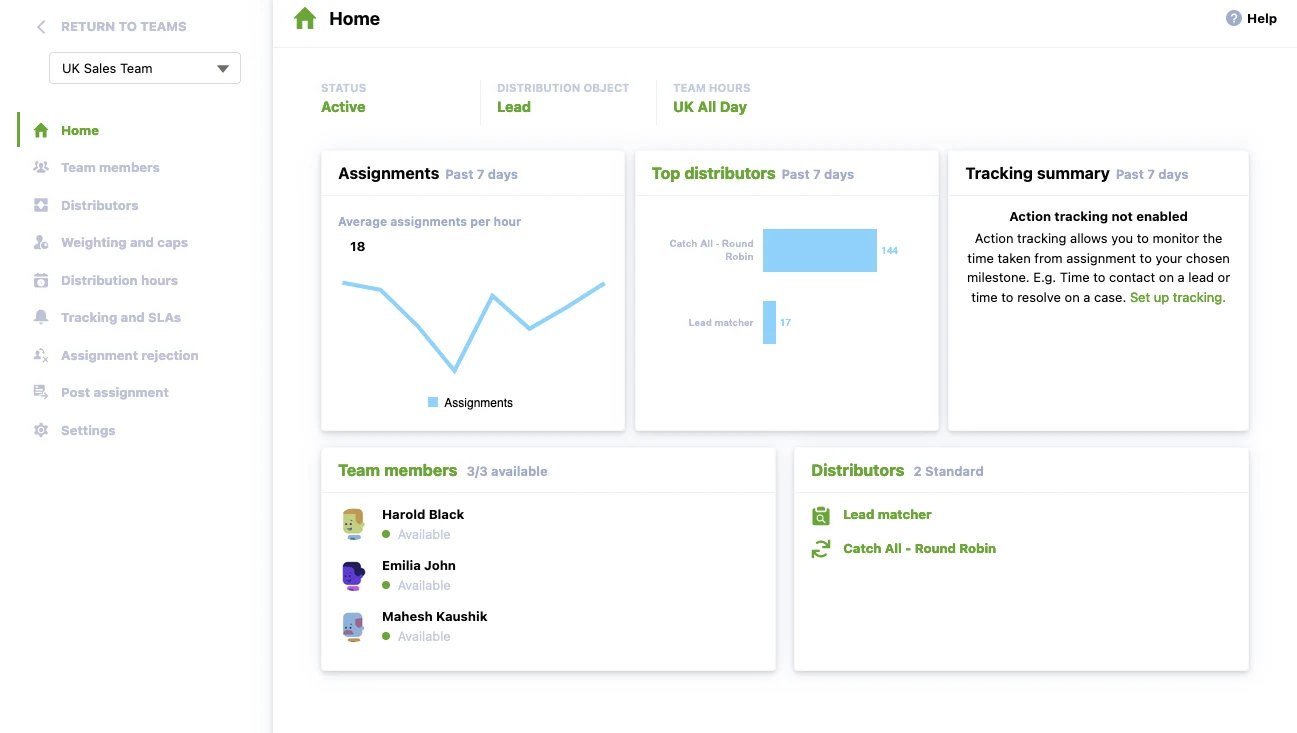
NC Squared Distribution Engine is a native Salesforce application that provides flexible lead and case distribution. It’s built for mid-market and enterprise teams with customizable round robin, territory-based routing, and load balancing.
Key Features
- Auto-Distribution: Automatically distribute leads, cases, contacts, accounts, opportunities, and custom objects
- Multi-Object Routing: Route any standard or custom Salesforce object
- Round Robin and Workload-Based Distribution: Balance record volume across reps by capacity and availability
- Native Salesforce Execution: Runs entirely inside Salesforce with no external data movement
Pricing
NC Squared offers three pricing tiers. Starter: $20, Advanced: $35, and Unlimited: $55 per user per month.
G2 Rating
G2 Rating: 4.9/5 stars (10 reviews)
Pros
- Fair and consistent lead distribution across the team
- It’s easy to set up and manage, with strong support when you’re building more advanced routing logic
- It’s reliable in high-volume environments and cuts down on manual oversight
Cons
- Limited flexibility when assigning leads based on specific criteria
- Settings and controls aren’t on one screen, which makes troubleshooting harder
- Harder to prioritize or customize lead types for individual reps
Best For
Mid-market and enterprise teams that need fair, flexible round robin distribution across any Salesforce object.
4. Ortoo Q-Assign
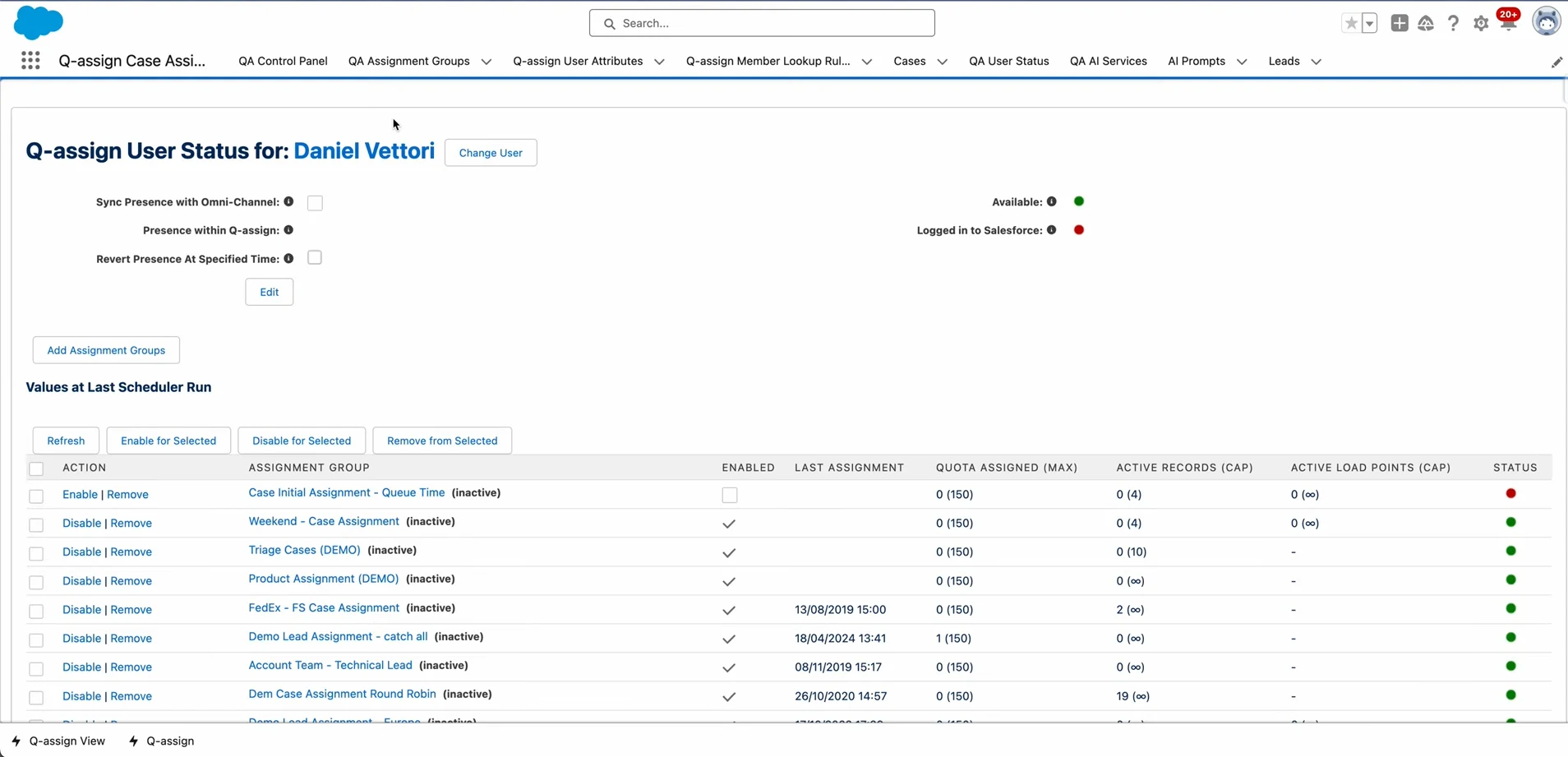
Ortoo Q-Assign is a queue-based assignment tool with built-in workload balancing capability. It’s designed for teams managing high volumes of leads and cases. It distributes records fairly among available reps based on workload.
Key Features
- Q-Assign for Sales: Automate lead and opportunity assignment with intelligent routing rules
- Q-Assign for Service: Route cases to agents based on skills, availability, and current queue depth
- Territory Assignment: Assign records based on geographic or account-based territory definitions
- Workload Balancing: Distribute records evenly by factoring in each rep’s current active queue
Pricing
Contact Ortoo for pricing information.
AppExchange Rating
AppExchange Rating: 4.97/5 stars (139) reviews
Pros
- Robust visual journey builder that’s user-friendly even for complex automations
- Excellent customer support
- CDP, analytics, email/SMS, and lead scoring all in one platform
Cons
- Steep learning curve when trying to go beyond basic campaigns
- Some important integrations are one-way sync only
- Deep segmentation and predictive analytics aren’t available unless you’re on a higher tier
Best For
Teams managing high volumes of leads and cases that need intelligent, workload-balanced assignments in Salesforce.
5. Plauti Assign
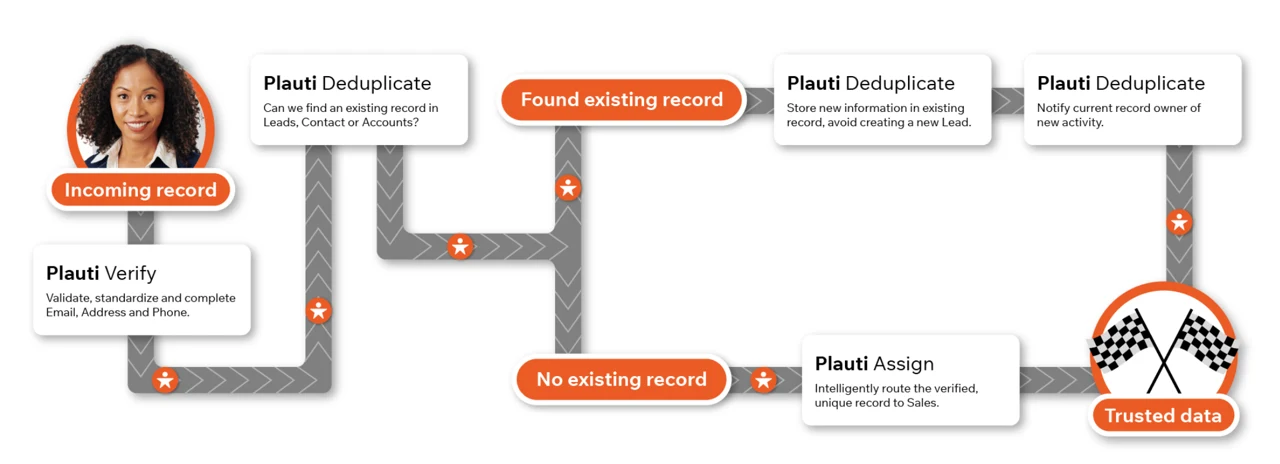
Plauti Assign is a native Salesforce assignment tool, built with an emphasis on European data compliance requirements. It supports multi-object assignment and follows GDPR-compliant data handling.
Key Features
- Plauti Verify: Validate emails, phone numbers, and addresses in real time
- Plauti Deduplicate: Identify and merge duplicate records across your Salesforce org
- Plauti Manipulate: Transform and clean data during automated workflows
- Plauti AgentForce: Manage real-time data quality within the Agentforce framework
Pricing
Plauti doesn’t list prices publicly. Contact them for a quote.
G2 Rating
G2 Rating: 4.4/5 stars (115 reviews)
Pros
- Accurate and adaptable duplicate detection that simplifies cleanup
- It’s easy to set up, and the interface feels simple to navigate
- Customization options that adapt well to different workflows
Cons
- Navigation can get complex once you move beyond basic configurations
- Users want more advanced matching capabilities than the tool currently offers
- Pricing and a few feature limits can hold some teams back
Best For
Salesforce teams that need data deduplication and record quality management alongside assignment.
6. LeadAngel
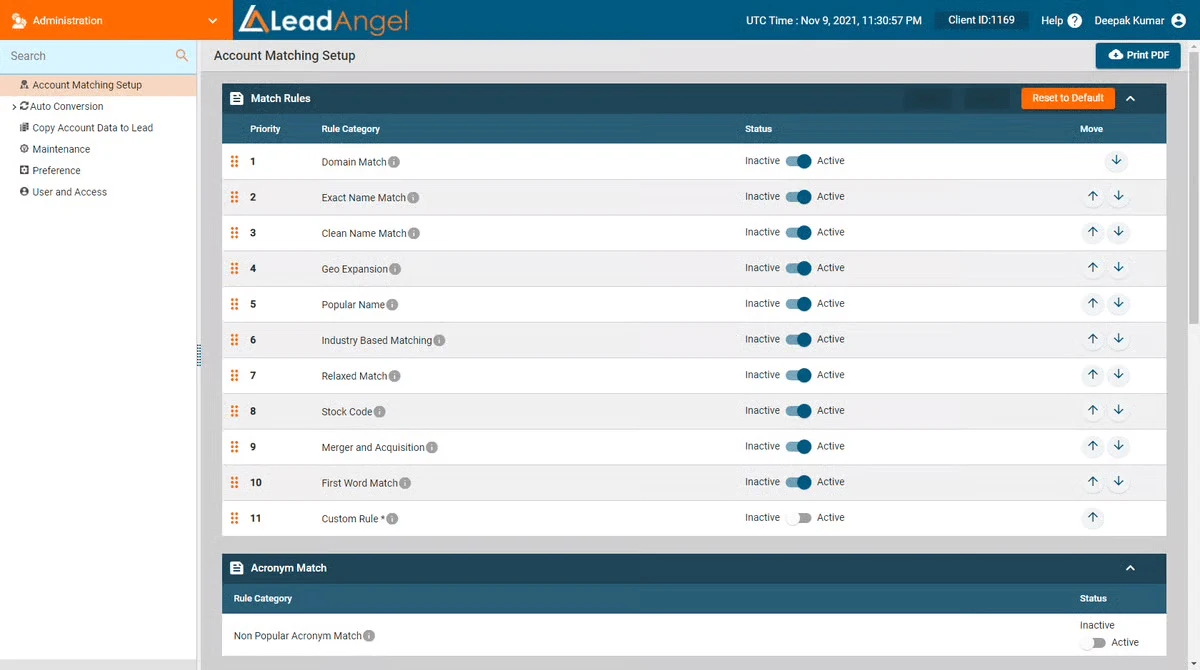
LeadAngel is built for teams that want intelligent lead-to-account matching, fast routing, and cleaner data inside Salesforce. It brings together routing, scheduling, hand-offs, and dedupe so your reps don’t deal with delays or duplicate noise.
Key Features
- Lead-to-Account Matching: Match incoming leads to existing accounts using fuzzy and exact logic
- Lead Routing: Route leads with rules managed by RevOps, not just Salesforce admins
- Calendar Scheduling and On-the-Spot Handoff: Book meetings and hand off leads between reps in real time
- Data Dedupe and Integration: Clean duplicate records and sync with your broader tech stack
Pricing
Pricing is quote-based. Contact LeadAngel for details.
G2 Rating
G2 Rating: 4.5/5 stars (46 reviews)
Pros
- Can route and match very specifically based on custom logic
- Easy to use once it’s configured
- Helps maintain data accuracy and improves lead quality
Cons
- Some users have noticed performance issues under heavy load
- There are occasional bugs that you’ll need vendor support to resolve
- Add-ons can significantly increase the overall cost
Best For
Teams that want lead-to-account matching, routing, and scheduling combined without enterprise-level complexity.
7. Chili Piper
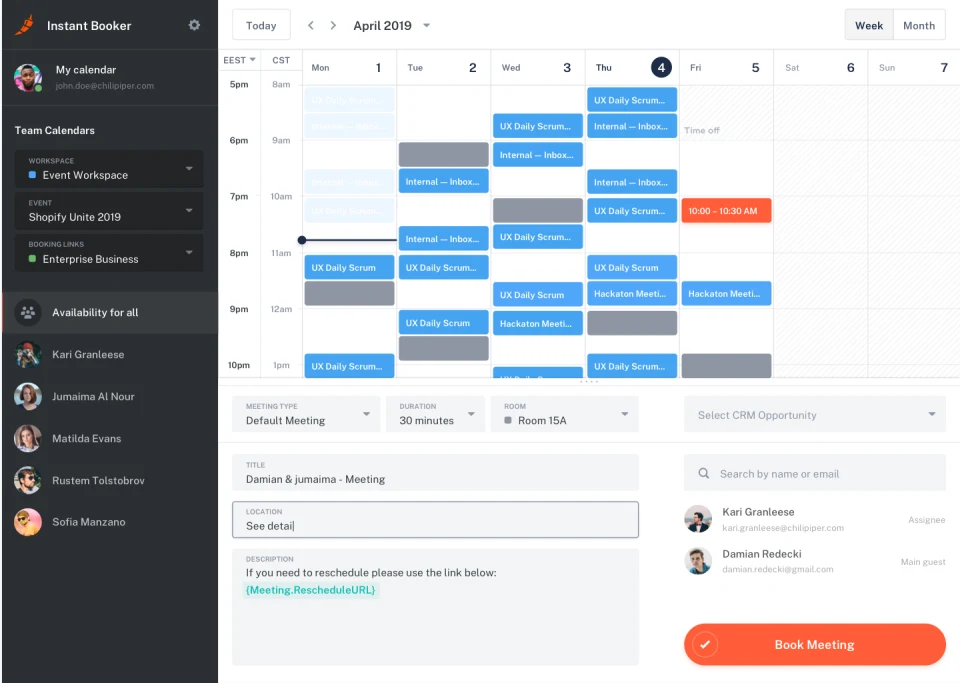
Chili Piper was built for teams focused on speed-to-lead that want to convert inbound meetings into scheduled conversations instantly. It uses smart routing rules, calendar integrations, and automated booking so prospects don’t sit in form-fill limbo.
Key Features
- Smart Lead and Meeting Routing: Route leads to the right rep by territory, account ownership, or custom rules, and book the meeting instantly
- Calendar Integrations: Sync with Google Workspace and Microsoft 365 so availability is always current
- Automated Reminders and Rescheduling: Reduce no-shows with automated confirmation and reschedule flows
- Salesforce Integration: Push every booking and routing action back into Salesforce automatically
Pricing
Chili Piper offers several pricing tiers:
- Routing & Scheduling: $1,250/month, including 15 seats; $45/month per additional seat
- Experiences: $3,500/month, including 30 seats; $50/month per additional seat
- ChiliCal: $12/user/month, with a 200-seat minimum
G2 Rating
G2 Rating: 4.6/5 stars (736 reviews)
Pros
- Boosts conversion rates with immediate scheduling when a prospect fills out a form
- Integrates with Salesforce and mainstream calendar platforms
- Web forms that qualify, route, and schedule automatically in one step
Cons
- You’ll need time to set up routing logic and calendar connections
- Occasional sync failures between calendars and CRM
- Costs rise quickly as you add modules
Best For
Inbound-heavy teams focused on converting form submissions into booked meetings as fast as possible.
8. Traction Complete
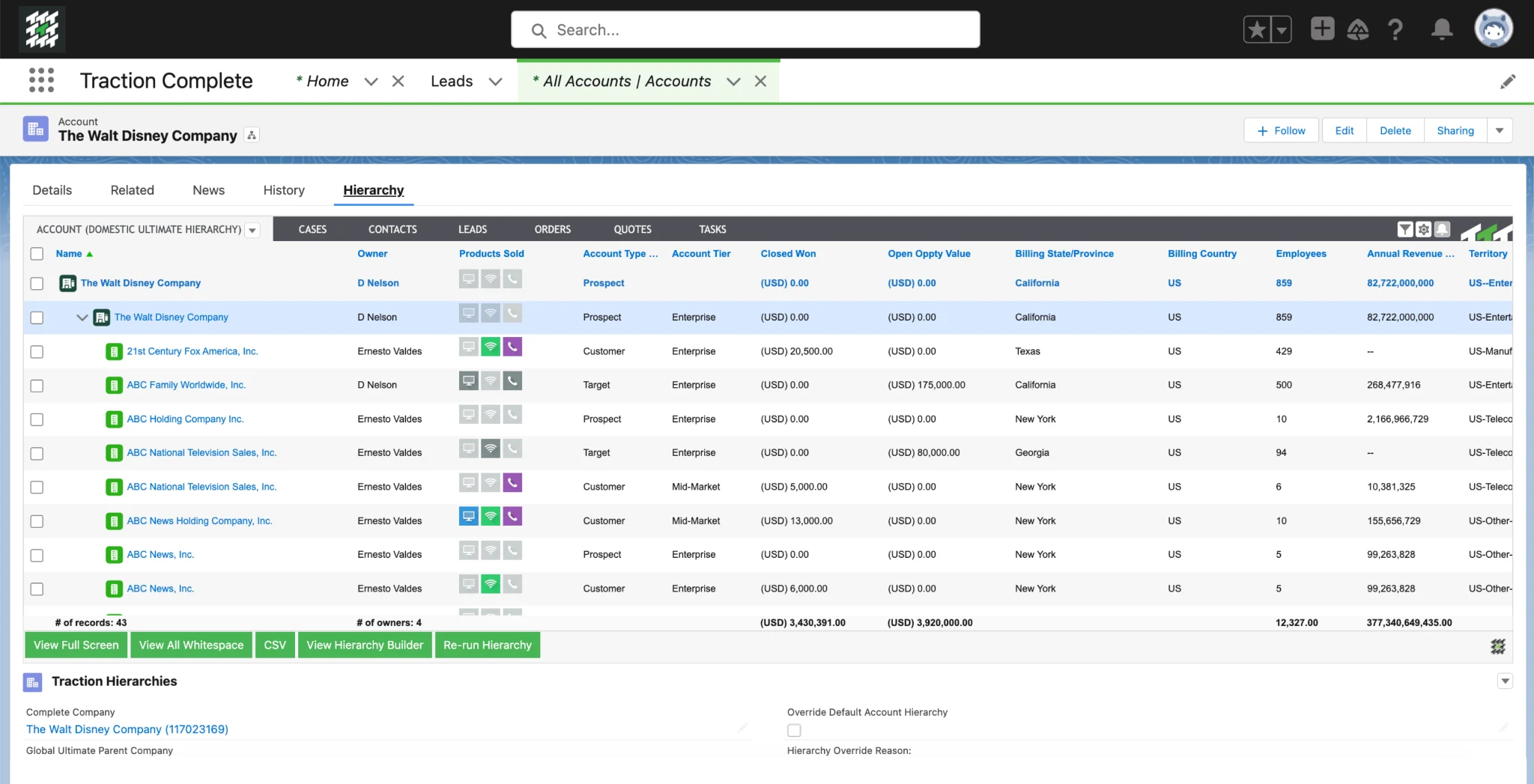
Traction Complete is built for organizations that want cleaner data and smarter routing inside Salesforce. It supports account-based sales models and complex assignments with visual flows, automated matching, and detailed audit trails. It’s both a data engine and a routing solution.
Key Features
- Lead Routing: Route leads based on territory, account ownership, and custom assignment criteria
- Lead-to-Account Matching: Match leads to existing accounts with configurable matching rules
- Deduplication: Merge duplicates across any object with mass-merge capabilities
- Account Hierarchy Automation: Build and maintain parent-child account structures automatically
Pricing
Pricing is custom and depends on volume and product configuration. Contact Traction Complete for a quote.
G2 Rating
G2 Rating: 4.7/5 stars (175 reviews)
Pros
- Powerful data enhancement and cleansing functionality
- It’s great for account-based territory strategies with complex hierarchies
- Access to detailed analytics and visibility in routing decisions
Cons
- Pricing model isn’t transparent
- Can feel overwhelming for smaller teams without dedicated ops support
- Some users say advanced configuration isn’t straightforward
Best For
Account-based teams that need clean data hierarchies, automated matching, and visual routing flows inside Salesforce.
9. LeadSquared
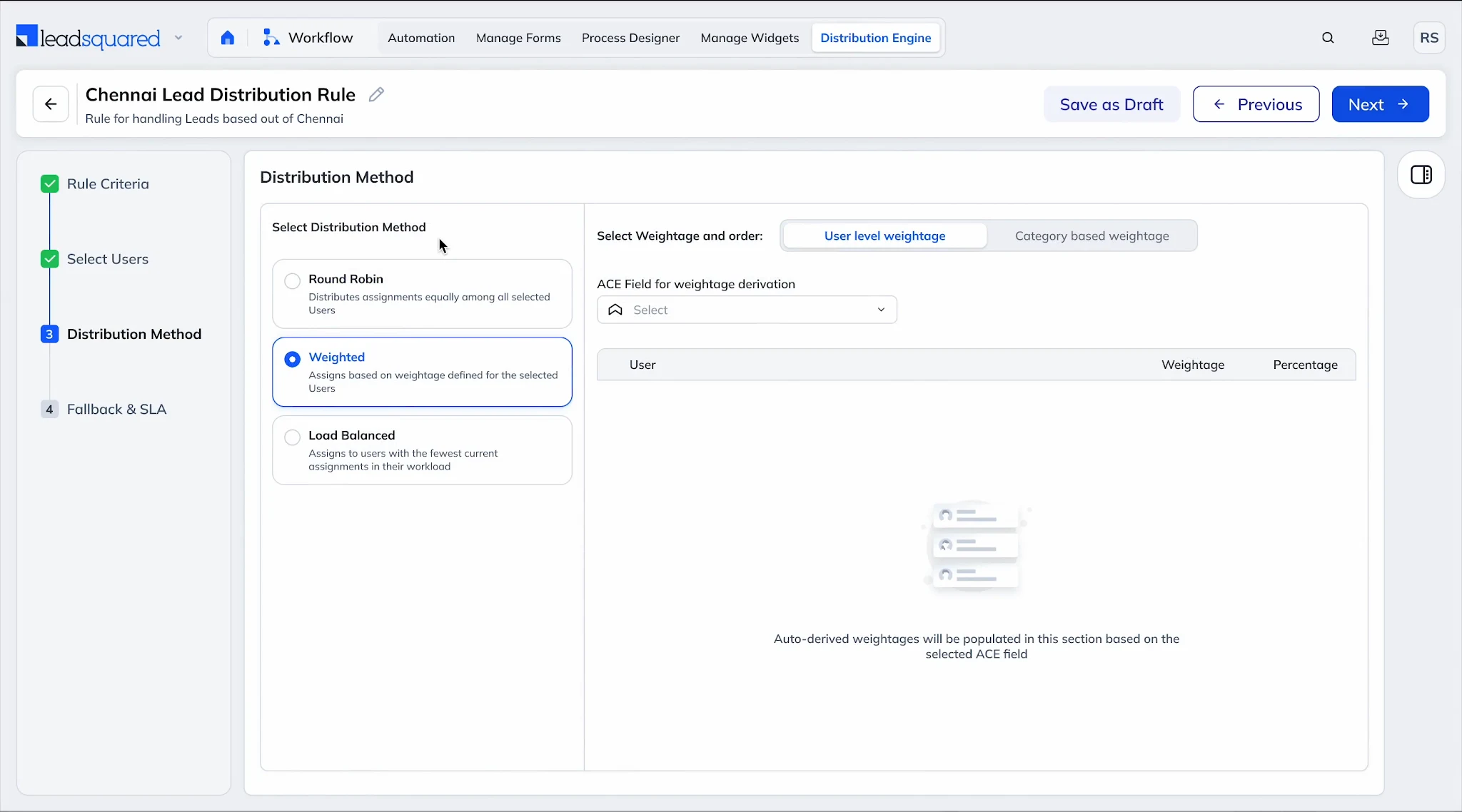
LeadSquared supports both marketing and sales teams with a unified approach to lead capture, scoring, and distribution. It’s effective for teams that want one platform to handle everything from web activity tracking to routing by location, lead quality, or rep performance.
Key Features
- Customer Relationship Management: Track leads from capture to close in a unified CRM
- Mobile CRM: Access your pipeline and update records from the field
- Sales Performance Suite: Monitor rep activity, conversion rates, and pipeline health in real time
- Self-Serve Sales Journeys: Let prospects book demos and access information through branded portals
Pricing
LeadSquared’s sales CRM product has two tiers:
- Sales PRO: $40 per user per month
- Sales Super: $60 per user per month
G2 Rating
G2 Rating: 4.5/5 stars (303 reviews)
Pros
- Very flexible routing rules and logic that adapt to complex scenarios
- Good value for growing teams building out their automation stack
- Brings together lead capture, scoring, and routing in one place
Cons
- More complex than routing-only tools, with a steeper initial setup
- You’ll likely need guided onboarding for high-end automation features
- Pricing and feature tiers aren’t always clearly communicated
Best For
Growing teams that want lead capture, scoring, and distribution unified in a single platform.
10. Salesloft
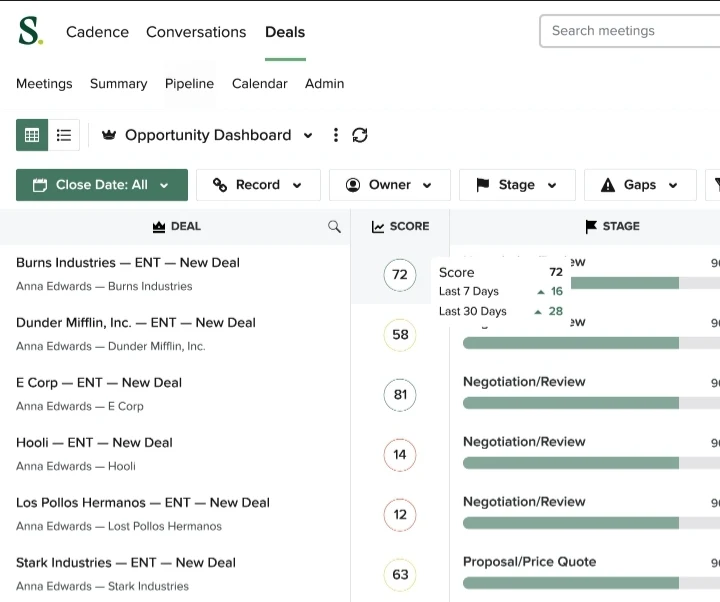
Salesloft is a revenue orchestration platform that helps sales teams create pipelines, manage opportunities, and accelerate deals through connected workflows and guided selling. It brings together engagement, analytics, operations, and lifecycle tools so reps don’t have to jump between platforms.
Key Features
- Technology and Workflow: Automate repetitive sales tasks and build repeatable cadences
- Team Productivity and Performance: Track rep activity and identify coaching opportunities
- Pipeline Creation and Coverage: Build and manage pipeline with multi-channel sequences
- Opportunity Acceleration and Management: Move deals forward with deal intelligence and guided actions
Pricing
Salesloft uses quote-based pricing. Contact their sales team for details.
G2 Rating
G2 Rating: 4.5/5 stars (4,290+ reviews)
Pros
- Simplifies outreach across multiple channels while tracking every touchpoint
- Powerful analytics for deal forecasting and sales coaching
- Integrates with Salesforce and other core go-to-market systems
Cons
- Some users report they’ve hit occasional issues with calls or integrations
- Pricing can be high for smaller teams
- The breadth of features means you’ll need a longer onboarding period
Best For
Sales teams running multi-channel outreach that need pipeline creation, deal management, and coaching analytics.
Honorable Mentions
| # | Tool | Description |
|---|---|---|
| 11 | Qualified | Converts website visitors into Salesforce-ready leads through real-time conversations |
| 12 | Drift | AI-powered chat and meeting routing for inbound visitors |
| 13 | Intercom | Conversational engagement platform with bots, automation, and proactive messaging |
| 14 | ZoomInfo SalesOS | Enriches and scores leads with verified B2B contact and company data |
| 15 | Clearbit | Real-time lead enrichment and form optimization for higher conversion |
| 16 | MadKudu | Predictive scoring that identifies high-intent leads and routes them to sales |
| 17 | RollWorks | Account-based identification and intent-driven routing for ABM teams |
FAQs
What is the best software for lead management in a CRM?
It depends on your CRM, your team size, and the specific problem you’re trying to solve. No single tool fits every scenario. Start with the one problem costing you the most deals, and find the tool that solves it without adding unnecessary complexity.
If you’re on Salesforce, native apps are a strong choice. They run inside your existing environment, which can reduce the need for external data movement and additional integration layers. Kubaru, LeanData, and Distribution Engine are three strong options for Salesforce lead routing.
If speed to lead is your main concern, look for a tool built specifically for automated lead routing. Purpose-built routers can add capabilities such as weighted round robin, workload balancing, territory-based assignment, and SLA-based reassignment that go beyond Salesforce’s standard assignment rules.
For teams that also need lead-to-account matching, scheduling, or data deduplication alongside routing, a broader platform like LeanData or Chili Piper covers more ground. Their broader feature sets can also mean more configuration and higher costs than a focused routing tool.
Can Salesforce be used for lead management on its own?
Yes. Salesforce has built-in tools to capture, track, assign, and convert leads, so it can handle basic lead management without an additional routing application. The limitations show when routing and assignment needs get more complex.
Salesforce’s standard assignment rules support leads and cases, with each rule limited to 3,000 entries, and changing them requires the Customize Application permission. While Salesforce can support basic round-robin lead assignment, its standard rules don’t offer the weighted, capacity-based, or availability-aware distribution that dedicated routing platforms provide.
For smaller teams with straightforward routing needs, Salesforce’s built-in tools may be enough. But when routing involves territories, account ownership, workload balancing, availability, or multiple conditions, dedicated routing software can provide more specialized control.
A native Salesforce app like Kubaru fills that gap with automated assignment, round robin distribution, and business-user administration. It runs entirely within Salesforce and does not transfer, store, or process customer data outside your Salesforce org.
Teams often don’t realize how much manual routing costs them until they start tracking lead response time. Research from InsideSales found that conversion rates were substantially higher when inbound leads received a response within the first five minutes.
Improve Speed-to-Lead and Assignment Accuracy With Kubaru
When lead flow grows, Salesforce routing can slow teams down. Kubaru removes those limits with instant assignment, simple rule updates, and routing that adapts as fast as your pipeline. If you want faster follow-up and cleaner operations without admin delays, schedule a demo to see how Kubaru fits your workflow.