















Quick Summary
Distribution Engine vs Q-Assign comes down to fit. Distribution Engine suits mid-market teams that want simple, transparent per-user routing. Q-Assign fits complex sales and service teams that need skill-based logic and AI triage. Both are Salesforce-native.
Kubaru is a compelling third option that offers the same routing power without the trade-offs.
| Key Differentiators | Distribution Engine | Q-Assign | Kubaru |
|---|---|---|---|
| 100% Salesforce-native (managed package) | Yes | Yes | Yes |
| Data leaves Salesforce | No | No | No |
| Routing logic (round robin, weighted, capacity) | Yes | Yes | Yes |
| Objects routed | Leads, cases, opps, custom | Any object | Any object |
| Working hours / OOO / capacity caps | Yes | Yes | Yes |
| Pricing | $20 to $55/user/mo (3 tiers) | Quote-only (per work item) | $20/user/mo (flat) |
| Free trial | 30-day | 30-day | 30-day |
| AppExchange Rating | 4.9/5 stars (AppExchange) | 4.9/5 stars (AppExchange) | 5/5 stars (AppExchange) |

Why Compare These Two Native Routers?
Draw up a shortlist of native Salesforce routing apps, and Distribution Engine and Q-Assign almost always appear on it. What sets them apart is approach: Distribution Engine favors clear, dependable logic, while Q-Assign adds skills and AI to the mix.
Choosing between them comes down to how much intelligence your lead routing actually calls for.
Both have earned their place. Distribution Engine routes leads for more than 20,000 users at companies like Okta and Aetna. Ortoo builds Q-Assign as part of a wider workflow suite alongside Email-to-anything and the Smart Actions AI app.
Both install as managed packages, so your data never leaves Salesforce. That matters for security-conscious teams in finance, healthcare, and insurance.
If you want to see how a purpose-built router fits your stack, our lead routing software page walks through it.
This guide weighs the two head-to-head. We'll cover features, ease of use, native fit, and pricing. Then we'll help you decide, including where Kubaru fits.
How Do Distribution Engine and Q-Assign Compare Head-to-Head?
Each section below puts the two tools side by side. We break down where each one leads and where it lags.
Features and Routing
Both cover the core routing methods. The difference is what they build on top of them.
Distribution Engine
Distribution Engine is a rules-based engine built for fair, predictable distribution. It routes leads, cases, opportunities, accounts, contacts, and custom objects using round robin, weighted distribution, and territory-based rules, with matching on skills, lead source, and account ownership.
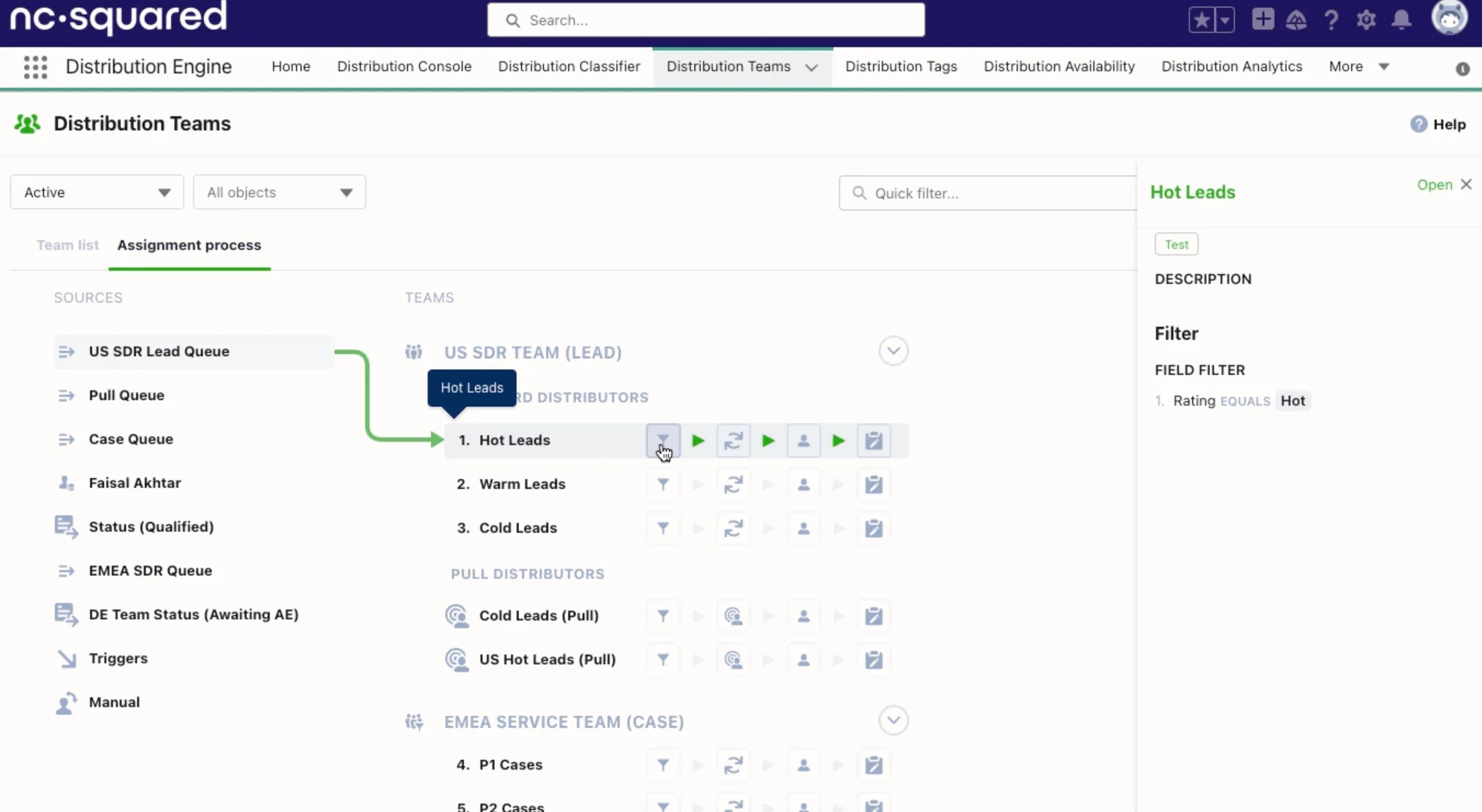
Lead-to-account matching supports exact and fuzzy matches, so an inbound lead lands with the rep who already owns the account.
Availability handling is thorough. You get load balancing, hourly and daily volume caps, working hours and shift patterns, out-of-office, and regional holidays. If a rep sits on a new lead too long, SLA-based reassignment moves it along.
Two features stand out for day-to-day management:
- an assignment simulator that tests routing rules against real data before launch
- live consoles showing scheduler status, today's assignments, and rep availability at a glance
One planning note: territory routing and lead-to-account matching sit in the Advanced tier and above, so the entry price doesn't include them.
Q-Assign
Q-Assign leans into intelligent, attribute-based matching. It routes any standard or custom Salesforce object, matching records to reps on skills, workload, and availability, with weighted round robin and waterfall fallback rules for when the first-choice rep is unavailable.
SLA tracking with automated escalation and inactivity-based reassignment keep leads from going stale. Per-record audit trails show exactly why each assignment was made, and notifications go out through Slack or Microsoft Teams as well as email.
The AI layer is the headline differentiator. AI Lead Triage classifies inbound leads by intent, fit, and urgency before routing them. It runs on your own OpenAI, Anthropic, or Google API key, so you pay the LLM provider directly.
In 2026 Ortoo repositioned its suite as "Ortoo Orchestrator," a broader orchestration platform, so expect the product to keep moving in that direction.
The customer base skews enterprise. Splunk uses Q-Assign for follow-the-sun support routing, and Rapid7 credits it with cutting case resolution time by four days.
Ease of Use
Setup effort is where these two diverge most.
Distribution Engine's pitch is no code, and it mostly holds up. Sales ops teams configure everything in the app without touching Apex or Flow, and most teams launch quickly without developer help.
Two caveats: it requires Salesforce Enterprise Edition or higher, and native notifications are email only, so Slack alerts mean building a Salesforce Flow yourself.
Q-Assign also markets point-and-click setup, but the skill and AI features reward a slower, guided rollout. Larger orgs typically lean on Ortoo's team during implementation, and that support gets consistently strong marks from AppExchange reviewers.
The pattern mirrors the feature gap. Distribution Engine trades some depth for speed, while Q-Assign does the reverse. Match the tool to the complexity of your routing.
Salesforce-Native Fit
Native fit is a wash. Both install as managed packages, keep every record inside your Salesforce org, and respect your existing security model, which keeps security reviews and procurement short in regulated industries.
Distribution Engine runs on native objects, so existing reports and dashboards keep working. Q-Assign covers standard and custom objects with one engine and sits comfortably alongside Salesforce Omni-Channel and Flow.
Pricing Model
Pricing is usually the real decision driver, and the two now sit at opposite ends of the spectrum.
Distribution Engine
Distribution Engine publishes three per-user tiers, billed annually with a five-license minimum:
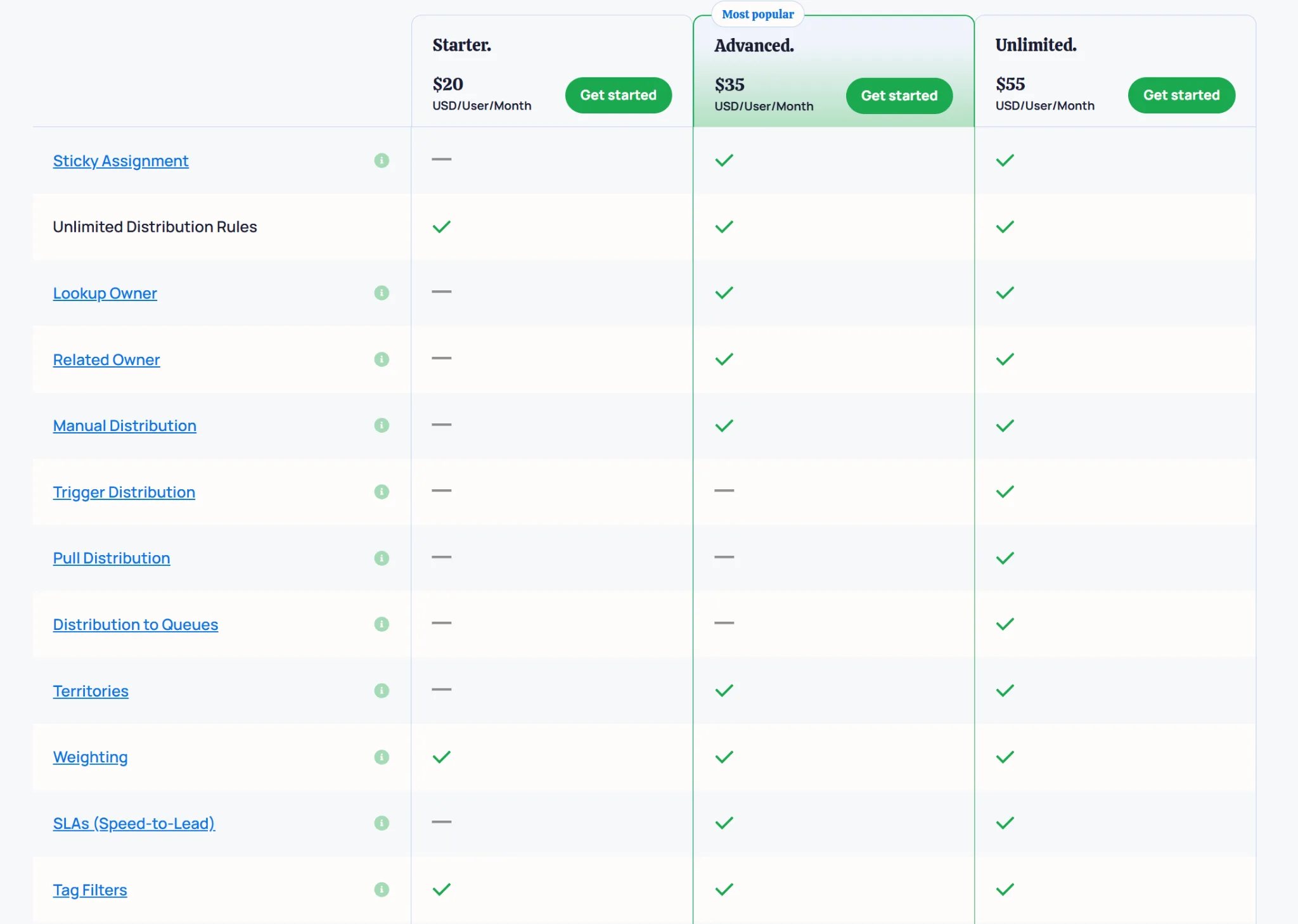
- Starter ($20/user/month): core round robin and weighted routing, volume caps, working hours
- Advanced ($35/user/month): adds territory routing, lead-to-account matching, SLA reassignment, and lookup routing
- Unlimited ($55/user/month): adds API access, pull routing, queue-to-queue distribution, and a dedicated CSM
Premier Support adds roughly 20% on top of any tier. The upside is predictability, since you can estimate cost from headcount alone. See our Distribution Engine pricing guide for the full breakdown.
Q-Assign
Q-Assign no longer publishes prices at all. Ortoo moved away from per-user tiers (historically $36 to $54 per user per month with a 20-user minimum) to a volume model priced per work item.
Every lead, case, or claim routed counts toward your bill, and you get a custom quote based on your volumes. That shift carries real risk for growing teams, because the bill scales with pipeline rather than headcount.
One customer reported an annual cost increase of roughly 700% after the model change, with the same team size and routing volume. Territory management has also been reported as a paid add-on. Our Q-Assign pricing guide covers what's known.
Which Should You Pick?
Pick Distribution Engine if...
- You want fair, reliable lead routing with transparent per-user pricing
- You're a mid-market sales team of roughly 10 to 50 reps
- And you value quick setup over deep AI features
While some capabilities sit behind higher tiers, Distribution Engine is quick and transparent, which holds real value for a lot of teams.
Pick Q-Assign if...
- You run complex sales or service operations
- You need skill-based matching, availability logic, or AI-assisted triage
- You have the resources for a guided, configuration-heavy implementation
- And you're comfortable with quote-only, volume-based pricing
Q-Assign packs a punch that Distribution Engine cannot match, but it comes with obscured costs and a heavier rollout, which are worth weighing before signing on.
Pick Kubaru if…
You want Q-Assign's intelligence and Distribution Engine's simplicity, without paying for tiers or a per-assignment meter. Kubaru is native to Salesforce and built solely for assignment.
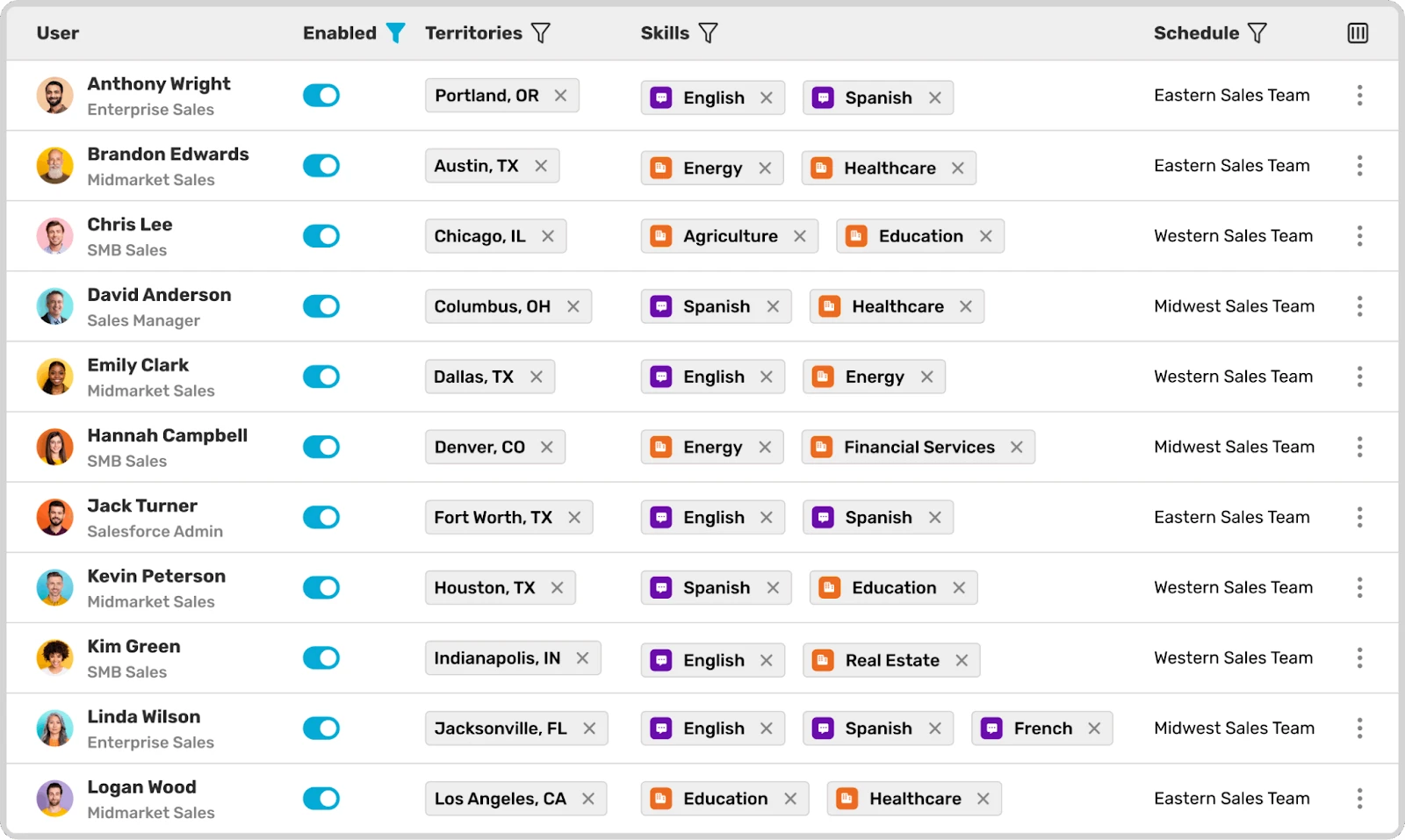
Everything sits in one plan at $20 per user each month:
- Skill-based logic and weighted round robin, with nothing locked behind a higher tier
- Territory routing and load balancing
- Availability-aware assignment and automated reassignment
- Duplicate matching to keep related records together
There is no upgrade path to climb and no usage meter running.
Because the price tracks seats alone, it never spikes with a busy quarter. Setup takes about a day, and onboarding and lifetime support are free. Business users manage the rules directly, so simple changes never wait on IT.
Compare all three on our comparison page.
Frequently Asked Questions
Are Distribution Engine and Q-Assign both native to Salesforce?
Yes. Both install as managed packages from the AppExchange. Your data stays inside Salesforce with each one.
Which is cheaper, Distribution Engine or Q-Assign?
Distribution Engine is easier to budget. It uses fixed per-user tiers from $20 to $55 per user per month. Q-Assign is quote-only and priced per work item routed, so cost varies with volume and can climb in a busy quarter.
Can both tools route objects beyond leads and cases?
Yes. Distribution Engine routes opportunities, accounts, contacts, and custom objects. Q-Assign routes any Salesforce object as well.
Is it hard to switch from one to the other?
Both run natively, so your records and history stay put. Migration mainly means rebuilding your routing rules in the new tool. Free trials let you test that setup before committing.
What's the simplest alternative to both?
Kubaru offers native lead routing at a flat $20 per user each month. Every feature is included from day one, with free onboarding and support. You can trial the full product for 30 days before you decide.