

Quick Summary
Skill-based routing in Salesforce automatically assigns leads, cases, and other records to the most qualified agent based on their skills. In this guide, you’ll learn when to use skill-based routing, how to set it up with Salesforce’s native tools, and how Kubaru simplifies and enhances the routing process to boost efficiency and improve customer outcomes.
Is Your Salesforce Lead Routing Process Holding You Back?
Many sales teams spend too much time manually assigning leads and cases, resulting in slow responses, frustrated customers, and missed opportunities. These inefficiencies limit productivity and reduce overall effectiveness.
Skill-based routing in Salesforce eliminates this by automatically directing leads and cases to the right agents based on their expertise. This speeds up response times, improves accuracy, and boosts customer satisfaction and conversion rates.
In this article, we’ll explain how skill-based routing works in Salesforce and how Kubaru can help automate and optimize the process to drive better results for your business.
Why Listen to Us?
At Kubaru, we specialize in optimizing Salesforce lead routing for clients across industries like fintech, healthcare, and SaaS. With years of experience in automating complex routing logic, we’ve helped companies improve their response times and conversion rates. This expertise gives us the insight to present a step-by-step guide on how to effectively implement skill-based routing in Salesforce, helping your team work smarter and faster.

What is Skill-based Routing in Salesforce?
Skill-based routing in Salesforce helps to automatically send leads, cases, or records to the right agent based on their expertise. Instead of assigning records randomly, it makes sure the right person handles the right issue.
For example, if you have a technical support agent, a complex technical case will be routed to them, while a more general inquiry could go to a different team member. This not only speeds up responses but also ensures customers get the best possible help right away.
When to Use Skill-Based Routing?
- Large teams: When you have a team with varying expertise, skill-based routing ensures the right agent gets the right record.
- Complex products or services: It helps route specialized issues to agents with the necessary skills, improving accuracy and speed.
- High-volume environments: In fast-paced sectors like fintech or healthcare, it reduces response times and keeps things moving smoothly.
- Improving customer satisfaction: Matching customers with the most qualified agent leads to quicker and better resolutions.
- Maximizing efficiency: It eliminates the guesswork in assigning records, ensuring tasks are handled by the right person every time.
How to Set Up Skill-Based Routing in Salesforce (Native Method)
To implement the native skill-based routing for cases or leads in Salesforce, you must enable Omni-Channel first and then configure the following components:
1. Enable Omni-Channel and Skills-Based Routing
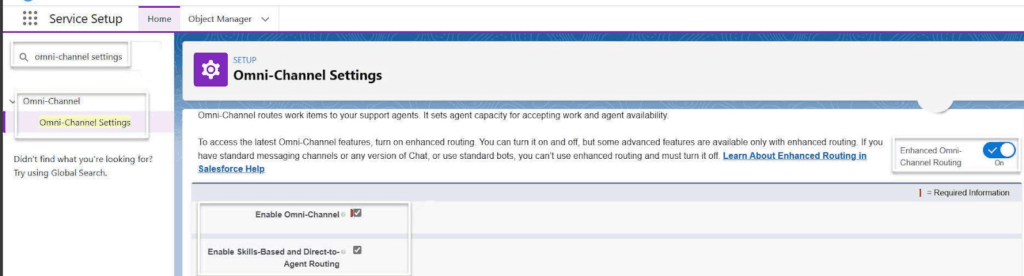
- Navigate to Service Setup → Omni-Channel Settings.
- Select Enable Omni-Channel if it isn’t already enabled.
- Check Enable Skills-Based Routing and save your changes.
- Create the required skills by going to Omni-Channel → Skills, and define skill names and descriptions that reflect the expertise your agents have.
2. Set Up Resources and Assign Skills
- Create Service Resources for your agents (or ensure users are set up as resources).
- Assign skills to each resource with appropriate proficiency levels using Service Resource Skills.
- Example: Agent A → “Product Support Level 2,” Agent B → “Technical Troubleshooting Level 1.”
3. Define Routing Rules and Skill Mapping
- Define the skill requirements for each work item type using Routing Configurations or Skill Mappings.
- Map work item fields (like Case Type, Product, or Lead Type) to the skills needed to handle them.
- Example: Case with Product = “Cloud Platform” → requires skill “Cloud Support Level 2.”
- Ensure the mapping aligns with your business logic so each work item is routed to a qualified agent.
4. Configure Routing Settings
- Go to Omni-Channel → Routing Configurations.
- Enable skills-based rules for each routing configuration you want to use.
- Set priorities and capacities for work item assignment, including considerations like agent availability and workload.
- Test routing to verify that work items are assigned to agents who meet all required skills and have available capacity.
5. Test and Monitor
- Create test cases or supported work items with different skill requirements.
- Observe how Omni-Channel routes work items to agents.
- Adjust skill levels, mapping sets, or routing configurations based on test results.
- Use Omni-Channel Supervisor dashboards to monitor real-time workload, agent availability, and routing efficiency.
Critical Limitations of Native Salesforce Skill-Based Routing (Omni-Channel)
1. Configuration Complexity
The main limitation is configuration complexity: there is no native “best partial match” logic, so work items can remain unassigned if no agent meets all required skills, requiring careful management of required versus optional skills.
2. Load Balancing and Routing Models
Salesforce includes basic load balancing through Least Active or Most Available routing models and capacity settings per agent. Advanced strategies, such as weighting assignments based on performance metrics, handle time, or fairness, are not natively supported and require custom logic or third-party tools.
3. Conditional / Attribute-Based Routing
Native Omni-Channel Flows and skills-based routing rules allow dynamic assignment based on work-item attributes. However, complex conditional logic involving multiple fields, context-dependent rules, or advanced business requirements typically requires Flow or custom automation, as standard assignment rules alone are insufficient.
4. Skill Maintenance and Automation
Skills and proficiency levels are maintained manually on service resources by default. Dynamic updates based on performance, certifications, or other metrics require custom automation using Flows, Apex, or external systems, as there is no turnkey native solution for automatic skill maintenance.
5. Skill-Focused Analytics and Insights
Omni-Channel provides dashboards, reports, and supervisor views for routing, queues, and agent presence. Deep skill-centric analytics, such as skill utilization, bottlenecks by skill, or predictive routing insights, are limited and often require custom reporting or external BI tools.
6. Scalability and Administrative Complexity
While supported for multiple objects (Case, Lead, Chat, Messaging, etc.) and designed to handle many agents and skills, configuration complexity grows rapidly with additional skills, mapping sets, and routing rules. Large organizations often implement governance, naming conventions, and occasionally third-party tools or heavy automation to manage skills and routing efficiently at scale.
How Kubaru Improves the Skill-Based Routing Process in Salesforce
Kubaru takes Salesforce’s skill-based routing to the next level by offering advanced automation and features that improve efficiency and customer satisfaction. Here’s how:
- Dynamic Routing: Kubaru lets you set up complex routing logic in minutes without the need for custom code. You can create rules based on skills, workload, availability, and even location, ensuring that records are automatically assigned to the most qualified agent. This speeds up the process and ensures better customer experiences from the get-go.
- Load Balancing: Kubaru ensures that records are evenly distributed across agents based on their current workload. This prevents some agents from being overloaded while others are underutilized, optimizing team productivity and avoiding bottlenecks.
- Reassignment Logic: If a record is left unworked or missed, Kubaru automatically reassigns it to an available agent. This ensures no records are left unattended, improving response times and keeping customer interactions on track.
- Real-Time Notifications: Kubaru sends automatic notifications via email, Slack, or mobile when a new record is assigned. This keeps agents informed and ready to act quickly, even during busy periods.
- Customizable Assignment Rules: Kubaru’s platform allows fine-tuning of how records are assigned. Whether it’s based on specific skill sets, priority, or customer type, Kubaru ensures that all rules are aligned with your business’s unique needs.
- Detailed Assignment Logs: Kubaru provides transparent, detailed assignment logs that allow you to track which records have been assigned to which agent, giving managers complete visibility into the workflow and making it easier to make adjustments as needed.
By automating the assignment process and offering features like load balancing and reassignment, Kubaru makes skill-based routing more efficient, reduces manual workload, and ensures that customers are paired with the most qualified agent every time.
Best Practices for Improving Skill-Based Routing with Kubaru
To maximize the effectiveness of skill-based routing and ensure continuous improvements, follow these best practices:
- Define Clear Skill Sets
Clearly outline and categorize the skills needed for specific roles or cases. This ensures that the right agent with the necessary expertise is assigned to each record. Kubaru allows you to map specific skill sets to agents, enabling precise routing based on customer needs and agent capabilities. Regularly update these skill sets as team members acquire new skills or as business requirements evolve.
- Monitor Agent Workload
Use Kubaru’s load balancing feature to track the real-time workload of each agent. By ensuring a balanced distribution of records, you prevent some agents from becoming overwhelmed while others have idle time. This helps maintain a consistent level of service quality and keeps team morale high. Kubaru’s dynamic workload allocation feature lets you prioritize urgent cases while still managing the overall workload effectively.
- Set Up Reassignment Logic
Ensure that unworked or missed records are automatically reassigned to available agents through Kubaru’s reassignment logic. This minimizes the risk of cases slipping through the cracks and keeps response times fast. You can set rules that automatically reassign unclaimed records within a certain timeframe, ensuring no lead or case remains unresolved.
- Regularly Review and Adjust Rules
Business needs, team dynamics, and customer expectations change over time. Regularly review your routing rules to make sure they are still aligned with the current goals and objectives. Kubaru makes it easy to adjust rules without requiring any custom code, ensuring that your team can adapt quickly to shifting needs.
- Leverage Real-Time Notifications
Take full advantage of Kubaru’s real-time notifications to alert agents when new records are assigned to them. Whether through email, Slack, or mobile notifications, timely alerts ensure agents act promptly, reducing delays in handling records. You can also set up alerts for high-priority cases, making sure they receive immediate attention.
- Use Detailed Logs for Performance Tracking
Kubaru’s detailed assignment logs provide visibility into the entire routing process. These logs help you track how efficiently records are being routed, identify any bottlenecks, and ensure that records are being assigned fairly. Reviewing these logs regularly allows you to identify underperforming areas and adjust your strategy accordingly to ensure continuous improvement.
- Customize Assignment Rules for Greater Flexibility
Take advantage of Kubaru’s ability to create custom assignment rules based on different factors, such as agent availability, skill level, and geographic location. Fine-tuning these rules gives you flexibility and ensures that your team’s expertise is fully utilized. You can also set specific weights and limits to ensure fairness in distribution.
- Empower Sales & Ops Managers
Empower your sales or operations managers to adjust assignment rules and strategies without needing to involve system admins. Kubaru allows business users to manage the assignment process directly, reducing reliance on IT resources and enabling quicker decision-making.
- Analyze and Iterate
Continuously analyze the data Kubaru provides to assess the success of your routing process. Use this data to identify patterns, measure efficiency, and spot any recurring challenges. Iterating and refining your rules based on these insights will help you achieve optimal outcomes and further enhance team productivity.
Streamline Skill-Based Routing in Salesforce with Kubaru
Improving skill-based routing in Salesforce boosts response times, reduces manual work, and ensures customers reach the right agent every time.
Kubaru strengthens this process by automating routing, balancing workloads, and providing clear visibility into every assignment. It removes the complexity of native setups and keeps routing accurate as your business grows.
Start your 30-day free trial with Kubaru today to streamline work in Salesforce and improve team performance. See how quickly you can simplify assignments and improve your routing process.