















Quick Summary
A marketing-to-sales handoff is complete only when a named rep owns the lead and a clock is running. To fix yours, define MQL criteria, write a handoff SLA, automate assignment, escalate overdue leads, and collect rejection feedback.
Kubaru runs multiple SLAs per lead, with alerts and automated reassignment.
Why Qualified Leads Go Unanswered
Even a demo request, one of the clearest signals a buyer can send, doesn’t always get a reply. When Workato tested 114 B2B companies, nearly 1 in 5 never replied by email, and only 31% responded by phone.
Forgotten leads are hard to spot. Marketing sees a lead become a marketing qualified lead (MQL) and counts it as handed over. The rep may not know it exists, and without response time tracking, nothing flags it.
This guide shows how to build a marketing-to-sales handoff where every qualified lead is picked up promptly, without relying on anyone’s memory.
Why Listen to Us?
Kubaru is a native Salesforce app for automated lead, case, and record assignment. That puts us at the center of the handoff, since we get each lead to a named rep and help keep that rep accountable.
We’ve helped Salesforce teams do exactly that, earning a 5.0/5 rating across more than 150 AppExchange reviews. More than 15,000 users route work through Kubaru. Conga used it to automate over 200,000 lead assignments and lift speed-to-lead by 40%.

What Is the Marketing-to-Sales Handoff?
The marketing-to-sales handoff is the moment an MQL becomes the responsibility of a named rep. In Salesforce, that’s when the rep’s name appears as the lead’s owner.
Everything marketing has learned should travel with the lead, so the rep can pick up right where marketing left off.
Where the Marketing-to-Sales Handoff Breaks Down
When MQLs reach sales and still go cold, look for one of three handoff gaps.
- Slow pickup: The longer your lead response time, the more time a buyer has to cool off or call another vendor. Most companies are slow. In the same test, more than 99% didn’t respond within five minutes.
- Unclear ownership: An MQL in a shared queue waits until someone claims it, and nobody answers if it goes cold. In that test, companies without a routing tool took nearly 13 hours, against 3 hours and 32 minutes with one.
- No feedback loop: When a rep rejects a lead without saying why, marketing never learns what was wrong. You may keep paying for bad leads from the same source, and reps trust each batch a little less.
All three gaps share one root cause, a handoff that depends on someone remembering to act. You can fix that by writing the rules down and letting the system enforce them.
How to Fix Your Marketing-to-Sales Handoff in 5 Steps
Follow these steps in order, and every new MQL gets assigned to a named rep with an active response timer.
1. Agree on When a Lead Is Ready for Sales
Both teams need to agree on what a ready lead looks like, and plenty don’t. In a Gartner survey of more than 200 sales leaders, 62% said sales and marketing define qualified leads differently.
Write your MQL definition in plain language and have both leaders sign it. Require fit and intent together, like the right job title and company size plus a demo request.
Don’t score on activity alone. Someone who downloads three ebooks racks up points, but if they’ve never asked for a conversation, they’re still researching. That’s how reps end up calling marketing’s leads bad.
Add a sales-accepted lead (SAL) stage between MQL and SQL, where the rep accepts or rejects each lead. Adding Accepted and Rejected to Salesforce’s Lead Status field gives every MQL a clear yes or no.
Finally, agree on what travels with the lead, so reps never call cold:
- Lead source and campaign
- Lead score, and what earned it
- Pages viewed, especially pricing and product pages
- Form answers, word for word
You’ll know it’s working when any rep can open an MQL and see why it qualified without asking marketing.
2. Write a Handoff SLA With a Clock and an Owner
“Follow up fast” means something different to every rep, so your speed-to-lead depends on who gets the lead. A handoff SLA fixes that by assigning a number and a name to each stage.
It answers four questions:
- How fast is the first touch? Five minutes for demo requests, a few hours for content downloads. In a 2007 InsideSales.com and MIT study, the odds of qualifying a web lead were 21 times higher at five minutes than at 30.
- Who owns the lead at each stage? Marketing owns it until it qualifies, then one rep does. A named sales manager is accountable for any lead that misses its window.
- How long can a rep take to accept or reject it? Set a fixed window, like 48 hours.
- What counts as a response? Count only a logged call or a personal email. Automated emails make a lead look worked when nobody has talked to the buyer.
Also spell out what happens when a window is missed, like reassigning the lead to the next rep; otherwise, the SLA is easy to ignore. Have both heads of marketing and sales sign it.
To test it, ask a marketer and a rep whether yesterday’s leads met the SLA. If their answers differ, tighten the wording.
3. Assign Every Lead to a Rep the Moment It Qualifies
A lead in a shared queue doesn’t belong to an individual rep, so everyone assumes someone else will call it. Your SLA clock can only start once a named rep owns the lead.
In Salesforce, use Lead Assignment Rules to route each MQL to a rep. In Setup, add rule entries that define where leads go, then choose how to distribute them.
- Round robin gives each rep an even share. Salesforce doesn’t offer a built-in round-robin setting, but you can configure one with a MOD formula on an auto-numbered lead field.
- Territory management routes leads by country, state, or ZIP code. Kubaru can also split a territory’s leads among several reps.
- Skill-based assignment matches leads to reps by language or product knowledge.
The MOD formula can’t tell whether a rep is on vacation or overloaded. Handling that takes custom fields and automation, or a routing app like Kubaru that tracks availability and workload.
Ooma used Kubaru to cut average response time to under five minutes and lift lead conversions by more than 10%.
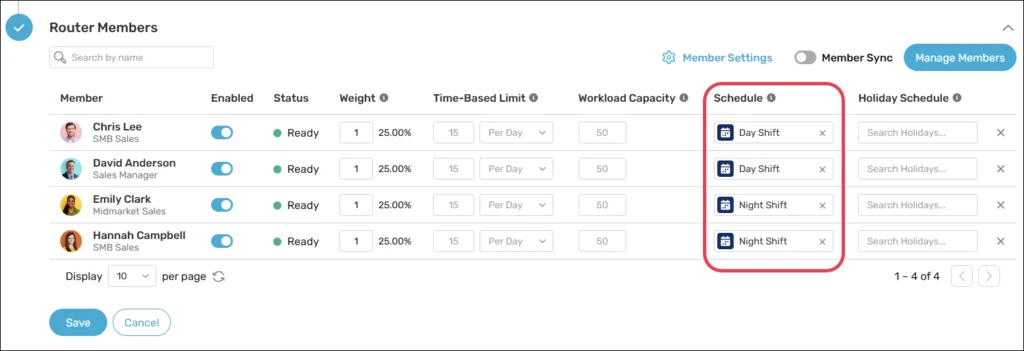
Leads created by integrations only pick up assignment rules if the integration asks for them, so check your imports and connectors.
If the rule doesn’t run, the lead keeps its existing owner, often the integration user. That also trips up leads that become MQLs later, since the status update that qualifies them can skip the rule too.
When it’s working, a lead report grouped by owner shows no open MQLs still assigned to a queue.
4. Track the SLA on Every Lead and Escalate Before It Breaches
A signed SLA only works if the system tracks its deadlines. Each lead needs a speed-to-lead timer that starts the moment a rep takes ownership.
The rep should get a warning while there’s still time to call. When time runs out, the system should trigger escalation, for example, by alerting their manager or reassigning the lead.
Salesforce’s native entitlement processes are built for support records, not leads, so you’ll need an app like Kubaru to track lead SLAs.
Kubaru’s SLA policies support leads, with multiple independent timers per record, so a first-touch SLA and an accept-or-reject SLA can run side by side. Advanced SLAs are currently in beta.
You build each policy without code or a Salesforce admin, then attach it to your lead router. The policy applies to leads that router assigns.
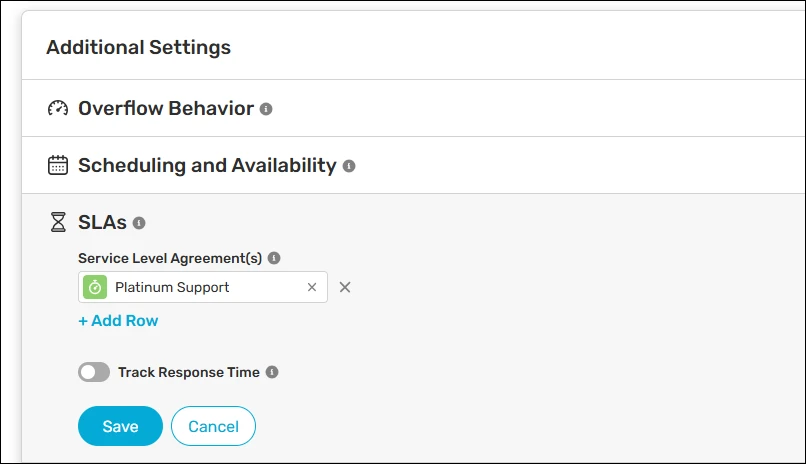
When an SLA approaches its deadline, Kubaru can send alerts through Slack, Microsoft Teams or email. If it’s breached, Kubaru can reassign the lead to its original queue, a specific queue or a named user.
Other escalation actions include marking the rep unavailable or creating a Salesforce task for their manager.
Reps see the SLAs running on a lead in the Kubaru SLA Panel on the record page. It lists each policy, its due date and the time remaining, so a rep knows what is due before any alert fires.
You’ll know it’s working when no lead passes its deadline without an alert, a reassignment or a task landing with a manager.
5. Close the Feedback Loop on Every Rejected Lead
In a 2022 SharpSpring and Ascend2 survey, 43% of B2B salespeople named targeting the wrong leads as a complaint about marketing. Requiring a rejection reason shows marketing exactly which leads are missing the mark.
Add a Rejection Reason picklist to the Lead object, with options such as wrong persona, bad timing, and junk data. Add a validation rule that blocks reps from rejecting a lead without selecting a reason.
Add Recycled to Lead Status for rejected leads worth another try. Marketing can then segment them by rejection reason. For bad-timing leads, set a follow-up date and create a sales task to reconnect with the prospect.
Delete only junk data. Keep other rejected leads so marketing can review their history and identify what went wrong.
Once a month, have both team leaders review three numbers:
- SLA hit rate, by rep and lead type
- Rejection reasons, by lead source
- MQL-to-opportunity conversion, by source
Use each review to refine the MQL definition or lead scoring model. For example, if webinar leads are repeatedly rejected for the wrong persona, reduce their lead scores and monitor subsequent rejection rates.
You’ll know it’s working when no lead is rejected without a reason and rejection rates fall for the sources you adjusted.
FAQs
How fast should sales follow up on a marketing qualified lead?
Set a target based on intent, with five minutes on demo requests and a few hours for content downloads. Define after-hours coverage in the SLA, so overnight leads are contacted first thing on the next business day.
What is the difference between an MQL, an SAL, and an SQL?
An MQL is a lead marketing judges ready for sales. It becomes an SAL (sales-accepted lead) when a rep accepts it, and an SQL when sales qualifies it against agreed criteria and considers it ready for an opportunity.
Who owns the marketing-to-sales handoff?
Sales ops or RevOps should run the marketing-to-sales handoff process, including routing and SLA administration. Marketing and sales leaders own the agreement; the named rep owns the first touch.
How do you measure the marketing-to-sales handoff?
Measure the marketing-to-sales handoff by tracking time to a named owner and time to first response for every MQL. Together, they show whether routing or follow-up slowed the lead.
For MQLs assigned through Kubaru, assignment logs record each assignment and, once response-time tracking is enabled, the event used to measure the response.
Start With Last Month’s MQLs
You don’t need new software to find out where your handoff breaks. Pull last month’s MQLs into a report showing each lead’s owner, first-contact time, and rejection reason. If you’re not tracking first-contact time yet, start there.
MQLs still owned by a queue indicate an ownership gap. Late first calls point to missed response-time SLAs. Blank rejection reasons show where your feedback loop needs work.
Kubaru offers automated lead routing and SLA tracking. It assigns MQLs to named reps, while SLA policies alert reps before deadlines and reassign leads when they breach them. Schedule a demo to see how Kubaru works on your own leads.