

Quick Summary
Salesforce lead routing automatically assigns incoming leads to the right reps based on criteria like territory, skill, and availability. Done well, it cuts response times, prevents dropped leads, and scales with your team. This guide covers the main routing methods, setup steps, common mistakes, and best practices to get it right.
Why Getting Lead Routing Right Is the Difference Between Salesforce ROI and Wasted Spend
At its core, Salesforce collects and centralizes your business leads and support cases. But without a clear system for prioritizing and assigning them to the right reps, it’s not much better than having leads scattered across inboxes and disconnected tools.
New leads pile up. No one knows who owns which account. Leads get replies too late, or not at all, and support stalls.
That’s why setting up a solid lead routing strategy is essential. Lead routing ensures leads move to the right rep fast, so prospects get answers before they get frustrated or turn to a competitor.
In this guide, we’ll break down what Salesforce lead routing is, highlight the different routing methods and common mistakes teams make, and show you how to set up a routing strategy that drives real business results.
Why Listen to Us?
Kubaru is a Salesforce-native lead routing platform used by 100+ companies including Ooma, Conga, SolarWinds, and Paysafe.

We’ve spent years helping revenue teams solve the exact routing challenges covered in this guide, from basic assignment rules to complex, multi-criteria routing across global sales orgs. The recommendations here are drawn from what we’ve seen work (and fail) across those implementations.
What Is Salesforce Lead Routing?
Salesforce lead routing is the process of automatically assigning leads to the right Salesforce user based on predefined criteria. When a new lead enters Salesforce, routing determines who should handle it, taking into account factors like skill, location, availability, and product expertise.
This ensures every lead reaches the most appropriate rep quickly and consistently, improving response times, accountability, and conversion rates.
What Are the Benefits of Salesforce Lead Routing?
Once set up, Salesforce lead routing automatically resolves much of the chaos in lead management. Here’s how:
1. Faster Response Times and Clear Ownership
Leads are immediately assigned to the right reps instead of sitting in a queue for hours or days. Every lead has a designated owner, so reps know exactly what they’re responsible for. This reduces confusion, prevents dropped leads, and makes it easier for managers to track performance.
2. Better Lead Prioritization
Routing rules can filter leads based on criteria like lead score, product interest, or geography, allowing high-value leads to reach the most experienced reps. This ensures your top talent focuses on the right opportunities.
3. Consistent Customer Experience and Fewer Duplicates
Routing enforces the same assignment rules every time a lead enters Salesforce. This predictability ensures consistent customer interactions and minimizes the risk of multiple reps contacting the same lead.
4. Scalability Without Admin Overhead
Automated routing handles increasing lead volume without adding manual work. As you expand into new regions or products, the system applies your rules automatically, supporting growth without chaos. Without routing, admins can spend hours each week manually assigning leads. Automation frees that time for selling.
5. Better Reporting and Analytics
With every lead having a clear owner and routing path, you can track lead response time, the effectiveness of routing rules, and conversion rates by team, region, or product. This data-driven approach lets you make informed decisions instead of guessing what works.
Common Salesforce Lead Routing Methods
Here are the routing methods teams commonly use in Salesforce.
| Method | Routes Based On | Best For |
| Round Robin | Equal rotation among reps | Even distribution across a team |
| Weighted Routing | Weighted rotation (e.g., by experience) | Teams with mixed seniority or capacity |
| Skill-Based | Rep certifications or expertise | Products requiring domain knowledge |
| Territory-Based | Geography or named territories | Multi-region or multi-country sales |
| Attribute-Based | Lead/company properties (size, title, score) | Segmented sales motions |
| Product-Based | Product interest or use case | Multi-product portfolios |
| Availability-Based | Rep availability or current workload | Speed-to-lead optimization |
| Lead Source | Acquisition channel | Separate inbound/outbound motions |
| First-to-Claim (Shark Tank) | Rep speed; first to claim wins | High-intent leads needing fast response |
| Custom Combination | Multiple criteria in one flow | Complex, mature sales processes |
1. Round Robin Routing
Distributes leads evenly among a group of reps in rotation. Rep A gets the first lead, Rep B gets the second, Rep C gets the third, and the cycle repeats.
Example:
- All inbound demo requests → rotate evenly across the SDR team
Use if:
- Your reps handle similar lead types and have comparable skill levels
- You want a simple, fair distribution method
- Lead volume is steady and doesn’t require prioritization
Benefit: Ensures equal distribution and prevents any single rep from being over- or under-assigned. It’s the simplest method to implement and the easiest for reps to trust as fair.
2. Weighted Routing
Similar to round robin, but leads are distributed in proportion to assigned weights rather than equally. For example, a senior rep might receive 3 leads for every 1 assigned to a newer rep.
Example:
- Senior AEs weighted at 3x → receive three leads per rotation cycle
- Junior AEs weighted at 1x → receive one lead per cycle
Use if:
- Reps have different experience levels or quota targets
- You want to ramp new hires gradually without starving them of leads
- Some reps have higher capacity than others
Benefit: Balances fairness with performance by directing more volume to reps who can handle it, while still giving newer reps a manageable pipeline.
3. Skill-Based Routing
Leads are assigned based on the skill set, certifications, or qualifications of your reps.
Examples:
- Language qualification: German leads → German-speaking reps
- Product certification: Enterprise security leads → Security-certified reps
- Market segment expertise: Healthcare leads → Healthcare specialists
Use if:
- Your product requires domain expertise or technical depth
- Reps have different certifications or specializations
- Misrouted leads result in poor discovery calls
Benefit: Ensures leads are handled by reps who understand the buyer’s context, improving conversation quality and close rates.
4. Territory-Based Routing
Leads are routed based on geography or territory definitions, like country, state, region, ZIP/postcode, or named sales territories. If you’re running defined territories in Salesforce, your routing logic needs to align with your territory management setup to avoid ownership conflicts.
Example:
- UK leads → UK-based reps
Use if:
- You sell across multiple regions or countries
- You operate defined sales territories
- You want to prevent ownership conflicts
Benefit: Prevents territory disputes, ensures clear ownership, and simplifies scaling across regions.
5. Attribute-Based Routing
Routes leads based on properties of the lead or company. Common attributes include industry, company size, revenue/ARR, job title, lead score, and priority level.
Examples:
- SaaS leads → SaaS sales team
- CTO or VP-level leads → Senior reps
Use if:
- Lead value varies significantly by company profile
- Senior buyers require more experienced reps
- You segment sales motions by company size or maturity
Benefit: Matches leads to reps best suited for their size, seniority, or complexity.
6. Product-Based Routing
Routes leads based on product interest, feature usage, or stated use case.
Examples:
- CRM product interest → CRM sales team
- Analytics add-on interest → Analytics specialists
Use if:
- You sell multiple products or modules
- Each product requires different demos or expertise
- One rep cannot credibly sell every product
Benefit: Improves buyer confidence by connecting leads with product experts.
7. Availability-Based Routing
Routes leads based on rep availability or capacity. In Salesforce, this is typically implemented using custom fields and Salesforce Flow rather than native assignment rules.
Examples:
- Route leads only to reps marked as Available = True
- Assign new leads to reps with fewer than X active leads
Use if:
- Speed-to-lead is a critical metric
- Lead volume fluctuates throughout the day
- You want to avoid overloading top performers
Benefit: Improves response times while preventing rep overload, without requiring manual assignment.
8. Lead Source Routing
Routes leads based on where they originated.
Examples:
- Website demo requests → Inside sales team
- Trade show leads → Field sales team
Use if:
- Different lead sources require different follow-up approaches
- You separate inbound and outbound sales motions
- Certain sources imply higher buying intent
Benefit: Aligns sales follow-up with buyer intent and acquisition channel.
9. First-to-Claim (Shark Tank) Routing
Instead of auto-assigning a lead to one rep, the lead is pushed to a shared pool and the first rep to claim it gets ownership. This creates a competitive, speed-based dynamic.
Example:
- High-intent demo requests → pushed to a shared queue; first rep to claim owns it
Use if:
- You want to reward fast-acting reps
- Speed-to-lead is your top priority
- Your team is competitive and motivated by first-come-first-served dynamics
Benefit: Maximizes response speed for high-value leads and keeps reps engaged. Works especially well for inbound leads where immediate follow-up is critical.
10. Custom Combination Routing
Combines multiple routing criteria into a single logic flow. In Salesforce, this is typically implemented using Lead Assignment Rules for simple cases or Salesforce Flow for more advanced logic.
Examples:
- Enterprise SaaS leads from Germany → German-speaking enterprise reps
- High-intent website leads from the US → Senior inbound SDRs
Use if:
- Single-factor routing is no longer sufficient
- Your sales process has grown in complexity
Benefit: Delivers highly accurate, scalable routing that mirrors real-world sales operations.
How to Set Up Lead Routing in Salesforce
Here’s a step-by-step process for setting up lead routing in Salesforce.
1. Define Your Routing Criteria
Start by deciding what determines which rep should get which lead. Base this on your product portfolio, sales motion, and reps’ experience. For example:
- A product-led sales team may want to route by feature adoption, not just geography
- A company selling across multiple regions needs territory-based rules at minimum
- Teams with tiered products may need attribute-based routing by company size or ARR
Next, determine the lead fields your routing depends on. If you route by job title alone, basic lead fields may suffice. But if you include lead score, you need a scoring model with defined thresholds. If you route by territory, make sure your geographic fields (country, state, postcode) are reliably populated.
Finally, decide when routing should trigger. High-intent leads like demo requests should be routed immediately at creation. Lower-intent leads may benefit from enrichment before routing.
2. Choose the Right Salesforce Feature
The tool you use depends on the complexity of your criteria:
- Lead Assignment Rules: Best for simple, static rules based on 1–2 fields. Navigate to Setup > Lead Assignment Rules, create your rule, define the entry order, set criteria, and assign to a user or queue. Rules are evaluated top-down, so order matters. Put your most specific rules first.
- Queues: Use for team-based ownership or temporary holding before individual assignment. Useful when you want a pool of reps to claim leads rather than auto-assigning to one person.
Flows: Best for routing that depends on multiple criteria, conditional logic, or dynamic data. Use Record-Triggered Flows to fire when a lead is created or updated. Flows give you more flexibility than assignment rules but are harder to maintain at scale.
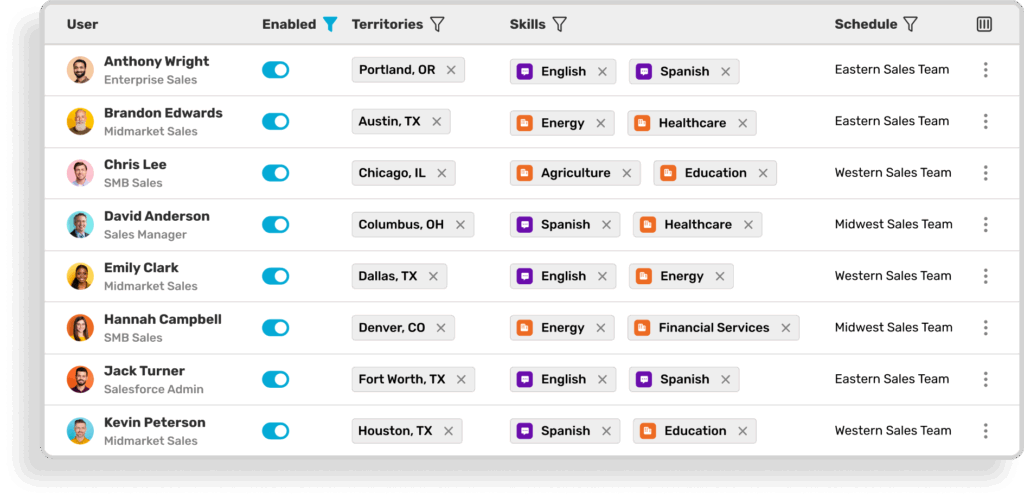
For teams that have outgrown native Salesforce tools due to multiple territories, dynamic availability requirements, or complex multi-criteria routing, a dedicated lead routing tool like Kubaru can handle what Flows and assignment rules can’t.
3. Account for Lead-to-Account Matching
Before routing, consider whether incoming leads should be matched to existing accounts in Salesforce. This is especially important for companies with named account ownership or account-based sales motions.
Without lead-to-account matching, a lead from an existing customer could be routed to the wrong rep, bypassing the account owner entirely. Salesforce doesn’t handle this natively, so most teams use enrichment tools or routing platforms that support matching logic before assignment.
4. Test, Monitor, and Refine
Lead routing is not “set and forget.”
Before going live, test with sample leads that match each rule to confirm correct ownership and notifications. After going live, monitor for unassigned and misrouted leads and adjust rules as teams, territories, and product offerings evolve.
Common Salesforce Lead Routing Mistakes to Avoid
If you want to set up Salesforce lead routing as efficiently as possible, watch out for these common mistakes.
1. Overlooking Data Quality
The effectiveness of your routing depends on how clean and accurate your Salesforce data is. When key attributes like job title, country, or company size are missing or incorrect, routing rules break. This results in leads failing to match any rule or high-value leads landing with the wrong rep.
To avoid this, implement lead enrichment and data validation before routing takes place.
2. Not Setting Fallback Rules
Some incoming leads won’t fully match your routing criteria. Without a fallback, those leads remain unassigned indefinitely, resulting in lost opportunities and pipeline blind spots, often without anyone realizing it.
Always include a default assignment rule or queue for unmatched leads.
3. Overcomplicating Routing Logic Too Early
When you’re just getting started, it’s tempting to include every possible condition from day one. But building multi-criteria rules before your lead volume justifies them often creates more problems than it solves. Conflicting logic causes misroutes, and assignment rules become difficult to maintain.
Start with simple criteria like territory or lead source and layer in complexity as your volume and needs grow.
4. Relying on Manual Assignment
While it’s technically possible to use Salesforce without assignment rules or automated routing, manual lead assignment almost always results in leads sitting unassigned for hours or days. On top of that, managers and reps end up spending valuable hours on admin instead of selling.
Automate assignment for most leads and reserve manual assignment only for true exceptions, such as edge cases or one-off account reviews.
Best Practices to Maximize Salesforce Lead Routing
Here are best practices to make the most of your lead routing setup.
1. Account for Rep Availability and Workload
Routing rules that ignore rep availability or workload fall short over time. When routing doesn’t factor in reps being overloaded, on leave, or managing too many active leads, problems stack up: top performers get flooded, some reps sit idle, high-intent leads experience delayed follow-ups, and team morale drops.
Using Salesforce Flows, you can partially account for availability with basic conditions. For example, you could route to a queue if a rep is marked unavailable, or assign to another rep if active leads exceed a threshold. But Salesforce doesn’t natively track real-time workload or dynamically balance assignments. Availability fields and capacity thresholds must be updated manually, and as Flow logic grows, it becomes harder to maintain and easier to hit Salesforce’s governor limits.

For dynamic availability and workload-based distribution, many teams turn to dedicated routing tools. Kubaru, for example, automatically distributes leads based on:
- Real-time availability
- Current workload
- Capacity limits
…and we support:
- Round robin
- Weighted round robin
- Unworked lead reassignment
Managers control assignment logic directly, without waiting on developers or admins.
Kubaru also routes beyond leads. It handles cases, accounts, opportunities, and tasks, making it useful across the full revenue workflow.
2. Keep Routing Rules Transparent and Documented
When reps don’t understand why leads are assigned the way they are, trust in the system breaks down. This usually happens when routing rules, queues, and Flows exist only in an admin’s head or are buried inside Salesforce with no explanation.
The result: reps question routing fairness, managers spend time answering “Why did I get this lead?”, and onboarding new reps becomes slow and confusing.
Avoid this by clearly documenting each routing rule (including criteria, priority, and assigned owner), making routing logic visible and accessible to reps and managers, and pairing documentation with basic training so reps understand how leads are routed, which data fields matter, and when exceptions occur.
3. Protect Speed-to-Lead SLAs
Effective lead routing directly impacts how quickly leads get responses, especially high-priority ones. Set your speed-to-lead SLA to the industry standard of under 5 minutes and treat it as a guiding principle.
When configuring routing rules, assign high-intent leads immediately to the right rep and avoid queue bottlenecks or rules that delay delivery. Consistently hitting response time targets improves conversion rates, enhances the buyer experience, and keeps reps motivated.
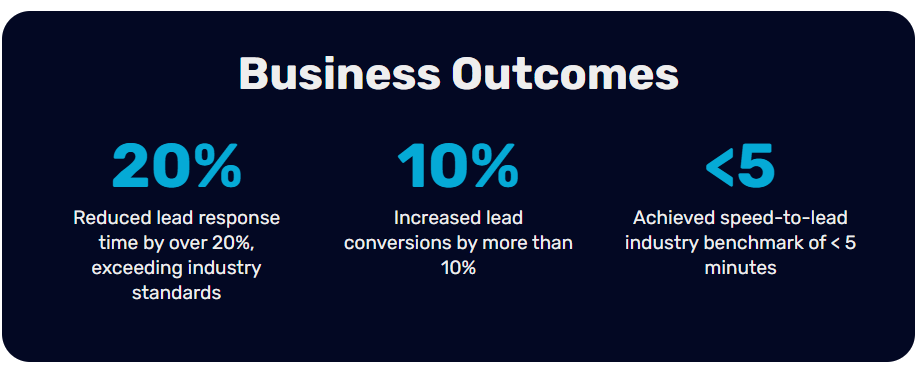
See how Kubaru helped Ooma achieve the speed-to-lead benchmark of under 5 minutes.
4. Regularly Review Lead Routing Performance
Periodically audit your routing efficiency by tracking key metrics: average lead response time, conversion rates per routing path, and workload distribution per rep.
Regular reviews keep your routing logic aligned with business goals, highlight bottlenecks or underperforming rules, and provide data to optimize your flows and assignment rules.
If you use Kubaru, you gain access to detailed assignment logs for each routed lead, enabling transparent tracking and clear visibility into the performance of every assignment.
Set Up Salesforce Lead Routing the Right Way
Adopting Salesforce is one thing. Maximizing its potential is another. To ensure Salesforce does more than just collect your business leads, you need a routing strategy that assigns those leads quickly and accurately.Whether that involves native assignment rules, Flows, or a custom solution depends on your team structure and business goals. However, if you need routing that adapts to real-time availability, workload, and growing complexity without relying on developers, try Kubaru. Start a free 30-day trial today.