

Quick Summary
Salesforce entitlements define the support each customer is promised. Milestones enforce those promises with time-based targets like first response and resolution deadlines. Together, they form Salesforce’s native SLA management system.
Most Teams Have SLAs. Few Consistently Enforce Them.
There is a clear gap between SLA adoption and SLA execution among service teams.
According to market research, about 75% of organizations have adopted SLAs, but 46% of these adopters struggle to meet customer SLAs. A study by Broadcom found that 98% of companies report SLA breaches, with 46% experiencing them monthly.
Even though SLAs are widely recognized as essential for customer satisfaction, most organizations still struggle to consistently enforce them across teams, cases, and workflows.
For businesses looking to close this gap, Salesforce entitlements and milestones can help. These native features enable teams to track, manage, and enforce SLAs so they don’t remain goals but become the actual service experience customers receive.
This article covers Salesforce entitlements and milestones in depth: why they matter, how they work together, how to set them up, and how Kubaru’s new features help you overcome native Salesforce limitations.
Why Listen to Us?
Kubaru is a Salesforce-native assignment platform used by 100+ companies including Ooma, Conga, SolarWinds, and Paysafe.
Our core product handles automated case assignment in Salesforce, and we’ve recently expanded into SLA management to address the limitations we kept seeing teams hit with native entitlements and milestones. The recommendations in this guide are drawn from what we’ve seen work across those implementations.
What Are Salesforce Entitlements?
Salesforce entitlements define the level of support a customer is entitled to under a specific agreement or contract. They answer three questions:
- Which cases are valid
- How long support is provided
- What happens when support expires
Entitlements can be applied to accounts (e.g., enterprise customers), assets or products (e.g., premium support for Product A only), and contacts (in Salesforce Classic only, not Lightning Experience). In practice, they typically cover things like:
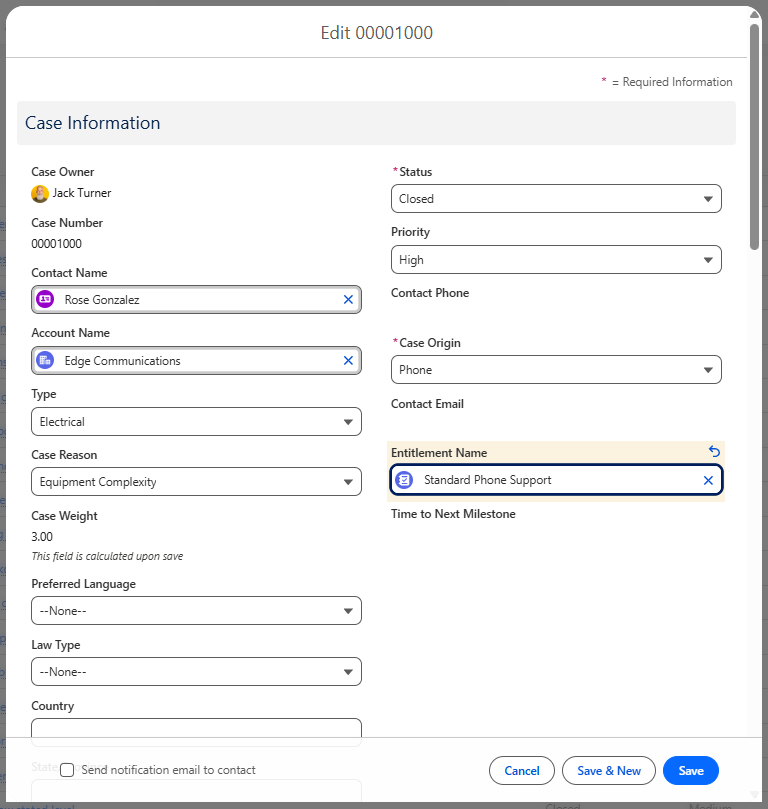
- Support level: Premium users get web, phone, and email support, while Starter plan users get web-only support
- Coverage period: Enterprise customers receive 24/7 support, while SMB customers receive business-hours support
- Eligible products: Customers using Product X receive priority email support
Without entitlements, all support cases are treated the same, and reps rely on manual judgment to decide the level of care to offer. This makes consistently meeting SLAs almost impossible. With entitlements, reps can see a customer’s SLA at a glance and deliver exactly what was promised.
Entitlement Models
Salesforce supports three entitlement models, depending on how your support agreements are structured:
- Entitlements only: The simplest model. Entitlements confirm eligibility and support type, similar to product warranties. Best for teams that just need to verify whether a customer qualifies for support.
- Entitlements with service contracts: Entitlements are tied to service contracts that define terms, renewal dates, and coverage periods. Use this when support is purchased or contractually agreed.
- Entitlements with service contracts and line items: The most complex model. Individual support entitlements are broken out as line items within a service contract. Use this when different products or services within the same contract carry different support terms.
The model you choose depends on the complexity of your support offerings. Most teams start with entitlements only and layer in service contracts as their support operations mature.
What Are Salesforce Milestones?
Salesforce milestones are time-based targets within an entitlement process that track whether support teams meet their service commitments within the promised timeframe. They are how Salesforce enforces time-bound entitlements. The most common milestones teams track are:
- First response time: How long it takes for a rep to send the first response
- Resolution time: How long it takes to fully resolve the case
- Time to next update: How long a customer waits between communications
When a milestone’s deadline passes without the required action, Salesforce marks it as breached and can trigger alerts or escalations.
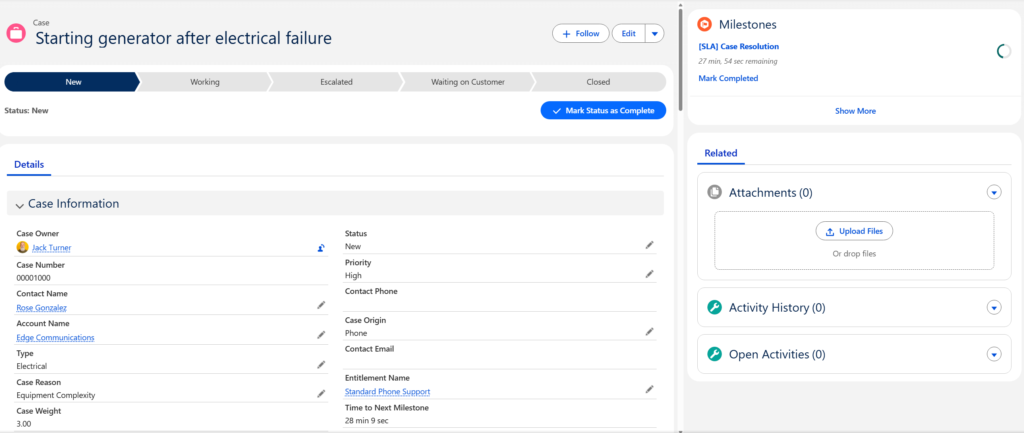
For example, if a premium customer with a 1-hour first-response SLA doesn’t receive a response within that window, the first-response milestone is breached and the assigned rep’s manager is notified.
Milestone Recurrence Types
When you create a milestone, you choose a recurrence type that controls how the milestone behaves:
- No recurrence: The milestone occurs only once per case (e.g., first response time).
- Sequential: The milestone repeats at regular intervals until the case is resolved (e.g., periodic customer updates).
- Independent: The milestone fires whenever its criteria are met on the case, regardless of sequence.
Milestone Actions
Each milestone supports three categories of time-dependent actions:
- Success actions: Fire when the milestone is completed on time (note: these also fire on milestones completed late).
- Warning actions: Fire when the milestone is approaching its deadline.
- Violation actions: Fire when the milestone deadline has passed without completion.
For each category, Salesforce supports four workflow action types: email alerts, tasks, field updates, and outbound messages. For example, you might send an email alert to the case owner 1 hour before a first-response milestone expires, then escalate to a manager if the milestone is violated.
One important detail: milestones are not marked as completed automatically. You need to create Apex triggers to auto-complete milestones when specific conditions are met (e.g., when a case status changes to “Responded” or “Closed”).
What Are Entitlement Processes?
Entitlement processes are the connective layer between entitlements and milestones. An entitlement process is a customizable timeline that contains an ordered set of milestones and defines when each milestone starts counting, when it pauses, and when it completes.
You can think of it this way: entitlements define what support a customer gets, milestones define the time-based steps reps must hit, and entitlement processes tie the milestones together into a single enforceable workflow.
Once you create an entitlement process, you can apply it to as many customer entitlements as you need. For example, you might create a “Premium Support” entitlement process with a 1-hour first response milestone and a 4-hour resolution milestone, then apply that process to every premium customer’s entitlement record.
Entitlement processes can be linked to cases or work orders. Business hours settings on the process determine when milestone countdowns run versus pause (e.g., milestones can pause outside of business hours or when a case is on hold awaiting customer response).
How Entitlements, Milestones, and Entitlement Processes Work Together
The full system works as an end-to-end SLA management workflow:
- A case is created. Whether via email, web form, chat, phone, or API, Salesforce creates the case record and captures key attributes like customer, priority, channel, and product.
- An entitlement is assigned. Based on predefined rules (customer tier, product level, or contract plan), Salesforce assigns an entitlement that defines the service commitment for the case.
- The entitlement process activates milestones. Once the entitlement is applied, the relevant entitlement process kicks in and its milestones begin counting down. Milestones start when entry criteria are met, pause based on business rules (e.g., waiting on a customer response or outside business hours), and stop when completion conditions are met (e.g., first response sent or case resolved).
- Actions fire based on milestone status. Warning actions alert reps before deadlines. Violation actions escalate when deadlines are missed. Success actions confirm completion.
Together, entitlements, milestones, and entitlement processes give service teams a structured way to define service expectations, monitor SLA performance, and intervene before breaches occur.
How to Set Up Entitlements and Milestones in Salesforce
Here’s a step-by-step overview of the setup process.
1. Enable Entitlement Management
Navigate to Setup > Entitlement Settings (or Service Setup > Entitlement Settings in Lightning). Check “Enable Entitlement Management” and save. It can take a few minutes for Salesforce to process the change.
After enabling, configure lookup filters for entitlements on cases (e.g., limit the entitlement lookup to active entitlements only, and the asset lookup to assets on the same account).
2. Add Entitlements to Page Layouts
Add the Entitlements related list to your Account and Contact page layouts so reps can see which entitlements are active. On Case page layouts, add the Entitlement Name, SLA Policy Start Time, and SLA Policy End Time fields so reps can see the SLA context when working a case.
3. Create Milestones
Navigate to Setup > Entitlement Management > Milestones. Create “master” milestones for the key steps in your support process, such as First Response Time and Resolution Time. Choose the appropriate recurrence type for each.
These master milestones can be reused across multiple entitlement processes.
4. Create Entitlement Processes and Add Milestones
Navigate to Setup > Entitlement Management > Entitlement Processes. Create a new process (select Case or Work Order as the type), define business hours, and save. Then add your milestones to the process, specifying time triggers (in minutes) and entry criteria for each.
For example, you might add a First Response milestone with a 60-minute trigger for high-priority cases and a 240-minute trigger for low-priority cases.
5. Add Milestone Actions
Click into each milestone within your entitlement process and add Warning, Violation, and Success actions. For example, send an email alert to the case owner 10 minutes before a first-response milestone expires.
Important: once an entitlement process is activated and applied to a case, you cannot delete its milestones or add new milestone actions. If you need to make changes, use entitlement versioning to create a new version of the process.
6. Create Entitlements for Customers
Create entitlement records on the relevant accounts (or via entitlement templates linked to products, if you want to automate creation). Link each entitlement to the appropriate entitlement process.
7. Add the Milestone Tracker to Case Pages
In Lightning Experience, add the Milestones component to your case record page layout. This displays a countdown tracker showing the current milestone’s remaining time. Note that the tracker shows only one milestone at a time by default.
8. Set Up Auto-Completion Triggers
Create Apex triggers to automatically mark milestones as completed when the relevant conditions are met (e.g., when a case status changes to “Responded” or “Closed”). Without these triggers, milestones must be completed manually.
Limitations of Native Salesforce Entitlements and Milestones
Salesforce entitlements and milestones give your team a solid foundation for SLA management, but as your operation scales, several limitations can affect enforcement and efficiency.
1. Multiple SLAs per Case Require Complex Configuration
Support cases often require multiple independently tracked SLAs. For instance, you might want separate timers for initial response, escalation handling, and resolution on a single ticket.
Salesforce supports up to 10 milestones per entitlement process, and you can technically track multiple SLAs this way. But each SLA requires a separate milestone setup, careful trigger configuration, and in some cases custom automation to prevent overlap or conflicts.
Once an entitlement process is activated, you can’t modify its milestones or actions without creating a new version. This makes iteration slow and error-prone for teams managing more than a couple of SLAs per case.
2. Limited and Rigid Milestone Actions
Salesforce supports four workflow action types on milestones: email alerts, tasks, field updates, and outbound messages. Each action is tied to one of three event categories (success, warning, violation).
If you need multi-stage intervention sequences before a breach, such as notifying the assigned agent at 15 minutes, the manager at 30 minutes, and escalating at 45 minutes, each stage requires its own time trigger and action configuration. This adds up quickly and becomes difficult to maintain, especially since you can’t modify actions on an activated process.
3. Milestones Aren’t Auto-Completed
Salesforce does not automatically mark milestones as completed. You need custom Apex triggers to detect when a milestone’s completion criteria have been met (e.g., a status change) and update the milestone accordingly. This is a common pain point for teams without developer resources.
4. No Built-in Workload and Availability Management
Salesforce does not natively account for rep availability or workload when assigning cases. While it can track SLA timing through milestones, it cannot ensure that cases are assigned to reps who are free or under capacity.
As a result, some reps become overloaded and inevitably breach SLAs, while managers manually redistribute cases to try to meet targets. Without workload safeguards, SLA management becomes reactive rather than proactive.
5. No Way to Automatically Restrict Underperforming Reps
Salesforce notifies managers before or after an SLA breach, but it does not prevent cases from being assigned to reps who consistently underperform. As long as a rep remains active, Salesforce continues routing cases to them per existing rules. Over time, this creates bottlenecks and compounding SLA breaches.
6. Limited Real-Time SLA Visibility
The native milestone tracker shows only one milestone countdown at a time per case. There’s no intuitive, real-time panel that displays SLA status across multiple cases, queues, or teams.
Managers who want to monitor SLA compliance across 50+ open cases must click into each case’s related list, pull separate reports by queue or team, and cross-reference priority and assignment status. This is time-consuming, error-prone, and makes it difficult to intervene proactively.
How Kubaru Improves Native Salesforce SLA Management
Salesforce entitlements and milestones are a strong starting point for SLA management. But as your support operation grows, their limitations can slow you down. Kubaru extends what native Salesforce offers so you can scale SLA management without building and maintaining heavy custom infrastructure.

Start Tracking Your SLAs Today
For teams that already have SLAs, the difference between those SLAs remaining goals and becoming a real customer experience comes down to proper setup and tracking. Without this, it’s difficult to know whether targets are being met, and reps are left guessing.Start with Salesforce entitlements to define your service commitments. Set up entitlement processes with milestones to track time-based targets like response and resolution times. Then, as your team grows and native limitations begin to slow you down, adopt Kubaru to manage SLAs more effectively and at scale.