

Quick Summary
Lead management in Salesforce follows five stages: capture, assignment, qualification, nurture, and conversion. The practices that separate high-converting teams from average ones come down to speed (responding in under five minutes), automation (removing manual routing bottlenecks), and consistency (standardized processes that scale).
Why Salesforce Lead Management Matters
Every lead represents potential revenue, but only if it reaches the right person fast enough. Research consistently shows that responding to leads within five minutes dramatically increases conversion rates compared to waiting even 30 minutes.
Yet most sales teams average response times measured in hours, not minutes.
The gap between best-in-class and average lead management is usually infrastructure, not effort. Teams that convert more leads aren’t working harder. They have systems that automatically route leads to available reps, enforce follow-up SLAs, and surface the highest-value prospects first.
Salesforce provides the foundation for this infrastructure, but the default configuration leaves most of the work manual. This Kubaru guide covers how to build lead management that actually scales.
Why Listen to Us

Over 100 companies use Kubaru to automate lead assignment in Salesforce. We see what separates teams with strong conversion rates from those losing leads to slow response times and messy routing.
What Is Salesforce Lead Management?
Lead management is the process of capturing, tracking, qualifying, and converting potential customers. In Salesforce, a Lead is a distinct object representing someone who has shown interest but hasn’t yet qualified as a sales opportunity.
The lead management process follows five core stages:
- Capture – Leads enter your database through Web-to-Lead forms, list imports, or API integrations from marketing platforms
- Assignment – Leads route to the right rep based on territory, product interest, availability, or other criteria
- Qualification – Reps assess whether the lead fits your ideal customer profile and has genuine buying intent
- Nurture – Leads that aren’t ready to buy stay engaged through marketing campaigns and periodic check-ins
- Conversion – Qualified leads become Contacts associated with Accounts and Opportunities
Each stage has failure points. Leads can enter with bad data, sit unassigned in queues, get worked by the wrong rep, stall without follow-up, or convert into duplicate accounts. Effective lead management plugs these gaps systematically.
Salesforce Lead Management Best Practices
1. Automate Lead Assignment
Manual assignment is the single biggest bottleneck in lead management. When leads sit in a queue waiting for someone to claim them (or worse, waiting for an admin to manually route them) response times suffer.
Effective automated assignment has four characteristics:
- Fast – Leads assign within seconds of creation, not minutes or hours
- Intelligent – Assignment considers territory, product interest, lead score, and rep availability
- Balanced – Round robin or load balancing ensures even distribution across the team
- Accessible – Business users can update routing rules without IT involvement
Native Salesforce assignment rules handle basic scenarios where you route based on simple field criteria like State or Lead Source.
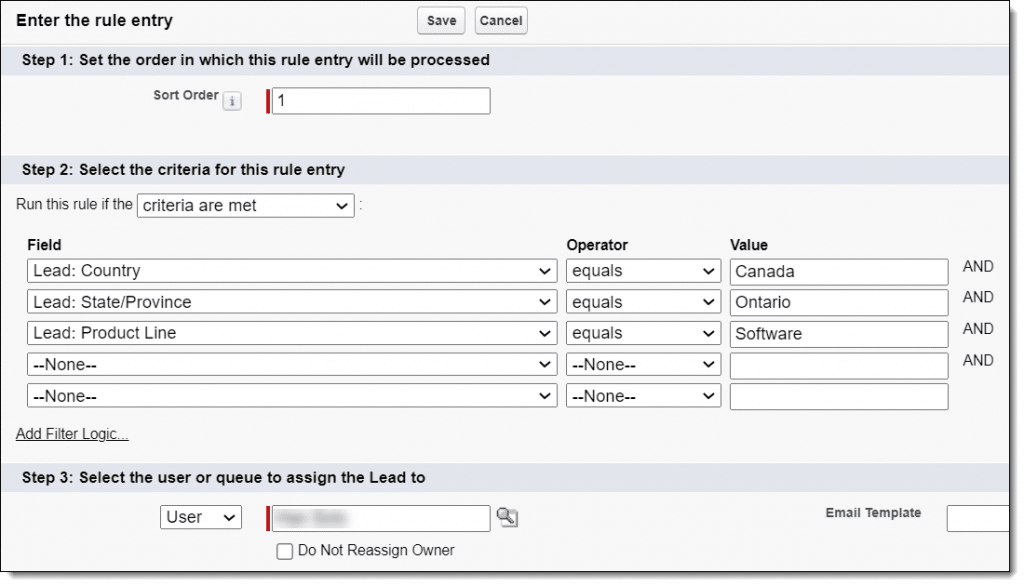
For anything more complex (round robin distribution, workload balancing, schedule-based routing) you need specialized lead routing tools like Kubaru that give business users direct control over routing logic.
2. Enforce Speed-to-Lead Standards
Speed-to-lead measures how quickly a rep makes first contact after a lead is assigned. It’s the metric most correlated with conversion rates, and most teams dramatically underperform.
Here are the benchmarks to aim for:
- Best-in-class – Under 5 minutes
- Good – Under 1 hour
- Acceptable – Same business day
- Poor – Over 24 hours
Enforcing these standards requires automated alerts when leads go unworked past your threshold, plus escalation or reassignment for leads that exceed the SLA. In Salesforce, you can build basic enforcement with workflow rules or flows that send reminder emails and time-based actions that update lead status.
3. Implement Lead Scoring
Not all leads deserve equal attention. Lead scoring assigns point values based on demographic fit and behavioral signals so reps prioritize the most promising prospects.
To implement scoring, create a numeric Lead Score field in Salesforce and use Process Builder, Flow, or Apex to increment the score based on field values and activities. Then set thresholds that trigger different actions:
- Scores >80 route to senior AEs with priority follow-up,
- Scores between 50-79 follow the standard sales process
- Scores <50 go to marketing nurture with no immediate sales touch
Review and adjust scoring weights quarterly based on which leads actually convert. Scoring that doesn’t correlate with real outcomes is just noise.
4. Standardize Lead Statuses
Lead Status tracks where each lead is in your qualification process. Ambiguous or inconsistent statuses make pipeline reporting meaningless and create confusion about who owns what.
A clean status structure includes these stages:
- New – Just entered the system, not yet reviewed by sales
- Contacted – Rep has made first outreach attempt
- Engaged – Lead has responded to outreach
- Qualified – Meets criteria and is ready to become an opportunity
- Nurture – Not ready to buy now but worth staying in touch
- Unqualified – Doesn’t fit your ICP, disqualified from sales process
- Converted – Successfully became a Contact and Opportunity
The rules that keep status tracking clean are straightforward: each lead should only be in one status at a time, moving backward in status should be rare and documented, “Contacted” means actual outreach happened (not just assignment), and you should set time limits for how long leads can stay in certain statuses before requiring action.
5. Match Leads to Existing Accounts
When a lead comes from a company you already do business with, it should route to the account owner—not a general sales queue. Without lead-to-account matching, your SDR team might cold call a prospect whose company already works with your account management team.
Lead-to-account matching compares the lead’s company name and domain to existing accounts, automatically populates the account relationship on the lead record, and enables routing based on account ownership. Salesforce includes basic matching via Duplicate Management rules that compare company name with fuzzy matching to catch minor variations.
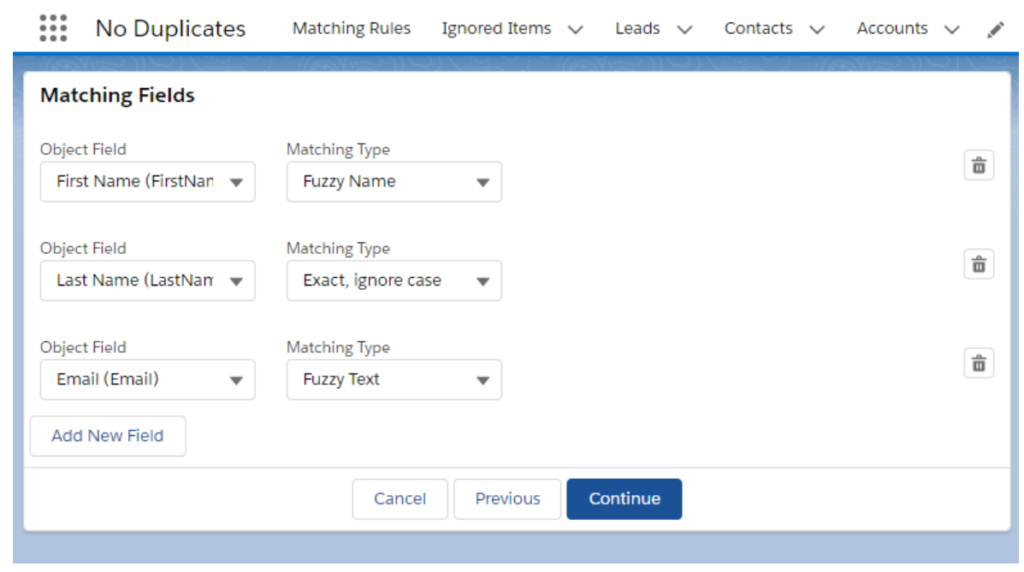
This matters because a lead from an existing customer represents expansion revenue, not new business. The account owner has context and relationships that make conversion far more likely than handing the lead to someone starting from scratch.
6. Maintain Data Hygiene
Bad data compounds over time. Duplicate leads, outdated information, and inconsistent formatting make every downstream process harder—routing becomes inaccurate, reporting becomes unreliable, and reps waste time sorting through garbage.
Ongoing hygiene requires regular maintenance tasks:
- Weekly – Merge duplicate leads using Duplicate Management reports, update stale lead statuses for leads inactive 30+ days
- Monthly – Standardize company names via mass update, remove invalid emails using verification services
- Quarterly – Archive old unqualified leads that are over a year old with no activity
Prevention is more effective than cleanup. Use validation rules on key fields, picklists instead of free text where possible, data enrichment on lead creation, and duplicate detection before save. The goal is stopping bad data at the point of entry rather than fixing it later.
7. Track the Right Metrics
You can’t improve what you don’t measure, but measuring everything creates noise that obscures actual problems. Focus on the metrics that directly indicate lead management health:
| Metric | What It Measures | Target |
| Speed-to-lead | Time from creation to first contact | Under 5 minutes |
| Lead response rate | Percentage of leads contacted within SLA | Above 95% |
| Conversion rate | Percentage of leads becoming opportunities | Segment by source |
| Time in stage | Days leads spend in each status | Minimize |
| Lead velocity | New qualified leads per period | Increasing trend |
| Source ROI | Conversion rate and deal size by source | Guides marketing spend |
Build dashboards showing current leads by status and owner, speed-to-lead trends over time, conversion rates by source and rep, and leads at risk from being over SLA or stalled in stage. Review metrics weekly with sales leadership and investigate anomalies immediately rather than waiting for monthly reviews.
Tools for Salesforce Lead Management
The lead management technology stack has three layers: native Salesforce features that provide the foundation, assignment automation that handles routing (which also applies to case assignment for support teams), and supporting tools that enhance data quality and engagement tracking.
Native Salesforce Features
Salesforce includes the foundational capabilities every team needs:
- Web-to-Lead – Creates leads automatically from website form submissions with configurable fields and auto-response emails
- Lead Assignment Rules – Routes leads to users or queues based on field criteria, evaluating rules in order
- Queues – Holds leads until claimed or manually assigned, serving as a safety net
- Duplicate Management – Identifies potential duplicates at creation and powers lead-to-account matching
- Campaigns – Tracks marketing initiatives and associates leads with their source for attribution
- Reports and Dashboards – Provides custom reporting on any lead field or metric
The limitations appear when you need round robin distribution, workload-based routing, schedule awareness, or business user administration of routing rules—which is where lead routing software becomes essential.
Assignment Automation
Assignment automation fills the gaps in native Salesforce routing.
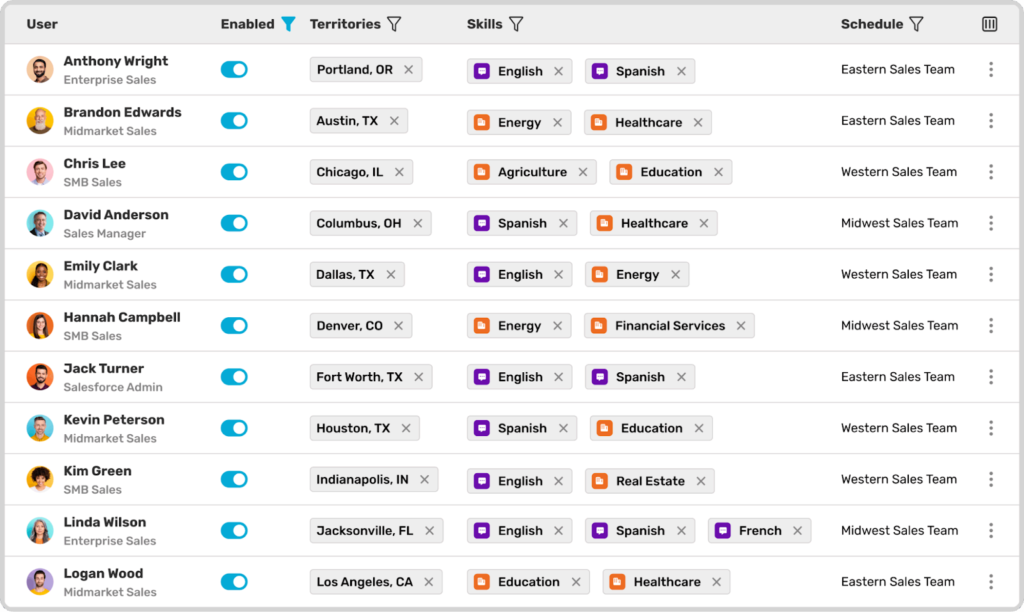
Kubaru is a native Salesforce application built specifically for this purpose, handling the routing scenarios that native assignment rules can’t:
- Round Robin – Spreads leads evenly across reps
- Weighted Distribution – Gives more leads to higher-capacity team members
- Load Balancing – Routes to reps with the fewest open leads
- Territory and Skill-Based Routing – Matches lead characteristics to rep expertise
- Schedule Awareness – Only assigns during business hours
- SLA Enforcement – Reassigns leads that go unworked
Business users can update routing without admin privileges, there’s no limit on assignment rules (versus Salesforce’s 3,000 cap), and you get complete visibility into why each lead was routed where it was.
Supporting Tools
Additional tools enhance specific parts of the lead management process.
- Data enrichment platforms like ZoomInfo, Clearbit, and Apollo automatically add company and contact data to leads (firmographics, technographics, direct phone numbers, and verified emails).
- Marketing automation platforms like HubSpot, Marketo, Pardot, and Mailchimp sync leads and campaign data with Salesforce. They handle nurture sequences for leads not ready to buy, track engagement scoring, and maintain campaign attribution for ROI analysis.
- Conversation intelligence tools like Gong, Chorus, and Salesloft capture and analyze sales conversations. They provide automatic activity logging, identify what messaging works for different lead types, and spot leads going cold based on conversation signals.
The right combination depends on your team size, lead volume, and process complexity. Most teams start with native Salesforce features, add assignment automation when manual routing becomes a bottleneck, then layer in enrichment and conversation tools as they scale.
Lead Management That Converts
Effective lead management isn’t about working leads harder—it’s about building systems that route leads faster, prioritize smarter, and ensure nothing falls through the cracks.
Salesforce provides the foundation. Native features handle capture, basic routing, and reporting. For teams that need round robin distribution, workload balancing, or schedule-aware routing, Kubaru adds the automation layer that makes sub-five-minute response times achievable.
If you’re ready to stop losing leads to slow assignment and inconsistent follow-up, see how automated routing works. Schedule a demo and we’ll walk through building assignment rules that match your sales process.