















Quick Summary
Q-Assign vs LeanData is a contest of depth versus breadth. Q-Assign delivers intelligent, skill-based assignment inside Salesforce. LeanData wraps routing, matching, and scheduling into one enterprise platform. Both quote privately and can be expensive.
Kubaru offers a focused, capable alternative at one transparent, flat per-user price.
| Key Differentiators | Q-Assign | LeanData | Kubaru |
|---|---|---|---|
| 100% Salesforce-native (managed package) | Yes | Yes | Yes |
| Data leaves Salesforce | No | No | No |
| Routing logic (round robin, weighted, capacity) | Yes | Yes | Yes |
| Objects routed | Any object | Any object (Premium tier) | Any object |
| Lead-to-account matching | Basic | Advanced (category-leading) | Included |
| AI-assisted triage | Yes (your own LLM key) | Signal-based | No |
| Scope | Assignment engine | Orchestration + scheduling | Routing only |
| Pricing | Quote-only (per work item) | Quote-only (typically $22k+/yr) | $20/user/mo (flat) |
| Implementation | Guided rollout | 4 to 8 weeks | ~1 day |
| AppExchange Rating | 4.9/5 stars (AppExchange) | 4.9/5 stars (AppExchange) | 5/5 stars (AppExchange) |

Why Compare an Engine and a Platform?
Should routing simply send each record to the right rep, or should it orchestrate your entire funnel? That question sits underneath every Q-Assign vs LeanData comparison, and the right answer depends on how much you want one tool to carry.
For teams moving toward purpose-built lead routing software, Q-Assign and LeanData both fit the bill, but they aren't the same kind of tool. Ortoo built Q-Assign as an intelligent assignment app, native to Salesforce.
LeanData built an orchestration platform for enterprise revenue teams, deployed at companies like Zoom, DocuSign, and Snowflake. Both install as managed packages, so your records stay put.
That on-platform footprint reassures security teams in finance, healthcare, and insurance, where data residency shapes buying decisions as much as features do.
This guide compares the pair across features, ease of use, native fit, and pricing. It closes with a clear recommendation and where Kubaru fits the picture.
How Do Q-Assign and LeanData Compare Head-to-Head?
We set the two against each other on the criteria buyers actually weigh. Each section flags the leader and the trade-off that comes with it.
Features and Routing
Both tools are smart, but they aim that intelligence at different problems.
Q-Assign
Q-Assign treats assignment as a matching problem. Every record, standard or custom, is scored against rep skills, current workload, and availability before it lands. Weighted round robin keeps distribution fair, and waterfall fallbacks catch records when the first choice is out.
Stalled leads get rescued too: SLA timers escalate, inactive assignments recycle, and an audit trail preserves the reasoning behind every routing decision. Reps hear about new assignments in Slack, Microsoft Teams, or email.
AI Lead Triage adds a scoring layer, reading intent, fit, and urgency before routing. You connect your own OpenAI, Anthropic, or Google key and pay the model provider directly.
LeanData
LeanData plays a bigger game. FlowBuilder, its visual graph editor, chains routing decisions through branches, duplicate matching, and merge steps, then layers scheduling and buying signals on top of the same flows.
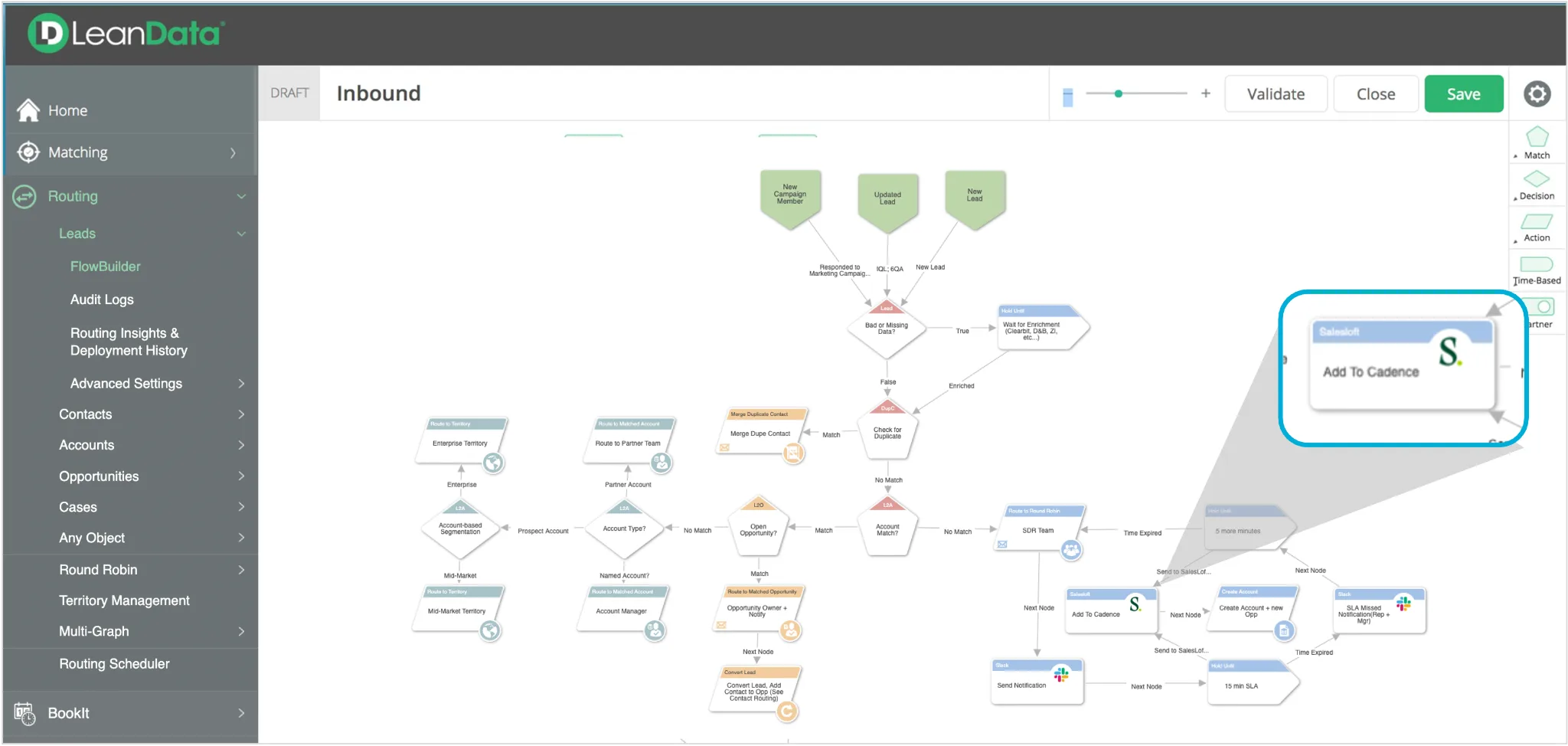
Its lead-to-account matching is the best-known piece. G2 tracks an entire category for the discipline, with LeanData at the front of it.
Object coverage depends on edition: Standard handles leads, Advanced brings in contacts and accounts, and Premium extends to opportunities, cases, and custom objects. BookIt scheduling is a paid add-on.
The split is clear. Q-Assign concentrates on getting each record to the right rep, while LeanData spreads its intelligence across the whole funnel, from match to meeting.
Ease of Use
How much each tool asks of its owner sets them apart.
Q-Assign configures point-and-click, and Ortoo's team typically guides larger rollouts. Reviewers single out that support as a highlight of the product.
LeanData wants a specialist. Plan on four to eight weeks with professional services, plus a standing admin or RevOps owner to keep the graphs healthy.
That is the trade in miniature: modest, well-supported setup for an engine, real staffing for a platform.
Salesforce-Native Fit
Both are managed packages, and neither ships your records anywhere. Q-Assign's engine sits directly on your objects, standard or custom.
LeanData is native at the core too, though its AI graph summaries call a Google Gemini integration and BookIt syncs with external calendars. Treat native fit as even and decide on scope instead.
Pricing Model
Here the two look alike, and not in a way that helps buyers: neither publishes a price.
Q-Assign
Ortoo quotes every deal individually and bills per work item, so each routed lead, case, or claim adds to the total. Headcount doesn't drive the price; volume does.
Budget carefully if your pipeline is growing. After the model changed, one customer saw their annual bill rise roughly 700% on flat volume. Our Q-Assign pricing guide has the details.
LeanData
LeanData also quotes privately, per user, across Standard, Advanced, and Premium. Vendr pegs the median contract at $22,722 a year, and smaller teams often hear $25,000 to $50,000.
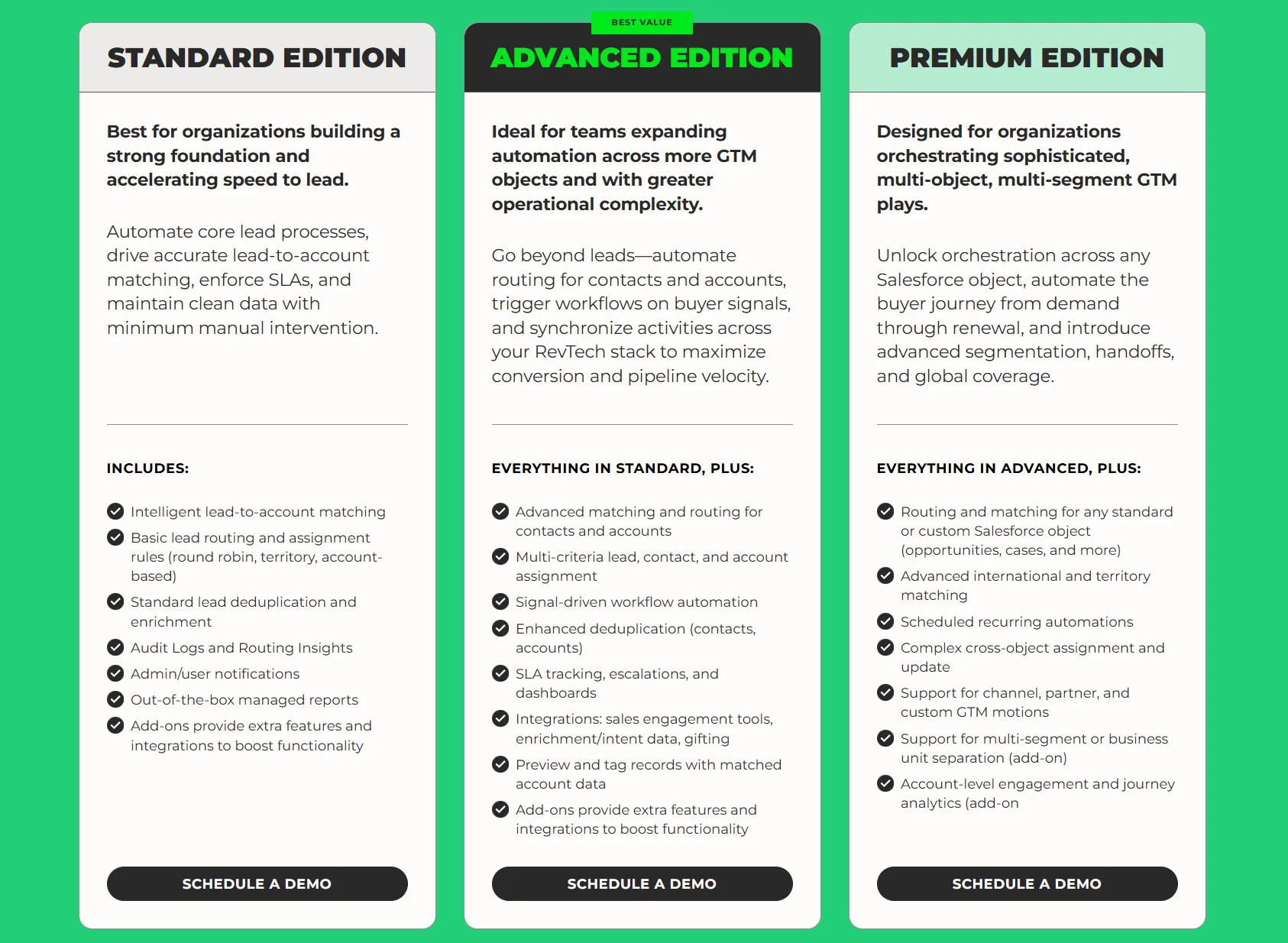
Add-ons like BookIt, Multi-Graph, and NotifyPlus raise the total, premium support adds 10 to 20%, and implementation bills separately. Renewal increases are a common reason teams start shopping. Our LeanData pricing guide rounds up the reported numbers.
Which Should You Pick?
Pick Q-Assign if...
- You want intelligent, skill-based assignment inside Salesforce
- AI triage and workload balancing genuinely fit your team
- You can absorb volume-based, quote-only pricing
- And you don't need matching or scheduling bundled in
Q-Assign is a strong engine for complex assignment. Just model the per-work-item cost against your real record volume first.
Pick LeanData if...
- You run intricate, multi-team GTM at enterprise scale
- Category-leading lead-to-account matching is essential
- You want routing, matching, and scheduling on one platform
- And you have the budget and a RevOps owner to run it
LeanData's breadth is genuine, but so are its price tag and ramp. Commit only if you'll use the platform fully.
Pick Kubaru if...
You want smart, native routing without quote-only pricing or a lengthy build. Kubaru focuses on one job, assignment, and goes deep on it.
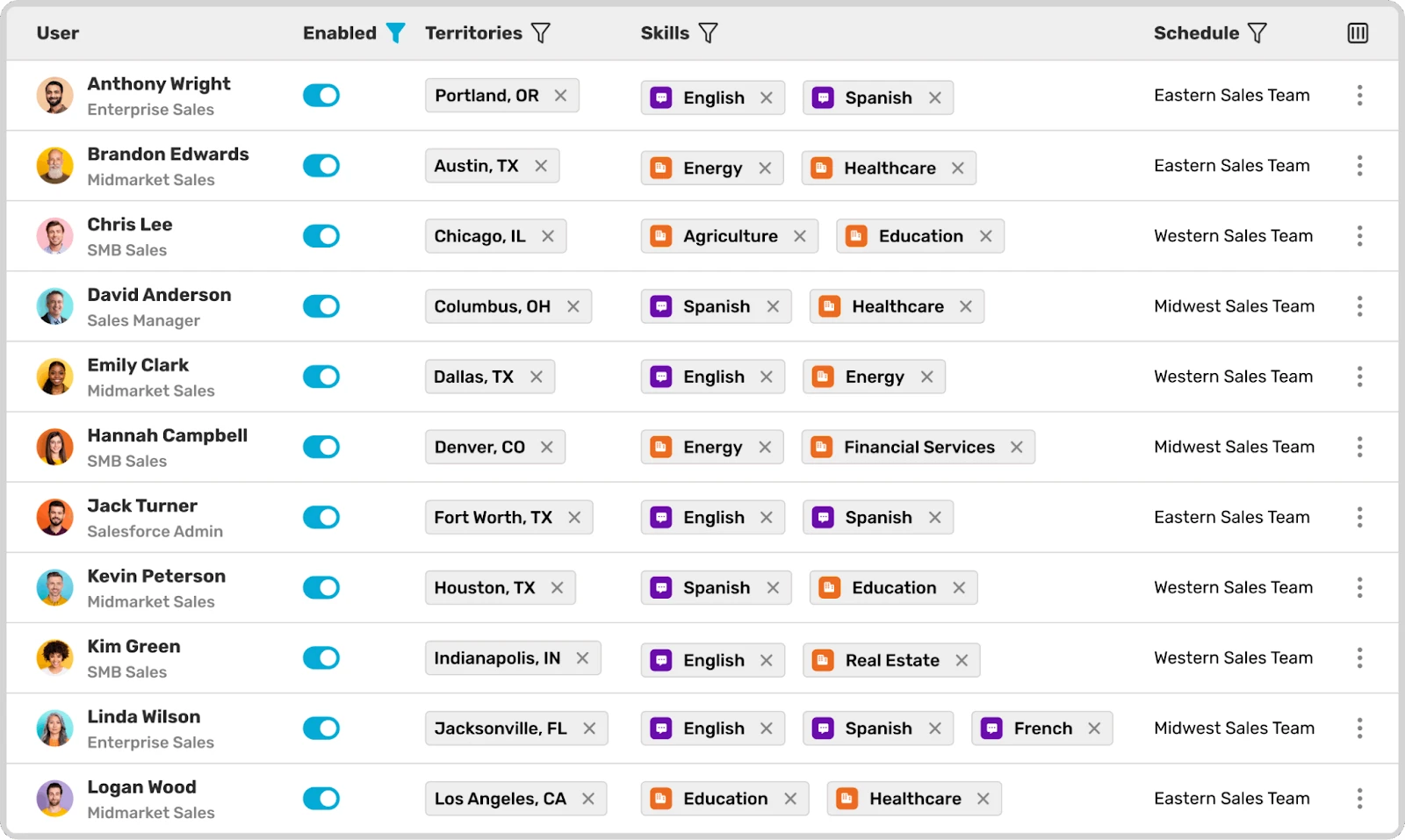
Everything arrives in a single plan at $20 per user each month:
- Round robin, weighted, and territory routing
- Skill-based logic and load balancing
- Availability-aware assignment and automatic reassignment
- Duplicate matching and SLA automation
No add-ons, no per-assignment meter, no surprise renewals.
Because the price tracks seats alone, you can forecast it on a napkin. Setup runs about a day, and onboarding and lifetime support are free.
Business users own the rules directly, so you skip both the specialist hire and the IT queue.
Having trouble deciding? Have a look at our comparison page that sets them side by side.
Frequently Asked Questions
Is Q-Assign or LeanData better for complex routing?
It depends on the type of complexity. Q-Assign excels at intelligent, skill-based assignment. LeanData excels at multi-object orchestration and matching across a wide funnel.
Do both run natively inside Salesforce?
Yes. Each is a managed package, so your data never leaves your Salesforce org.
Which one is more affordable?
Neither publishes pricing, and both can run high. Q-Assign bills per work item routed, while LeanData contracts typically start above $20,000 a year. Kubaru's flat per-seat rate is the predictable option.
How long does each take to implement?
Q-Assign rollouts are vendor-guided and vary with complexity. LeanData typically takes four to eight weeks, given FlowBuilder's depth.
What's the simplest alternative to both?
Kubaru routes natively at a flat $20 per user each month, with free onboarding and support and a 30-day trial of the full product.