















Quick Summary
A better routing setup gives Sales and RevOps teams a clearer way to keep leads moving without relying on constant manual fixes. It also makes routing easier to adjust when territories change, new reps join, or lead sources evolve. This guide walks through seven best practices that can help your team build a faster, more reliable lead routing process.
Why Most Lead Routing Setups Underperform
Lead routing tends to get harder as your sales process grows. What starts as a simple assignment rule can become difficult to manage once territories change, reps move in and out of availability, or your team adds new routing criteria.
When that happens, small delays can become part of the workflow. A lead may wait longer than expected, or it may reach a rep who is not the best fit to follow up. Over time, those gaps make routing harder for Sales Ops and RevOps to trust.
A better setup gives your team a clearer way to assign leads, adjust rules, and catch issues before follow-up slips. Here’s where to start.
Why Listen to Us
Kubaru helps Sales and RevOps teams manage lead routing inside Salesforce. Our routing app is used by more than 300 teams, including companies like Ooma, Conga, SolarWinds, and Paysafe, to automate assignment, improve speed-to-lead, and keep routing easier to manage as teams grow.
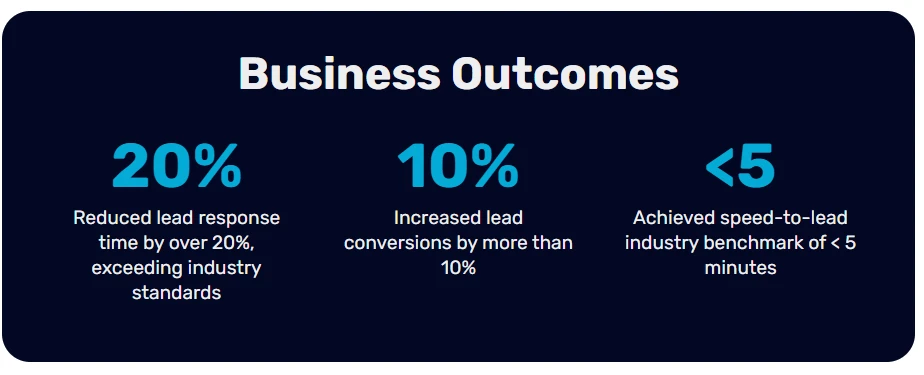
This guide is based on the routing problems we see most often, from overloaded reps to unworked leads and rules that become hard to maintain.
What Good Lead Routing Should Help You Do
Strong lead routing starts with clear rules, then adds the safeguards your team needs as volume grows. The setup should help you answer practical questions before they become manual work for Sales Ops or RevOps.
You should know:
- Which rep should receive each lead
- How quickly follow-up should happen
- What happens when a rep is unavailable
- How unworked leads get reassigned
- Which reports show whether routing is working
The seven best practices below follow that flow:
7 Lead Routing Best Practices to Streamline RevOps
1. Start With Clear Routing Criteria
Lead routing works best when everyone understands where leads should go and why. Before adjusting speed, notifications, or SLAs, it helps to define the rules behind assignment.
Most teams route leads using a few practical signals:
- Geography: Territory-based teams often assign by state, region, country, or ZIP code.
- Product Interest: Leads asking about different products or services may need to reach reps with the right expertise.
- Company Size: Enterprise accounts often follow a different sales motion than SMB leads. Employee count, revenue, or internal segments can help guide assignment.
- Lead Source: A demo request may need faster follow-up than someone downloading a guide or signing up for a webinar.
- Lead Intent: High-intent leads, such as repeat visitors or pricing-page traffic, often benefit from faster routing to experienced reps.
- Language: For global teams, routing by language can help conversations move more smoothly.
- Named Accounts: Leads from existing customers or target accounts usually belong with the account owner from the start.
As you build routing criteria, a few habits tend to help:
- Set a fallback rule: Every lead should have somewhere to go, even when it does not match your main criteria. A default queue or backup owner can help prevent leads from sitting unnoticed.
- Keep rules easy to follow: Routing logic should be documented clearly enough that more than one person understands how it works.
- Start with what you actually need: A simple sales motion rarely needs layers of routing logic. You can always add more detail as your process grows.
Once your routing rules are clear, the next step is making sure leads reach reps quickly.
2. Treat Speed-To-Lead as Part of The Process
Speed-to-lead measures the time between a prospect showing interest and your team reaching out. Faster follow-up has been linked to stronger conversion rates across multiple studies.
A 2026 benchmark study from Artemis GTM, which reviewed more than 250,000 B2B leads, found that teams responding within five minutes converted at much higher rates than teams responding a day later.
The same research found the median B2B response time was 42 hours. Research from MIT and Harvard Business Review also found that faster follow-up improves the chances of making contact, while Lead Connect reported that many buyers choose the first company to respond.
Reaching leads quickly usually comes down to process. Teams that respond consistently tend to have a few things in place:
- Instant lead assignment: Leads move to a rep automatically as soon as they enter the CRM.
- Notifications reps actually see: Email can help, though many teams also rely on Slack, desktop alerts, or mobile notifications.
- Automatic reassignment: When follow-up takes too long, leads move to someone else instead of sitting untouched.
- Clear measurement: Tracking time-to-assignment and time-to-first-touch can make delays easier to spot.
Kubaru supports these workflows inside Salesforce by routing leads automatically, sending notifications across multiple channels, and reassigning unworked leads based on the timing rules your team sets.
3. Distribute Leads In A Way Your Team Can Sustain
Lead distribution affects more than rep morale. When too many leads collect with the same few reps, follow-up tends to slow down and lead quality becomes harder to maintain over time.
Round robin is usually the starting point because it is easy to understand and manage. Each rep receives the next lead in rotation, which helps keep volume more balanced across the team.
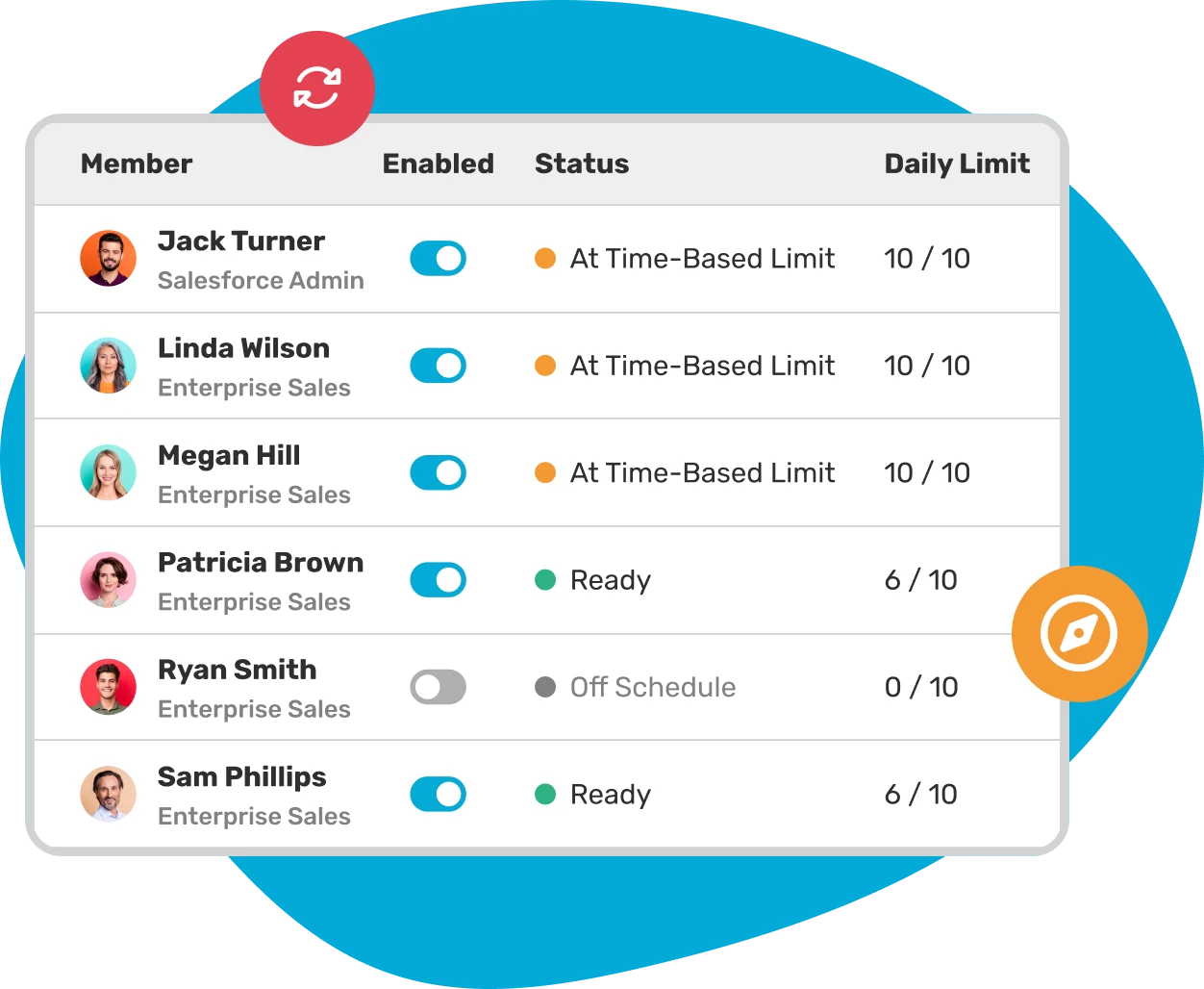
As teams grow, though, routing often needs a little more flexibility.
A few adjustments can help:
- Weighted round robin: More experienced reps can receive a larger share of leads, while newer reps ramp more gradually.
- Workload limits: Once a rep reaches a certain number of open leads, new assignments move to someone else until capacity opens up again.
- Separate routing pools: Enterprise leads, inbound demo requests, or partner referrals may follow different assignment paths instead of moving through the same rotation.
It also helps to look beyond lead volume alone. Reps tend to notice differences in lead quality quickly, especially when certain territories, sources, or segments convert more often than others.
4. Build Rep Availability Into Your Routing Rules
Lead routing works better when assignment reflects who can respond right now, not just who owns a territory or account.
Availability can shift throughout the day. Reps step into meetings, take time off, or finish their working hours while leads are still coming in. Without availability-aware routing, leads can sit longer than expected before anyone follows up.
A few routing rules usually make a noticeable difference:
- Working hours by rep or team: Leads arriving after hours can move to someone who is still online instead of waiting until the next morning.
- Time off and holidays: Reps on PTO should come out of the rotation automatically so leads continue moving.
- Temporary unavailability: Teams often need a way for reps to pause assignments during meetings, focused work blocks, or training sessions.
- Timezone coverage: Global teams may need routing based on who is currently working, especially when inbound leads arrive outside a territory owner’s local hours.
Many routing setups account for territory and lead ownership early on, then add availability rules later after response delays start appearing more often.
5. Set SLAs Your Team Can Actually Meet
A response-time SLA works best when it gives your team a clear target and a clear process for acting on it. It should define the timing, how that timing gets measured, and what happens when follow-up starts to slip.
The data supports that structure. The 2026 Blazeo benchmark report found that companies with a formal response-time SLA hit the 15-minute standard 54.9% of the time, compared with 29.5% for companies without one.
A useful SLA usually includes a few practical pieces:
- Different targets by lead type: A demo request from a target account may need a shorter response window than a webinar lead or content download.
- CRM-level measurement: Track when the lead was created, when it was assigned, and when the first touch happened. That helps you separate routing delays from rep follow-up delays.
- Automated follow-through: Alerts and reassignment rules can help catch missed targets while there is still time to act.
- Realistic time windows: A five-minute target may be workable when routing is automated and reps receive real-time alerts. The same target becomes harder to hit when leads still depend on manual assignment.
- Regular review: SLA targets should stay connected to how your team actually works. Review performance often enough to adjust the timing as your process improves.
Kubaru’s Advanced SLA feature helps teams manage these rules inside Salesforce. You can define multiple SLA policies per record, set success conditions, apply business-hour schedules, and trigger automatic actions when a lead approaches or misses a target.
6. Build Escalation Paths That Move Leads Forward
An escalation path gives your team a plan when a lead goes unworked or an SLA is missed. Without that plan, leads can stay in the same place while managers try to spot the issue manually.
Good escalation paths are usually built around action. A reminder can help, but the process should also move the lead when follow-up does not happen.
A strong escalation setup may include:
- Automatic triggers: The escalation fires when a timing rule is met, without waiting for someone to check a report.
- Actions that change the record: The lead can be reassigned, updated, or moved into a higher-priority workflow.
- Follow-up tasks: A task gives the next owner a clear next step instead of leaving the handoff unclear.
- Timing by lead type: High-intent leads may need shorter escalation windows than lower-priority records.
Kubaru supports multi-step escalation using triggers such as SLA active, SLA approaching, SLA violated, and SLA met. Each trigger can run actions like reassignment, field updates, Slack or Teams notifications, and task creation.
7. Measure What Actually Matters
Lead routing usually gets easier to improve once you can see where leads slow down. A standard CRM dashboard may give you a starting point, but Sales Ops and RevOps teams often need a closer view of what happens between lead creation and follow-up.
A few metrics can help make those gaps easier to spot.
Speed Metrics
- Time-To-Assignment: This shows how long it takes for a new lead to receive an owner. When routing is automated, delays here often point to a setup issue that needs a closer look.
- Time-To-First-Touch: This measures how long it takes a rep to follow up after assignment. It can help you understand whether your SLA is realistic and whether reps have enough support to meet it.
- First-Touch Channel: It can also help to see whether reps are reaching out by phone, email, or another channel. Over time, this gives you a clearer view of how follow-up actually happens.
Distribution Metrics
- Lead Volume By Rep: Reviewing lead volume can show whether assignments are spreading across the team as expected.
- Lead Quality By Rep: Lead volume only tells part of the story. Conversion rates can help you see whether some reps are getting stronger opportunities more often than others.
- Queue Aging: Leads that sit in queues for too long are often a sign that routing needs attention. Watching queue age can help you catch that before it becomes a larger issue.
Outcome Metrics
- Lead-To-Opportunity Conversion: This helps connect routing decisions to pipeline. Breaking it down by source, territory, or routing path can show where the process is working smoothly.
- SLA Compliance Rate: This shows how often leads are contacted within your target window. It can also help reveal where timing starts to slip.
- Reassignment Rate: Frequent reassignments may mean reps are overloaded, SLA windows are too tight, or routing rules need to be adjusted.
Together, these metrics give your team a clearer way to review lead routing without relying on guesswork. Once the patterns are visible, it becomes much easier to improve the process over time.
How To Make Measurement Stick
Reporting works best when it becomes part of the way your team already reviews performance. A dashboard may show the right numbers, but it still needs a regular place in your team’s workflow.
That could mean reviewing SLA performance during your weekly Sales Ops meeting, sharing follow-up trends with team leads, or checking routing rules each month to make sure they still match your team structure.
It also helps to look at trends over time. One missed SLA may not mean much on its own. A pattern over several weeks usually deserves a closer look.
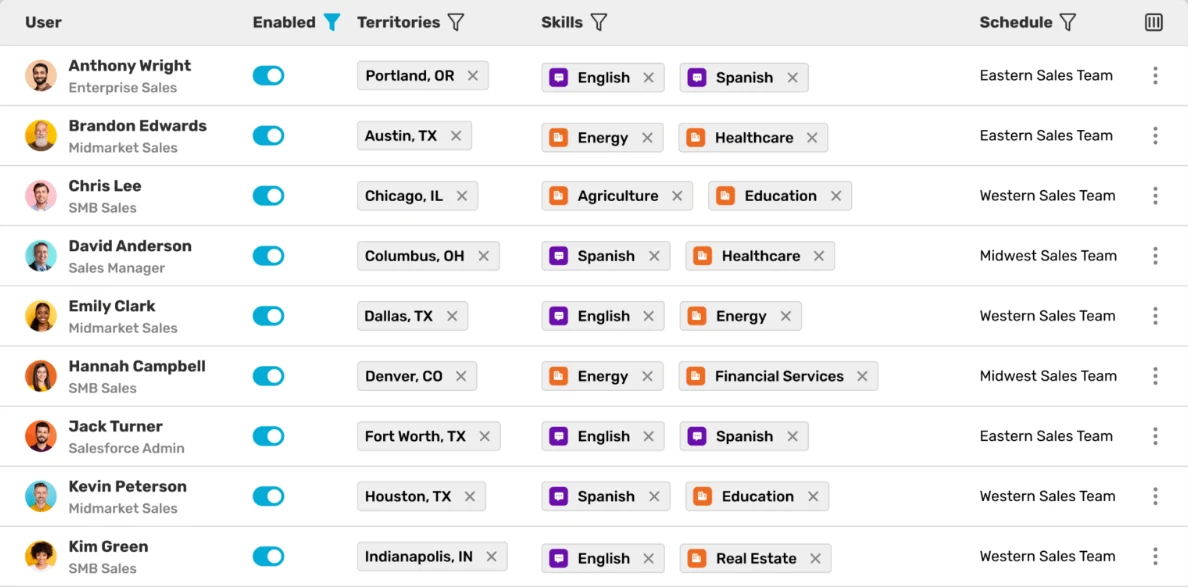
Kubaru makes this easier by giving your team detailed assignment logs for every routed lead, including what happened, when it happened, and which rule applied. SLA status can also be tracked from a central dashboard or shown directly on record pages, so your team can review routing performance without building reports from scratch.
Try A More Practical Way To Route Leads
Kubaru helps you put these best practices into action inside Salesforce. You can route by territory, segment, workload, availability, or custom rules, then track what happens after each lead is assigned.
You can try Kubaru free for 30 days on the Salesforce AppExchange. We’ll help configure the app around your routing requirements at no cost, so your team can start with a setup that fits how you already work.